


Rockstar Learning Platform
Last Updated
Overview
Rockstar Learning Platform is a comprehensive solution that fosters peer-based learning. It offers tools for diverse learning management needs, including blended learning delivery and video-based microlearning. While the setup may require some time, its customizable experiences and personalized learning paths make it a compelling choice for businesses.
Overall Rating
Based on 14 users reviews
4.5
Rating Distribution
Positive
86%
Neutral
14%
Negative
0%
Starting Price
$117
per month

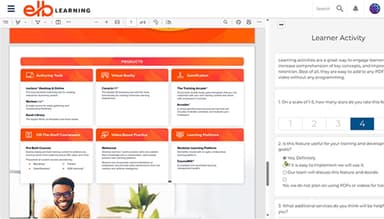
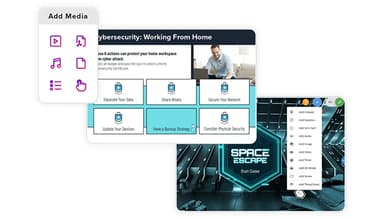
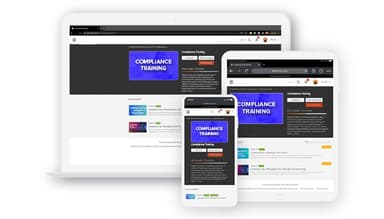
Rockstar Learning Platform Specifications
- Activity Dashboard
- Asynchronous Learning
- Activity Tracking
- Access Controls/Permissions
What Is Rockstar Learning Platform?
Overview
The Rockstar Learning Platform by ELB Learning is a cloud-based solution designed to foster a culture of peer-based learning. It offers a comprehensive suite of tools to meet diverse learning management needs, including employee onboarding and customer training. The platform simplifies content creation and enables employees to have just-in-time, on-demand learning experiences. An engaging social learning environment enhances learner engagement and transforms the training arcade.
What Is Rockstar Learning Platform Best For?
The software is well-known for its ability to deliver video-based microlearning on demand. This unique feature allows users to access bite-sized, highly focused pieces of content designed to meet specific learning outcomes. The on-demand aspect ensures that learning process happens at the learner’s pace and convenience, making the process of video-based practice more efficient and effective.
Rockstar Learning Platform Pricing
It offers flexible pricing plans to meet various customer needs and budgets. There are three primary Studio subscription plans available:
- Studio Gold Suite – Starting at $117/month
- Studio Essentials – Starting at $799/month
- Customizable Studio – Starting at $399/month
- Premium Support Package – for $2,500
Disclaimer: The pricing is subject to change.
Rockstar Learning Platform Integrations
The software integrates with several third-party applications, including:
- CenarioVR
- GoToMeeting
- Zapier
- OpenSesame
- GoToWebinar
How Does Rockstar Learning Platform Work?
If you’re wondering how to navigate the dashboard and make the most of the software’s features, here’s a guide:
- Go to the ‘Author’ tab at the top of the page to access authoring tools so you can create and manage content in a centralized location
- Click on ‘New’ to start building a new course; select the type of content such as video, assessment, learning path, etc.
- Populate the course by adding sections and pages, uploading files, writing content, and adding interactive elements
- Preview the course as a learner to check functionality and make any necessary edits
- Click ‘Publish’ to make the course live and assignable to learners
- Manage student registrations, assignments, and cohorts from the ‘Administration’ tab
- Track learner progress, performance, and engagement with real-time reporting and analytics
- Collect student feedback to keep adding and improving your learning content
Who Is Rockstar Learning Platform For?
Rockstar Learning Platform is suitable for organizations in various industries, including:
- Manufacturing
- Hospitality
- Banking
- Education
- Healthcare
Is Rockstar Learning Platform Right For You?
Are you seeking an engaging and versatile learning platform for continuous skills development for a distributed workforce? Rockstar Learning Platform might be ideal for businesses seeking to implement an effective and comprehensive LMS. It offers robust security protocols, such as multi-factor authentication and single sign-on integration, to protect sensitive data. Rigorous testing ensures compliance with standards like ADA, COPPA, and GDPR. Backed by an award-winning R&D team, it supports the needs of several companies, including Bloomberg, Stryker, Dr Brown’s Medical, and Sakon.
Not sure if Rockstar Learning Platform is the right platform for your needs? We’re here to assist. Contact us at (661) 384-7070, and we’ll guide you in making a well-informed decision.
Rockstar Learning Platform Features
Virtual Instructor-Led Training (VILT/ILT)
It supports Virtual Instructor-Led Training (VILT) and Instructor-Led Training (ILT). This feature allows users to add VILT courses directly integrated with video conferencing tools like Zoom, WebEx, and Microsoft Teams. The Rockstar Learning Platform makes synchronous online training and fosters collaborative learning experiences.
Learner UI In Multiple Languages
The platform's user interface can be configured in different languages to support multilingual learning. This feature allows the platform to cater to a global learner audience and enables the translation of content into various languages.
Contributor And User-Generated Content
It encourages learners to become contributors by sharing their knowledge, experiences, and answers to questions in a social, peer-based learning model. This feature augments informal learning experiences, distribute on-demand content, and promotes a culture of collaborative learning.
Integrated Digital And On-The-Job Learning
The Rockstar Learning Platform seamlessly merges on-platform learning with practical job tasks through integration with HRIS and workflow systems. This feature ensures that digital lessons link to real-world performance criteria.
Personalized Learning Paths
The platform offers personalized learning paths based on competency assessments. The system dynamically generates customized routes and recommends specific lessons to fill identified skill gaps for each individual. This feature ensures targeted and compelling learning experiences with automated enrollment.
Pros And Cons of Rockstar Learning Platform
Pros
Engaging and customizable learning experiences for businesses with multiple offices
A key factor for helping with the Aess training program
Offers personalized learning paths
Facilitates peer-based social learning
Cons
Setting up courses requires some time initially
Support for some niche features could be improved, according to some reviews
Rockstar Learning Platform Pricing
Studio Gold Suite | Studio Essentials | Customizable Studio | Premium Support Package |
|---|---|---|---|
$117per month | $799per month | $399per month | $2,500 |
|
|
|
|
Disclaimer: The pricing details were last updated on Sep 25, 2026 from the vendor's website. Please contact us for a tailored pricing list.
Rockstar Learning Platform Reviews
Total 14 reviews
4.5
All reviews are from verified customers
Rating Distribution
5
Stars64%
4
Stars21%
3
Stars14%
2
Stars0%
1
Stars0%
Share your experience
Non-Profit Organization Management, 500+ employees
Less than a year
“admin features need improvement”
Pros
Completing training modules is feasible and I find that I can keep track of my progress effortlessly.
Cons
I find the admin and reporting features lacking. I wish there were a way to send a mass invite email rather than adding users one by one. Enrolling people in courses and learning paths is also somewhat complicated.
Rating Distribution
Ease of use
7
Value for money
8
Customer Support
8
Functionality
8
Non-Profit Organization Management, 500+ employees
More than a year
“Practical modules for staff guidance”
Pros
Within my team I've discovered that the learning topics are practical and I use the modules to help staff improve performance. I can pull up materials whenever someone needs extra guidance which I think is excellent.
Cons
When assigning modules or lessons I'd love a feature that would email a reminder if someone misses the deadline, instead of forcing me to log in repeatedly to check their progress. That kind of notification would really align administration when I'm managing a large number of employees, too.
Rating Distribution
Ease of use
10
Value for money
10
Customer Support
10
Functionality
8
Non-Profit Organization Management, 101-500 employees
Less than a year
“reporting needs significant improvement”
Pros
Navigating the platform is simple and I notice that I can figure out tasks quickly even without much LMS experience.
Cons
The reporting features are my biggest frustration. I feel there's significant room for improvement and I would really appreciate a feasible, easy-to-read report I could generate for each employee that lists every course and lesson along with the exact completion dates. Another point is that when I create learner activities, I still have no idea where to find short-answer submissions, there's nowhere obvious to look them up which forces me to dig around. On top of that, a handful of modules will occasionally freeze or stop progressing, it's intermittent so it's hard to pin down. I can't tell whether those hang-ups are caused by a flaky internet connection, a glitch in the module itself, or user behavior and despite trying to troubleshoot I haven't been able to resolve it.
Rating Distribution
Ease of use
8
Value for money
8
Customer Support
8
Functionality
7
Frequently Asked Questions
Does Rockstar Learning Platform offer an API?
Yes, it has an API.
What languages does Rockstar Learning Platform support?
It supports the English language.
What other apps does Rockstar Learning Platform integrate with?
The software integrates with several third-party applications, including CenarioVR, Zapier, GoToMeeting, OpenSesame, and GoToWebinar.
Does Rockstar Learning Platform support mobile devices?
Yes, it is optimized for mobile devices.
What types of pricing plans does Rockstar Learning Platform offer?
The software offers affordable price plans to meet various customer needs and budgets, including the Studio Gold Suite starting at $117/month, Studio Essentials starting at $799/month, Customizable Studio starting at $399/month, and a Premium Support Package starting at $2,500. Contact us for a personalized Rockstar Learning Platform cost quote.
Who are the typical users of Rockstar Learning Platform?
Rockstar LMS suits organizations in various industries, including healthcare, manufacturing, education, hospitality, and banking.
What level of support does Rockstar Learning Platform offer?
The software offers support options such as chat, phone support, email, knowledge base, FAQs, and help desk.