



Last Updated
Overview
Experience the Power of Usersnap: Elevate feedback and bug tracking for exceptional digital products taking them to new heights. With its comprehensive suite of features, Usersnap transforms collaboration, improves software quality, and enhances the overall user experience.


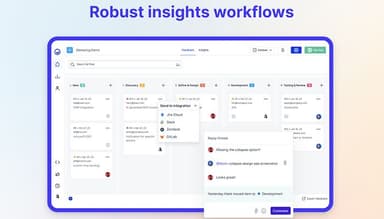
Usersnap Specifications
- Production Planning
- Inventory Management
- Quality Control
- Supply Chain Management
What Is Usersnap?
Overview
Usersnap, a cloud-based user feedback manufacturing software, helps businesses streamline user intuitions for product testing and prompt feature accuracy. It allows companies to create a user-centered feedback culture by simplifying feedback management, reducing communication overhead, and gathering in-product user research.
Usersnap Pricing
Usersnap provides four main pricing plans, including:
Usersnap Integrations
It integrates with various third-party applications, including:
Who Is Usersnap For?
It caters to manufacturing businesses of all sizes. Some of the facilities using include:
- Computer Software
- Information Technology and Services
- Marketing And Advertising
- Internet
- Financial Services
Is UserSnap Right for You?
Whether Usersnap is the right choice of manufacturing software will depend on the business size and requirements. It helps businesses put user needs at the core of product management and build precise, successful solutions meeting the needs of their users, improving the overall quality of their products and services.
Still not sure about the software? Contact our customer support team on 661-384-7070 and let them help you make the best decision.
Usersnap Features
Opportunities Board
AI ranks recurring issues and requests by frequency and impact, so the team sees what is worth building without reading every comment. What gets committed to syncs two ways with Jira, staying tied to the evidence behind it.
Sentiment Sensor
Every piece of input is scored for sentiment the moment it arrives, surfacing what is trending before a human has to go looking for it.
Channels
Pulls customer calls and support conversations into the same shared view as in-app surveys and screenshots, tagged back to source the moment they appear.
Visual Feedback & In-App Surveys
Visitors report a bug, request a feature, or answer a survey without leaving the page, and every submission arrives with the technical detail a developer needs to reproduce it.
AI Hypothesis & Solution Generator
AI turns ranked evidence into a hypothesis and a proposed solution the team can act on, scoped to the input actually collected so nothing is invented along the way. It's part of the AI sidekick add-on.
Alloy Prototyping
Turns a build-ready solution into a working prototype the team can react to before a single line gets built, so the roadmap gets tested before it gets committed.
Pros And Cons of Usersnap
Pros
Ease Of Integration
Easy To Send Feedback
Relatively Easy-to-use Interface
Ability To Export as Excel
Cons
Unhelpful Support
Minimal Reporting Features
Usersnap Pricing
FreeFirst 20 items free |
|---|
Free |
|
Disclaimer: The pricing details were last updated on Oct 12, 2026 from the vendor's website. Please contact us for a tailored pricing list.
Usersnap Reviews
Total 27 reviews
4.7
All reviews are from verified customers
Rating Distribution
5
Stars74%
4
Stars22%
3
Stars4%
2
Stars0%
1
Stars0%
Share your experience
Manufacturing, Product, Custom Product, 51-100 employees
Less than 6 months
“Usersnap for beta testing and post launch feedback is critical to our success! thank you!”
Pros
Integrating with Jira has been a game-changer for us. I can select the project and ticket type to send the tickets, and the automation saves us so much time. Downloading videos and screenshots directly from Jira tickets is really easy, and Usersnap even fills in details like device type, screen resolution, and the URL the feedback was collected from.
Cons
It would be great if I could expand the Jira integration and have the option to assign Usersnap feedback to an epic. It would also be helpful to have an "internal" version of the widget, like a flag, so that our internal staff has more choices such as selecting an epic and assigning it to a specific Jira user.
Rating Distribution
Ease of use
10
Value for money
10
Customer Support
10
Functionality
10
IT, 1-10 employees
Less than 6 months
“Great tool to collect user feedback and bugs”
Pros
The setup process is an unproblematic task. Submitting bugs and issues requires hardly any effort from the user. The bug and issue reports are well structured and include browser console logs.
Cons
So far, I have not encountered any issues; the software functions as expected.
Rating Distribution
Ease of use
10
Value for money
10
Customer Support
10
Functionality
10
Healthcare, 1-10 employees
Less than a year
“Usersnap helped us increase interaction with our visitors by 3 times”
Pros
It is highly intuitive. The passive and active feedback forms have significantly increased the amount of feedback we receive. Before Usersnap, we only relied on emails and chat to communicate with visitors and customers.
Cons
The statistics could use some improvement, but other than that, everything is excellent.
Rating Distribution
Ease of use
10
Value for money
10
Customer Support
10
Functionality
10
Frequently Asked Questions
What pricing plans does Usersnap offer?
Usersnap starts free, with the first 20 items included, no time limit and no credit card required. Paid plans scale with volume and team size rather than a flat per-seat fee. For current plan details, visit usersnap.com/pricing.
Who are the typical users of Usersnap?
Usersnap is built for enterprise product and B2B SaaS teams, including Heads of Product, Product Ops leads, PMs, and product researchers running continuous discovery. Customers include Canva, Red Hat, and Dynatrace.
What languages does Usersnap support?
The Usersnap interface is in English. Visual feedback widgets and in-app surveys can be customized with your own copy to match the language your customers use.
What other apps does Usersnap integrate with?
Usersnap connects to 100+ tools, including Jira, Azure DevOps, Linear, Slack, Intercom, and Zendesk. The Jira integration syncs two ways, and an MCP connection makes the evidence layer reachable from the AI tools already in your workflow.
Does Usersnap support mobile devices?
Usersnap works in mobile browsers, and a mobile feedback form is currently in beta. There's no native iOS or Android app today.
What level of support does Usersnap offer?
Support runs through help docs, email, and in-app chat, with enterprise plans getting a dedicated point of contact. Compliance documentation (SOC 2, GDPR, ISO 27001) is available ahead of security reviews.
Does Usersnap offer an API?
Yes. Usersnap is also reachable via MCP, so the AI tools already in your workflow can query the evidence layer directly, on top of the 100+ native integrations.