



Last Updated
Key Takeaways
Generated from the text of customer reviews
Our Verdict
Overall Rating
Based on 15 users reviews
4.9
Rating Distribution
Positive
100%
Neutral
0%
Negative
0%
Starting Price
$79
per month
Vista Social Specifications
- Social Media Management
- Content Management
- Analytics and Reporting
- Marketing Automation
Vista Social Features
Publishing And Scheduling
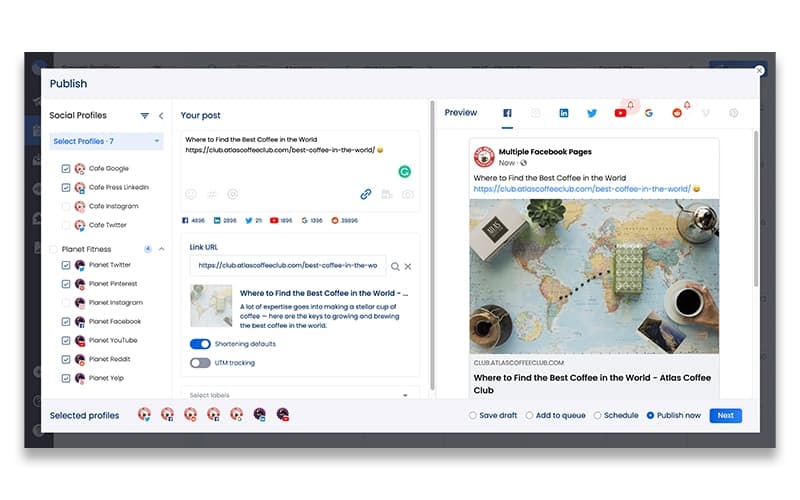
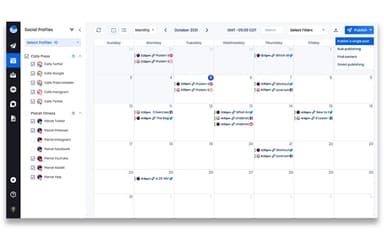
Teams can schedule posts across Instagram, TikTok, Facebook, LinkedIn, X, YouTube, Pinterest, Reddit, Snapchat, and Threads from one dashboard. Optimal send time analysis identifies when each profile's audience is most active, and bulk scheduling via CSV handles high-volume content planning without manual entry per post.
Unified Social Inbox
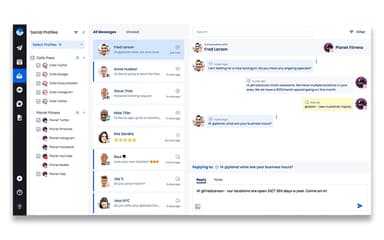
All incoming messages, comments, and mentions across connected platforms land in one inbox. Teams can assign conversations, leave internal notes, and respond without switching between platform apps. This reduces the chance that customer interactions get missed during high-volume periods.
Analytics And Reporting
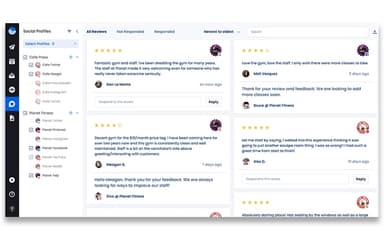
Vista Social offers analytics and reporting tools that pull performance data across all connected profiles. They do it into customizable reports that can be scheduled and delivered automatically to clients or stakeholders. Cross-channel comparisons and engagement breakdowns help teams identify which content types and posting times produce the most consistent results.
DM Automations
Wiith this feature, teams can set trigger-based rules that automatically respond to direct messages, route conversations to the right team member. They can also create tasks when specific inbox conditions are met. By doing so, they can handle routine interactions without manual intervention while keeping a human in control of escalations.
Pros And Cons of Vista Social
Pros
Consolidates messages from different social media platforms into one place
AI feature assist in drafting content for the target audience
Offers multi-platform bulk-scheduling
Cons
Direct messages and comments in one folder can create confusion
At times, the backend creates issues when attaching a picture to Google Business profile
Vista Social Pricing
Professional | Advanced | Scale | Enterprise |
|---|---|---|---|
$79 per month | $149 per month | $349 per month | Custom pricing |
|
|
|
|
Disclaimer: The pricing details were last updated on Sep 16, 2026 from the vendor's website. Please contact us for a tailored pricing list.
Vista Social Reviews
Total 15 reviews
4.9
All reviews are from verified customers
Rating Distribution
5
Stars87%
4
Stars13%
3
Stars0%
2
Stars0%
1
Stars0%
Share your experience
Marketing and Advertising, 51-100 employees
Less than a year
“Responsive support”
Pros
Getting started doesn't take long and generating leads is pretty easy. The customer support team is very helpful and the size of the database is definitely a strong point.
Cons
Pricing feels a bit expensive for what's included especially since Bombora intent data costs extra. On top of that some lead details are not always verified.
Rating Distribution
Ease of use
9
Value for money
7
Customer Support
10
Functionality
7
Marketing and Advertising, 51-100 employees
Free Trial
“Makes my job stress-free”
Pros
I am very much impressed by the number of profiles, functions and tools available. Social listening is also a powerful tool it has for tracking a brand's online presence and the best thing is that it is offered at such a reasonable price.
Cons
There is just one thing that with so many features and options, the options panel in post creation can sometimes become a bit difficult to navigate. Even though it is easily fixable by adjusting the scroll bar but it is an issue that is worth noting. And I hope they make improvements in this area soon.
Rating Distribution
Ease of use
8
Value for money
10
Customer Support
10
Functionality
10
Marketing and Advertising, 1-10 employees
Free Trial
“Very happy with it”
Pros
There is so much that I like about it such as pricing, the number of social profiles included and the customer support everything is great.
Cons
Some features were only available with an enterprise account but the good thing is that customer service was willing to add those features for me.
Rating Distribution
Ease of use
10
Value for money
10
Customer Support
10
Functionality
10
Frequently Asked Questions
What type of pricing plans does Vista Social offer?
It offers Professional for $79/month, Advanced for $149/month, Scale for $349/month, and Enterprise for Custom Pricing. Get a flexible Vista Social cost today.
Does Vista Social offer an API?
Yes, Vista Social offers an API to its users.
What language does Vista Social software support?
Vista Social supports various languages such as English, French, German, Spanish, etc.
What other apps does Vista Social integrate with?
Vista Social integrates with Instagram, Canva, Facebook and Slack.
What level of support does Vista Social offer?
Vista Social software offers email and form support, FAQs, and knowledge base guides.
Who are the typical users of Vista Social?
Vista Social software is used by the marketing, retail, and hospitality industries.
Does Vista Social have a mobile app?
Yes, Vista Social has a mobile app available on iOS and Android devices.