


Forecast Software
Last Updated
Overview
Forecast Software empowers informed resource allocation with future demand insights. Predict workload and optimize team utilization, ensuring projects are staffed effectively. While some users may experience a learning curve, Forecast's comprehensive features empower strategic resource management. Contact us today to discuss your specific needs.
Overall Rating
Based on 28 users reviews
4.5
Rating Distribution
Positive
96%
Neutral
0%
Negative
4%
Starting Price
Custom Pricing
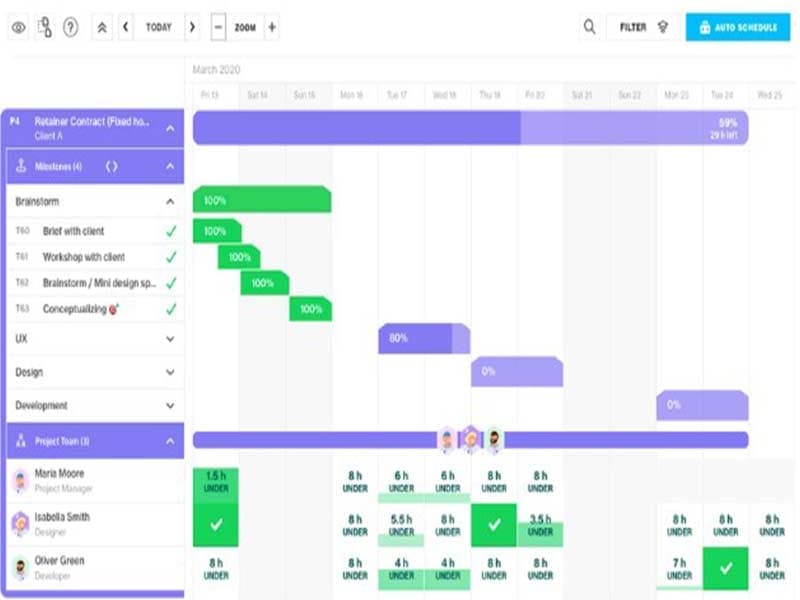
Forecast Software Specifications
- Time Tracking
- Task Management
- Reporting
- Budget Management
What Is Forecast Software?
Overview
Forecast is a cloud-based project and resource management solution designed to aid businesses in the software as a service (SaaS) industry. It offers a comprehensive suite of tools for project management, resource allocation, and financial control. This platform is not just an application; it’s a complete ecosystem that integrates seamlessly with your existing tech stack, supporting your entire team.
What Is Forecast Software Best For?
The software is known for its advanced AI technology. This unique feature sets it apart from competitors by providing intelligent recommendations, risk warnings, and insights that help teams focus on what’s important, execute projects predictably, and maintain financial control. This innovative use of AI in project and resource management makes Forecast a standout choice in the SaaS industry.
Forecast Pricing
The vendor offers the following annual plan:
- Core (Minimum 25 Users)
Forecast Software Integrations
The software integrates with third-party applications, including:
How Does Forecast Software Work?
Here is how to start with the software:
- Log in using your credentials
- Explore the dashboard for all ongoing projects, resources, and finances
- Create new projects and define their scope, timeline, and budget
- Allocate tasks to team members and set deadlines
- Keep track of resource availability and allocation
- Use the project tracking feature to monitor the progress of each project
- Generate detailed reports on project performance, resource utilization, and financials
- Use AI-powered insights for intelligent recommendations and risk warnings
Who Is Forecast Software For?
Forecast Software is designed for businesses of all sizes - small, medium, and large. The platform is versatile and can be used across various industries, including:
- Advertising & Digital Agencies
- Consultancy
- Software & Technology
Is Forecast Software Right For You?
Are you looking for a project management solution leveraging AI's power to provide intelligent recommendations and insights? If so, Forecast can be the perfect fit for you.
When it comes to security and scalability, Forecast Software has you covered. It provides robust security features to safeguard your data and is scalable to accommodate the growth of your business. Forecast Software can adapt to meet your needs, whether you’re a small startup or a large corporation.
Still not sure if Forecast Software is right for you? Contact our customer support team at (661) 384-7070, and it will help you make the best decision.
Forecast Software Features
Project Management
Forecast project management feature allows you to upload files, collaborate with your team, and manage your team’s priorities. It’s like having a central command center for all your projects. With this feature, you can effortlessly monitor task deadlines, identify responsible individuals, and stay informed about their current status.
Resource Management
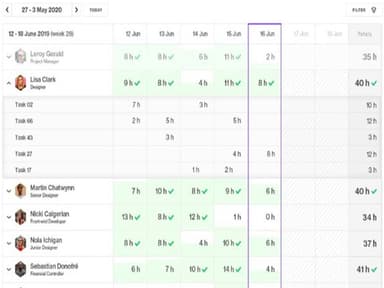
Stay on top of your resources with Forecast Software. This feature allows you to monitor future demand and utilization of your workforce, helping you save time and money. It’s like having a crystal ball to predict future resource needs.
Financial Management
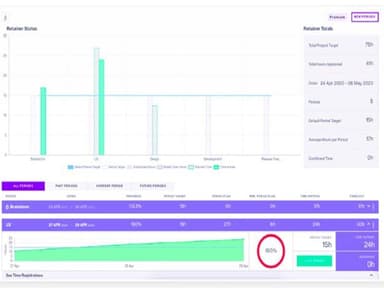
With this feature, you can track costs and profits, compare your baseline to actuals, and pull reports in real-time. It’s like having a financial advisor for your projects. You can see where your money is going and make informed decisions about your project budget.
Business Intelligence
Access actionable business insights with Forecast's real-time project data feature. This powerful functionality automatically generates comprehensive reports, eliminating the need to sift through spreadsheets for valuable information.
Team Collaboration
Ensure seamless collaboration within your project team with Forecast's comprehensive features. Keep team members informed about their assigned tasks and provide them with a prioritized task list. Enable comments, file sharing, and time tracking through task cards.
Pros And Cons of Forecast Software
Pros
Advanced AI technology
Cloud-based platform
Real-time data analysis
Seamless tech stack integration
Cons
Occasional software updates
Customer service can be improved, according to some Forecast reviews
Initial training required
Forecast Software Pricing
Core(Minimum 25 users) |
|---|
Custom Pricing |
|
Disclaimer: The pricing details were last updated on Sep 25, 2026 from the vendor's website. Please contact us for a tailored pricing list.
Forecast Software Reviews
Total 28 reviews
4.5
All reviews are from verified customers
Rating Distribution
5
Stars64%
4
Stars32%
3
Stars0%
2
Stars0%
1
Stars4%
Share your experience
Consumer Goods, 500+ employees
“Carefully designed for seamless team operations”
Pros
Forecast is a robust tool that fosters smooth communication and integrates seamlessly with various applications aiding us in efficient product management and achieving desired outcomes. Generating tickets and lists is a straightforward process enabling us to effectively track products and customer notes. The ability to assign tickets to team members adds flexibility to our followup process. Additionally the project manager can easily access comprehensive reports covering all workflow stages providing accurate team progress updates.
Cons
While Forecast is an excellent tool it may require some training to utilize all its features effectively. Occasionally when handling a large number of tasks it may take a bit of time to load although this is not a recurring issue.
Rating Distribution
Ease of use
10
Value for money
10
Customer Support
8
Functionality
9
Not specified, 1-10 employees
“A distinctive tool for challenging tasks”
Pros
I appreciate how it manages my projects and organizes my schedule efficiently.
Cons
Occasionally I encounter some usability issues but I believe these problems are easily solvable.
Rating Distribution
Ease of use
9
Value for money
7
Customer Support
8
Functionality
7
Information Technology and Services, 11-50 employees
“Great tool for a complex business model”
Pros
Forecast is a precise tool for administrative work and workflow management.
Cons
The software could be faster and have an improved visual design.
Rating Distribution
Ease of use
7
Value for money
9
Customer Support
9
Functionality
7
Frequently Asked Questions
How does Forecast Software help improve financial performance?
Forecast features uses advanced AI technology to provide intelligent recommendations, risk warnings, and insights that help teams focus on what’s important, execute projects efficiently, and maintain financial control.
What types of pricing plans does Forecast Software offer?
The Software offers customized pricing with the Pro and Plus plans to cater to diverse organizational needs. Request for a custom Forecast price.
Does Forecast Software support mobile devices?
The software supports mobile devices.
Does Forecast Software offer an API?
Yes, the software has an API available for use.
What level of support does Forecast Software offer?
Forecast project management software provides support through a variety of channels, including a comprehensive knowledge base, a FAQs/forum section for common queries, direct phone support, an email/help desk for detailed inquiries, and chat for real-time assistance.
What language does Forecast Software support?
The software supports the English language.
What other apps does Forecast Software integrate with?
Forecast Software integrates with third-party applications such as Google Drive, Jira, Monday.com, Asana, BambooHR, GitHub, and Okta.
Who are the typical users of Forecast Software?
Forecast Software is a versatile platform designed for all business sizes, supporting departments like resource planning, project management, and financial control.