Last Updated
Key Takeaways
Generated from the text of customer reviews
Landlord Studio is a rental property management and accounting platform designed for independent landlords and small property portfolios. Users frequently praise its intuitive bookkeeping and reporting tools, though some report limitations in reconciliation workflows. The platform is now an HMRC-recognized MTD software, enabling landlords to maintain digital rental records and submit required tax updates directly to HMRC.
Our Verdict
The platform is best suited for small-scale landlords and property managers, who prioritize ease of use and centralized financial control. Pricing is generally considered fair for the value it offers, given its all-in-one approach to rent, expense, and reporting management. Overall, it is recommended for independent landlords and small portfolios rather than large firms needing advanced customization or enterprise-grade depth.
Overall Rating
Based on 46 users reviews
4.9
Rating Distribution
Positive
98%
Neutral
2%
Negative
0%
Starting Price
Free
Landlord Studio Specifications
- Tenant Management
- Lease Management
- Rent Collection
- Maintenance Requests
What Is Landlord Studio?
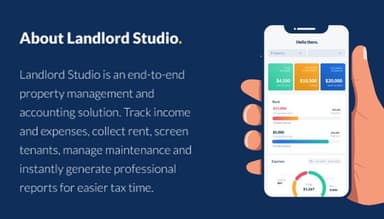
Landlord Studio is a cloud-based property management and accounting platform which combines property-level bookkeeping, rent tracking, and tenant management in one system. It allows landlords to manage their rental properties more efficiently by streamlining tasks such as rent payment logging, expense management, mileage tracking, reminders for important dates, automated tenant emails, and providing powerful analytical reporting tools.
The platform emphasizes ease of use and operational simplicity, aiming to reduce the administrative burden typically associated with managing rental properties. It is built to support landlords who manage properties independently or with minimal staff, enabling them to oversee multiple units through a unified portfolio.
What Is Landlord Studio Best For?
The platform is widely acknowledged for its rental accounting capabilities, which let users separate and track multiple properties individually while also managing general business expenses in one system. Its structured setup supports property-level categorization, making ongoing bookkeeping quick after initial configuration. This is especially useful for small landlords handling mixed portfolios who need tax-ready records without complex accounting tools.
How Much Does Landlord Studio Cost?
The pricing for Landlord Studio starts at $15/month for the Pro plan. This plan also comes with a 14-day free trial. Below are the details of the other two plans:
- Go: Free
- Pro Plus: $35/month
Other than the base subscription costs, users may also incur the following additional estimated expenses:
- Implementation Services: $500 - $1,000
- Custom Setup / Configuration: $500 (for small businesses)
- Data Migration: $200 - $1,000
- Staff Training: $200 - $750
Users generally view Landlord Studio as good value for money, with pricing considered suitable for independent landlords and small property portfolios due to its affordability and all-in-one feature set.
Disclaimer: The pricing is subject to change.
Landlord Studio Integrations
It integrates with various third-party applications, including:
- Xero
- Plaid
How Does Landlord Studio Work?
Here’s how to get started with the software:
- After logging in, use the main dashboard to view property performance, cash flow, upcoming rent payments, overdue balances, and recent activity across your portfolio
- Review the Properties section to manage units, leases, tenant details, documents, and renewal reminders from a centralized workspace
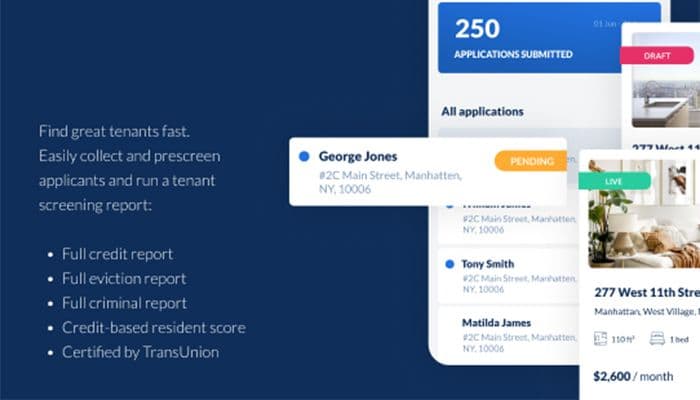
- Navigate to the Leads and Listings area to create rental listings, syndicate them across listing platforms, track inquiries, and prescreen applicants
- Use the Tenant Screening and Applications tools to review rental applications, run background and credit checks, and approve qualified tenants digitally
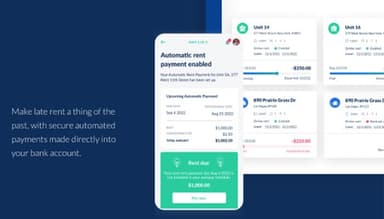
- Open the Rent Collection module to monitor payments, enable autopay, send automated reminders, and track overdue rent in real time
- Manage maintenance requests through the maintenance portal, where tenants can submit issues and landlords can prioritize tasks, track maintenance requests, and monitor updates
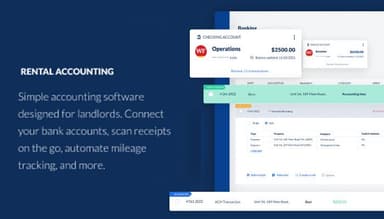
- Use the Accounting and Reporting dashboard to track expenses, scan receipts, reconcile bank feeds, and generate reports such as P&L statements and tax summaries
Who Is Landlord Studio For?
It caters to property businesses of all sizes. Landlord Studio users include:
- Real Estate
- Self-employed landowners
- Leisure, Travel & Tourism
- Information Technology and Services
- Telecommunications
- Investment Management
- Hospitality
Landlord Studio Use Cases
Based on our analysis of user reviews and Landlord Studio’s current capabilities, we identified several scenarios where the software is a strong fit for landlords and small property management operations:
Independent Landlords Replacing Manual Tracking
Due to its ability to centralize rent tracking, expenses, receipts, and reporting within a single workflow, Landlord Studio works well for landlords moving away from spreadsheets and manual bookkeeping.
Small Property Portfolios Managed Without Administrative Staff
The platform is a practical fit for landlords managing multiple properties independently. Reviews highlight its value in organizing day-to-day operations such as rent collection, maintenance requests, and tenant communication without requiring additional staff.
Landlords Seeking A Simpler Alternative To Enterprise Platforms
Several users chose Landlord Studio over more complex property management systems due to its easier setup and usability. This makes it suitable for smaller operations that do not require enterprise-level functionality.
Rental Owners Prioritizing Tax And Financial Reporting
The software is well suited for landlords who need organized financial records for tax preparation and accountant collaboration. The platform’s reporting structure and expense tracking capabilities are key operational advantages.
Investors Managing Both Long-Term And Short-Term Rentals
It is practical for property owners managing mixed rental portfolios, including traditional and short-term rentals. Users value having a centralized system to oversee finances and operations across different property types.
Is Landlord Studio Right for You?
Whether or not Landlord Studio is a good choice of software for property owners depends on the size and requirements of a business. Landlord Studio offers a purpose-built solution for landlords self-managing their rental properties. By automating workflow, centralizing information, and streamlining payment tracking and management, Landlord Studio makes it easier than ever for landlords to self-manage their rental properties. It also follows GDPR-aligned practices with encrypted data handling and secure storage, which can support safer management of tenant and financial records.
Still not sure about the software? Contact us at (661) 384-7070 for guidance toward the best decision.
Landlord Studio Features
Rental Accounting
Landlord Studio provides a comprehensive rental accounting solution, allowing landlords to track income and expenses related to their rental properties. It includes expense tracking, rent tracking, and income and expense reports.
Property Maintenance
Property maintenance helps track tasks and expenses, ensuring that landlords can stay on top of repairs and maintenance needs for their properties, including features such as maintenance tracking, work order management, and vendor management.
Reporting and Tax Accounting
The solution provides a range of reporting and tax accounting tools, enabling landlords to stay organized and compliant with tax regulations. It includes profit and loss reports, tax reports, and Schedule E tax preparation.
Online Rent Collection
Online rent collection tools allow landlords to collect rent payments electronically and easily manage rent payments from their tenants. Automated rent reminders, online rent payment processing, and payment tracking are Key features of this module.
Tenant Screening
Landlord Studio offers tenant screening tools, allowing landlords to screen potential tenants for credit, criminal history, and other relevant factors. It helps landlords decide who to rent their properties to and reduces the risk of problematic tenants.
Pros And Cons of Landlord Studio
Pros
The platform is user-friendly and easy to navigate
Simplifies bookkeeping and keeps financial records organized
Makes tax preparation more manageable and efficient
Supports separate property-level and general business expense tracking
Cons
Managing reconciliations may require extra manual effort
Rent payment frequency cannot be modified after tenant setup
The platform offers limited in-app guidance when listings are not approved
Landlord Studio Reviews
Total 46 reviews
4.9
All reviews are from verified customers
Rating Distribution
5
Stars89%
4
Stars9%
3
Stars2%
2
Stars0%
1
Stars0%
Share your experience
Steven
Real Estate, 1-10 employees
Less than a year
“A true One Stop Shop for Property Managers
Pros
I had an issue specific to my iPad. I contacted support, and by the next day, an update addressing my problem was available in the App Store.
Cons
I have no complaints. I haven't explored the app completely yet. I do wish there was a feature for messaging tenants and sending mass notifications easily.
Rating Distribution
Ease of use
10
Value for money
10
Customer Support
10
Functionality
9
Rich
Accounting, 1-10 employees
Less than a year
“Finally Dumped QB
Pros
It didn't take long to learn. I quickly found all the features I needed.
Cons
Bank downloads were somewhat confusing initially, so I had to reach out to support.
Rating Distribution
Ease of use
8
Value for money
10
Customer Support
10
Functionality
8
Christos
Real Estate, 1-10 employees
Less than 6 months
“Good value for money
Pros
I can store all the details about my rental properties in one place.
Cons
As an EU customer, I can't link my bank account to automatically track rent payments. Consequently, everything feels manual. Instead of getting a quick overview when I log in, I have to update everything manually first. Sometimes, it feels like I'm working for the app rather than the app working for me.
Rating Distribution
Ease of use
7
Value for money
7
Customer Support
4
Functionality
4
Frequently Asked Questions
What types of pricing plans does Landlord Studio offer?
Landlord Studio offers a free Go plan, while paid pricing starts at $15/month for the Pro plan, which includes a 14-day free trial. The Pro Plus plan is available for $35/month. Contact us for a personalized Landlord Studio pricing estimate.
Who are the typical users of Landlord Studio?
It caters to property businesses of all sizes. Landlord Studio users include Real Estate, Self-employed landowners, Leisure, Travel and Tourism, Information Technology and Services, Telecommunications, Investment Management and Hospitality.
What languages does Landlord Studio support?
It supports English.
What other apps does Landlord Studio integrate with?
It integrates with various third-party applications, including Xero and Plaid.
Does Landlord Studio have a mobile app?
Yes, it offers a dedicated mobile application for both iOS and Android users.
Does Landlord Studio offer an API?
No, it does not provide an API.
What level of support does Landlord Studio offer?
The platform offers customer support via phone, email, FAQs, and a help center.