Article
Best Payroll Software Comparison Guide: Choose The Right Solution
4 mins read
Last Updated


By Ayesha Suleman and


Article
4 mins read
Last Updated
By Ayesha Suleman and

Managing payroll is one of the most critical functions in any business; even a small error can lead to financial strain and employee dissatisfaction. With complex regulations, varying pay structures, and different types of employees, choosing the right payroll software has never been more important or challenging.
Given these difficulties, this guide will highlight the must-have features and evaluation criteria of the best payroll software. Whether you are selecting a first payroll system or upgrading from an outdated one, understanding what works well for your organization will help you make an informed decision.
This quick overview will help you make an informed decision depending on your needs, size, and requirements.
Software | Ratings | Trial Info | Best For | Starting Price | Unique Features |
| 4.6/5
| Not Available | All in one HR automation
| Custom pricing
|
|
4.5/5
| Trial available (Free up to two consecutive billing cycles)
| Small to mid-sized businesses | Starting from $49/month + $6/person
| • Automated tax filings • Autopilot payroll runs • Gusto debit card | |
| 4/5
| Free trial available
| Growing businesses
| Custom pricing
| • Multi-state payroll • Payroll submission via phone or specialist • Advanced garnishment payment processing
|
| 4.9/5
| 14-day free trial
| Tech forward companies
| Starting at $8/user/month + $40/month base fee
| • Compensation bands • Global EOR • Customizable pay types
|
4.4/5
| N/A
| Mid-sized to large companies | Custom pricing
| • 200 pre-built reports & dashboards • Smart alerts + built-in error detection • Automated GL export for accounting | |
4.4/5
| 30-day free trial
| Businesses that already use QuickBooks and want all-in-one payroll solution | Starting from $50/month + $6.50/employee
| • Workforce portal • Integrated HR and benefits management • Contractor payments |
Payroll can be a major challenge for your distributed team, where compensation structures, tax regulations, and compliance requirements vary by location. When you handle these complexities manually, it increases the risk of errors, delays, and regulatory gaps. An efficient payroll system in place addresses these challenges by:
Having payroll software helps you eradicate repetitive tasks, maintain consistent, accurate pay cycles, and reduce costly mistakes. It helps in keeping employees satisfied and ensures compliance requirements are fully met.
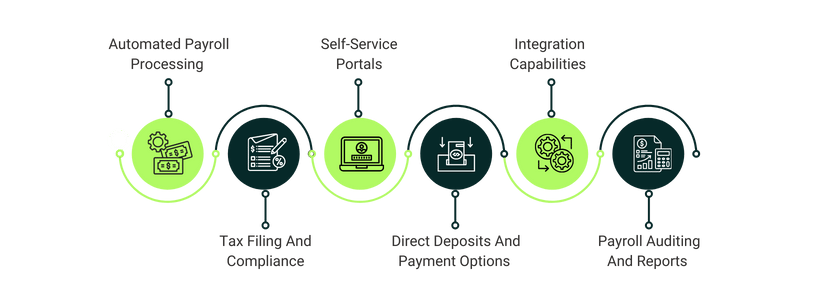
When comparing several payroll software options, focus on the following must-have capabilities of the system that can truly make a difference in your day-to-day operations:
Pick software that will automatically calculate wages, overtime, reimbursements, bonuses, and deductions. You need to make sure that it processes paychecks on time, improving employee satisfaction.
It is important to go with a solution that has built-in tax tables for federal, state, and local tax calculations. The system should be able to generate W-2 forms, simplify tax filings, and automatically update with regulatory changes. Ensure it complies with labor laws and tax regulations across each jurisdiction where your business operates.
Through self-service portals, you can empower employees to view their pay slips, download tax documents, update personal details, and track deductions in real time. This not only improves employee satisfaction, but it also frees HR teams from routine clerical tasks, so they can work on strategic priorities.
Compare tools and select the one that supports fast direct deposits and flexible payment methods such as split deposits, pay cards, and digital transfers. These features eliminate the need for manual checks, prevent payout errors, and ensure employees are paid on time.
Select software that integrates well with your existing Human Resources (HR) systems, time-tracking tools, and accounting software. This connection enables clear visibility into labor costs, smooth data flow, and efficient payroll management.
Look for systems that provide detailed auditing tools and customizable reporting features. It will enable you to analyze expense reports, tax liability summaries, labor cost analytics, and compliance documentation. These insights help prevent unnecessary expenses, support budgeting decisions, and provide full operational visibility.
Nhlaka Mncube, director at CFO360, said, "Payroll visibility helps spot trends in workforce costs and give strategic advice on workforce planning."
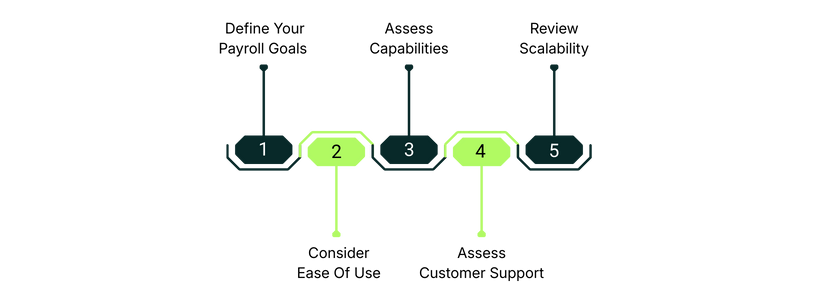
When selecting payroll software, consider the following step-by-step methodology that will equip you with a structured evaluation process:
When choosing the payroll system, avoid the following pitfalls to ensure your payroll system becomes a strategic advantage, not a recurring problem:
The right payroll system transforms the way your business operates, improves accuracy, and keeps you compliant. When you understand your needs and compare essential features, you will be better equipped to choose a system that works for your team and continues to support as the organization scales.