


Procore Estimating
Last Updated

Overview
Procore Estimating simplifies complicated construction estimates with its centralized cost data, automated calculations, and comprehensive change management tools, ensuring efficiency and accuracy. While it does require some initial setup, the resulting time savings and error reduction promptly validate the effort for many businesses.
Procore Estimating Specifications
- Project Planning and Scheduling
- Budget Management
- Resource Allocation
- Document Management
What Is Procore Estimating?
Overview
Procore Estimating is a cloud-based construction estimating software meticulously crafted to streamline the entire estimating process for contractors of varying scales. It allows construction professionals to perform accurate quantity takeoffs, create detailed estimates, and generate professional proposals. By utilizing the Procore Estimating software, construction companies can improve their bidding accuracy, increase project predictability, optimize resource allocation, and make data-driven decisions for better project outcomes.
What Is Procore Estimating Best For?
Procore Estimating's primary distinction lies in its integration and automated processes. Its seamless connection to the wider Procore platform eradicates data silos and manual handoffs, significantly reducing errors common in fragmented workflows.
Procore Estimating Pricing
Procore Estimating Integrations
The software integrates with the following third-party applications:
- Airtasks
- Avvir
- Sage
- DocuSign
- QuickBooks
- Tenna
- Dispatcher
- Eyrus
How Does Procore Estimating Work?
Here's how you can get started with the software:
- Log in to your Procore Estimating account using the credentials
- Navigate to the dashboard for an overview of your active estimates, recent bids, and critical project metrics
- Create projects to organize individual estimates
- Set up cost catalogs by importing existing data or building a custom database of material, labor, and equipment costs
- Establish a bidding workflow by creating a bid board
- Invite users and collaborators to assign specific roles and access levels for secure collaboration
- Begin building a new estimate by linking to a project and utilizing takeoff tools
- Access comprehensive support and training resources for quick onboarding and continuous learning
Who Is Procore Estimating For?
The design of Procore Estimating caters to construction professionals in search of an integrated estimating solution. This encompasses general contractors and a diverse range of specialty subcontractors across various sectors. Its scalability renders it suitable for companies of all sizes, ranging from small businesses to enterprise-level organizations within industries and sectors such as:
- Commercial construction
- Heavy civil construction
- Residential construction
- Industrial construction
- Specialty trades
Is Procore Estimating Right For You?
Struggling with manual, error-prone construction estimates and seeking to boost profitability in your projects? Procore Estimating relieves the frustration caused by inaccurate and time-consuming estimation processes. It transforms your approach, minimizing errors through automation and making the whole process far less labor-intensive.
Rest assured, Procore understands the importance of data security in the construction world. The software employs robust cloud-based security protocols to safeguard your sensitive project information. Additionally, the platform's flexible design adapts to businesses of various sizes, making it an asset for growing contractors and established enterprises alike.
Still not sure if Procore Estimating is the ideal fit? Contact our customer support team at (661) 384-7070.
Procore Estimating Features
Cost Catalog
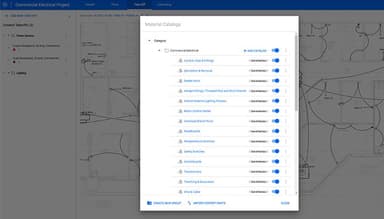
The software allows users to construct and manage a centralized database encompassing material, labor, and equipment costs. This ensures consistency across the estimates, streamlines cost updates and promotes informed decision-making regarding pricing and project expenses.
Bid Management
It provides tools for inviting subcontractors, managing bids, and comparing responses side-by-side. This optimizes the bidding process, fosters informed decision-making, and enhances efficiency when dealing with competitive bids.
Change Order Management
The platform enables straightforward project tracking and pricing capabilities, minimizing the risk of budget overruns and maximizing financial control. It provides clear visibility into cost impacts and facilitates prompt approval of necessary adjustments.
Revision Tracking
This feature maintains a clear history of estimate changes and revisions, which is crucial for version control. It ensures transparency and aids in understanding how bids and project budgets evolve.
Collaboration
Facilitating real-time communication among project team members directly within the estimated context fosters swift problem-solving and efficient decision-making. It also promotes better alignment among stakeholders regarding the estimate.
Pros And Cons of Procore Estimating
Pros
Intuitive user interface and navigation
Powerful takeoff and estimating tools
Time-saving automation and enhanced accuracy
Customizable reporting and insights
Cons
Potential learning curve for advanced features, according to some Procore Estimating reviews
Limited flexibility with some customization options
Initial setup and configuration may take time
Procore Estimating Reviews
Total 26 reviews
4.3
All reviews are from verified customers
Rating Distribution
5
Stars50%
4
Stars35%
3
Stars12%
2
Stars4%
1
Stars0%
Share your experience
Construction, 500+ employees
More than a year
“Tool errors in Esticom Estimating ”
Pros
overall a good takeoff software
Cons
I am escalating a serious concern regarding the linear drop tool functionality in Esticom and the lack of adequate response from support. The current behavior of the tool produces inaccurate takeoffs. It automatically applies drop lengths not only at the beginning and end of runs, but also at every change in direction within a single run. This results in inflated linear quantities, unnecessary manual adjustments, and a lack of confidence in the accuracy of estimates generated within the platform. For a professional estimating system, this level of uncontrolled calculation behavior is unacceptable. The tool should function strictly based on user-defined input. It must only add the total drop length as explicitly dictated by the user and should not automatically insert additional drops at directional changes unless the user specifically enables that feature. Estimating software must provide precision and control — not assumptions that alter quantities without direct instruction. In addition, my repeated requests to speak with a department manager regarding this issue have gone unanswered. The absence of managerial follow-up and escalation support is concerning and does not reflect a professional level of customer service for a technical estimating platform. This matter directly impacts project accuracy, pricing integrity, and operational efficiency. I am formally requesting: Immediate review of the linear drop tool logic, Correction of the automatic drop behavior, And direct contact from a qualified department manager to address this issue without further delay. I expect a prompt response outlining corrective action and a clear timeline for resolution.
Rating Distribution
Ease of use
8
Value for money
8
Customer Support
2
Functionality
2
Construction, 11-50 employees
Less than 6 months
“Good Procure Add On, unavailable for free licenses”
Pros
It's easy to use with Procore, cutting out the need for transferring data between different platforms and streamlining work processes.
Cons
Esticom has recently become an integrated Procure tool, but during this transition, Procore users with non-profit or free licenses can't access it. I'm hoping this will change over the next year since this is a key feature Procore is missing, and I currently have to pay for a separate third-party app integration to fill the gap. I appreciate that Procore offers a non-profit program that helps us train new trades employees for adopting digital construction technology, so it's a bit frustrating that this functionality isn't available for free yet!
Rating Distribution
Ease of use
8
Value for money
10
Customer Support
6
Functionality
6
Construction, 500+ employees
Less than a year
“Handles takeoffs well”
Pros
This software works really well for my weekly quality takeoff needs.
Cons
Using this software for bid management can be a bit confusing sometimes.
Rating Distribution
Ease of use
10
Value for money
9
Customer Support
9
Functionality
10
Frequently Asked Questions
Does Procore Estimating offer an API?
Yes, the software has an API available.
What language does Procore Estimating support?
The software supports the English language.
What other apps does Procore Estimating integrate with?
The software integrates with Sage, Tenna, DocuSign, QuickBooks, Airtasks, Dispatcher, Avvir, and Eyrus.
Does Procore Estimating support mobile devices?
The software supports mobile devices.
What types of pricing plans does Procore Estimating offer?
You can request a customized Procore Estimating pricing plan based on your organization's specific requirements.
Who are the typical users of Procore Estimating?
Procore Estimating caters to construction professionals, including general contractors and specialty subcontractors across various sectors. It is suitable for construction companies of all sizes, from small businesses to enterprise-level organizations, engaging in various projects, including industrial, commercial, heavy civil, residential construction, and specialty trades.
What level of support does Procore Estimating offer?
Procore Estimating provides support through FAQs/forums, email/help desk, phone support, and chat.
How do I speed up my quantity takeoff process with Procore Estimating?
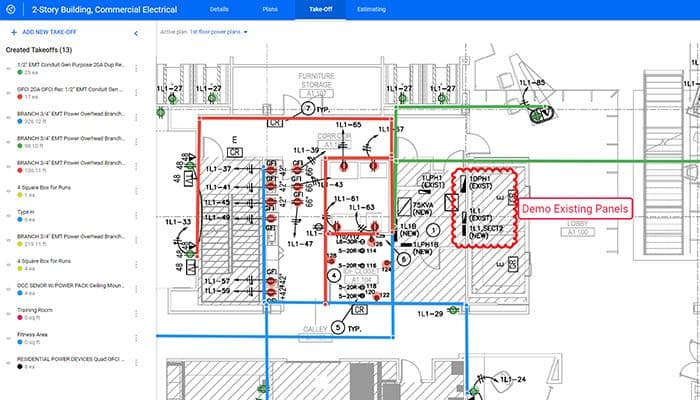
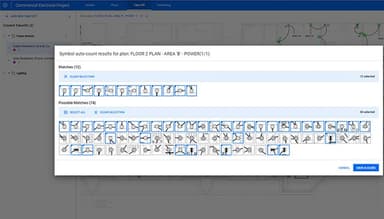
Procore Estimating offers several features to accelerate your takeoff, including automated area takeoff, the auto-count feature for symbol recognition, and the takeoff page, which streamlines the entire process.
What resources are available to help me learn Procore Estimating?
Procore offers a wealth of resources, such as a comprehensive knowledge base, support channels, and the ease of use of the estimating page. This makes the adoption of Procore Estimating smooth, regardless of your prior experience.
Why should I consider choosing Procore Estimating for my construction business?
Procore Estimating can significantly streamline your workflows. Features like a customizable material database, internet access for on-the-go usage, and integration with project financials lead to a more efficient process, potentially offering a nominal incentive or financial advantage.
Does Procore Estimating require internet access to use features like takeoff page, create structured cabling estimates, and utilize the estimating section?
Yes, the software primarily relies on internet access for its full range of features. This includes automatically creating structured cabling estimates, utilizing the dedicated estimating section, and working within the takeoff page. This cloud-based approach ensures real-time collaboration and data consistency.