Last Updated
Overview
WorkMarket is a comprehensive platform to efficiently and compliantly manage independent contractors. It simplifies tasks such as contractor verification, work assignment, and tax management, saving time and reducing risk. While initial customization of the system may be necessary, the benefits far outweigh the setup period.
Overall Rating
Based on 9 users reviews
4.4
Rating Distribution
Positive
78%
Neutral
22%
Negative
0%
Starting Price
Custom
WorkMarket Specifications
- Project Planning and Scheduling
- Budget Management
- Resource Allocation
- Document Management
What Is WorkMarket?
Overview
WorkMarket is a cloud-based independent contractor management system tailored to streamline the entire process for businesses heavily dependent on freelance or contract workers. It provides end-to-end solutions for onboarding, verifying, paying, organizing talent, managing work assignments, 1099 tax filing and integrating with existing systems. WorkMarket helps businesses ensure compliance with complex regulations surrounding independent contractor classification.
What Is WorkMarket Best For?
The software distinguishes itself with its robust suite of tools, providing companies with the ability to efficiently onboard, manage, and compensate independent contractors. Its features streamline worker verification, handle tax documentation, and ensure adherence to regulations. This emphasis on efficiency and regulatory adherence is particularly valuable, given the complexities surrounding contractor classification.
WorkMarket Pricing
WorkMarket Integrations
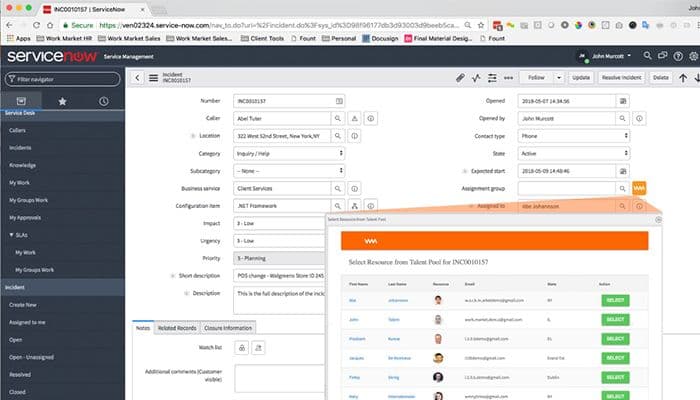
The software integrates with the following third-party applications, including:
- Salesforce
- NetSuite
- Mulesoft
How Does WorkMarket Work?
Once your WorkMarket setup is complete, follow these initial steps:
- Log in to the software using your credentials.
- Start by tailoring WorkMarket's configuration to align with your organization's specific needs and workflow preferences.
- Begin building a pool of talent by adding new independent contractor profiles, capturing pertinent details such as skills, experience, certifications, and availability.
- Ensure compliance by uploading required contractor documents (e.g., background checks, tax forms) and initiate the verification process.
- Design approval chains for contractor onboarding and project assignments for proper review and delegation.
- Configure preferred payment methods and tax withholding rules in accordance with your financial processes.
- The main dashboard offers an at-a-glance overview of contractor activity, project status, compliance insights, and key metrics.
- Dedicate a section for managing all aspects of independent contractors, from onboarding to payment and document management.
- Create, track, and manage individual work assignments, matching them to the most suitable contractors.
Who Is WorkMarket For?
It's suitable for organizations from Small to Medium-sized Businesses (SMBs) and large enterprises. It caters to industries and sectors, including:
- Field services
- IT & technology
- Professional services
- Healthcare
- Creative and marketing services
- Logistics and supply chain
Is WorkMarket Right For You?
Are you tired of managing a large freelance workforce amidst chaos and risks, struggling to find the right talent and keeping track of ever-changing regulations? WorkMarket could be the solution you need. It addresses common challenges in independent contractor management, saving time and minimizing compliance worries while providing a secure and scalable platform for managing the entire contractor lifecycle and reducing risk.
For more information about WorkMarket, contact us at (661) 384-7070.
WorkMarket Features
Contractor Sourcing And Matching
Facilitate the seamless identification and acquisition of skilled talent. With WorkMarket, businesses can effortlessly search their pool of verified contractors, filtering them based on specific skills, experience, and availability. Automated matching suggests well-suited workers for job assignments, saving time in the selection process.
Work Order Management
Centralize and simplify the process of assigning and tracking work. Create detailed work orders, define deliverables and deadlines, and monitor project progress with real-time updates. This feature promotes visibility and efficient completion of work by independent contractors.
Payment And Invoicing
Simplify compensation for your independent workers. WorkMarket offers multiple payment options, invoice generation, automated tax filing (1099-NEC), and the ability to handle contractor expenses, maintain organized financial records and reduce administrative workload.
Customizable Reporting And Analytics
Gain valuable insights into your independent contractor workforce. Generate tailored reports on contractor spend, project completion rates, compliance metrics, and more. These insights help you optimize your workforce strategy and make informed business decisions.
Automated Onboarding
Optimize and expedite the process of bringing new contractors into your system. The WorkMarket software provides automated workflows for collecting essential contractor information, verifying qualifications, and managing necessary documentation. This enhances the onboarding process, saving time and ensuring adherence to regulations.
Communication And Collaboration
WorkMarket fosters seamless communication between businesses and contractors within the platform. Built-in messaging, discussion threads, and document-sharing capabilities facilitate clear and efficient collaboration throughout the project lifecycle.
Pros And Cons of WorkMarket
Pros
Robust compliance and tax management
Streamlined contractor onboarding and verification
Efficient work order and project management
Simplified payments and invoicing
Cons
Occasional updates impacting workflow continuity
Initial setup may require time investment (according to some reviews)
Limited control over customizing certain features
WorkMarket Reviews
Total 9 reviews
4.4
All reviews are from verified customers
Rating Distribution
5
Stars67%
4
Stars11%
3
Stars22%
2
Stars0%
1
Stars0%
Share your experience
Hospital & Health Care, 101-500 employees
Less than 6 months
“Withdrawing money with Workmarket is neh”
Pros
I like the website's visibility. It's simple to navigate and offers many details not found on other platforms.
Cons
I'm not happy that when I withdraw my earnings, I can't see the transactions, like the forex amount or what I'm supposed to receive.
Rating Distribution
Ease of use
10
Value for money
9
Customer Support
10
Functionality
10
Entertainment, 1-10 employees
More than a year
“you have to work with this app”
Pros
The functionality is fair and smooth for employers and vendors to use.
Cons
After onboarding, some applications are tricky within the mobile app. It's easier to work through the website, but if you're on the move, the app isn't the best option.
Rating Distribution
Ease of use
6
Value for money
6
Customer Support
10
Functionality
6
Computer Software, 1-10 employees
More than a year
“Honest Review on Work market”
Pros
The website is quite reliable, offering a variety of useful filtering options. It's easy to use, making it easy to navigate through the different features and find exactly what you're looking for. Whether you're filtering job searches or browsing through listings, the process is smooth and hassle-free.
Cons
The mobile app has a lot of limitations and many users suggest it's better to use the site through a browser whenever possible.
Rating Distribution
Ease of use
9
Value for money
9
Customer Support
10
Functionality
9
Frequently Asked Questions
Does WorkMarket offer an API?
Yes, the software has an API available.
What language does WorkMarket support?
The software supports the English language.
What other apps does WorkMarket integrate with?
The software offers integrations with third-party applications such as NetSuite, Mulesoft, and Salesforce.
Does WorkMarket support mobile devices?
Yes, the software supports mobile devices.
What types of pricing plans does WorkMarket offer?
Customers can request a custom WorkMarket price quote based on their business requirements.
Who are the typical users of WorkMarket?
WorkMarket is a platform for businesses of all sizes that manage independent contractors or freelancers. It serves various industries such as healthcare, field services, IT & technology, professional services, creative and marketing services, and logistics and supply chain.
What level of support does WorkMarket offer?
WorkMarket provides support through a variety of channels, including a knowledge base, a FAQs/forum section, phone support, an email/help desk, and live chat.
How can WorkMarket help me optimize independent contracting processes?
WorkMarket tackles the administrative burden of independent contracting. It offers automated invoice generation, tax filing support, and seamless integration with your existing accounting software.
Does WorkMarket offer features to attract and retain talent?
WorkMarket assists in sourcing suitable independent contractors and centralizes all your work assignments. This creates efficient workflows, which can improve contractor satisfaction, help you retain top talent and ensure timely completion of projects.
Can I customize WorkMarket to fit my business needs?
Work Market lets you set up custom automation rules to match your unique business needs. The platform can be used to manage both on-site and remote contractors and ensure seamless workflows.
How does WorkMarket help me scale my independent contractor workforce?
WorkMarket integrates seamlessly with your existing systems, enabling you to manage work assignments effectively on both the platform and through your current tools. This helps you handle not only the volume of independent contractors but also allows you to attract talent and optimize your overall workforce strategy.