


Centrally HR
Last Updated

Overview
Centrally HR covers payroll, time tracking, benefits, recruiting, and performance management for mid-sized organizations. Teams adopting multiple modules may need some time to become familiar with the system, while CBIZ provides implementation support. Centrally HR also offers workforce analytics to help organizations track and evaluate employee data.
Centrally HR Specifications
- Employee Information Management
- Recruitment And Applicant Tracking
- Performance Management
- Attendance And Time Tracking
What Is Centrally HR?
Centrally HR is CBIZ's Human Capital Management (HCM) platform, built to follow employees from job application through payroll and day-to-day HR. Applicant data carries into the new hire record, so onboarding starts without retyping details. Benefits enrollment, leave, compensation planning, and performance reviews run from the same system. Time tracking and demand-based scheduling feed payroll, and a learning library covers compliance training. Payroll and general ledger data can also sync to Acumatica, Sage ERP, or QuickBooks.
What Is Centrally HR Best For?
Centrally HR's most distinct characteristic is its unified employee record. That single record is continuously updated, so payroll, HR, time, and benefits stay in sync. This can remove the need for manual handoffs between modules. For teams using separate systems for payroll, time tracking, and benefits, the consolidation can also cut the reconciliation work that often falls between those tools.
How Much Does Centrally HR Cost?
Centrally HR pricing is estimated to range between $5–$8/employee/month. Final price may depend on many additional costs, some of which include:
- Implementation And Setup: The one-time cost may range from $500 to $2,500 for configuring and activating new accounts or modules
- Benefits Administration: The additional cost may range from $3 to $8/employee/month for benefits administration added to the HR module
- Additional State Payroll Filings: Each additional active state may cost $25 to $75/state/month beyond the included state tax filing
- Carrier/Retirement Integrations: Each carrier-file setup may cost $250 to $750 when adding carriers or making structural changes
Disclaimer: Pricing references are based on publicly available third-party information and industry benchmarks. Actual costs may vary.
Centrally HR Integrations
Centrally HR software offers integrations with various apps, including:
How Does Centrally HR Work?
Here's how HR administrators and managers can access the platform and manage the employee lifecycle end to end:
- Log in with organizational credentials and access the platform areas available according to your role
- Set up new employees through paperless onboarding. New hires complete documents online while HR tracks onboarding tasks through configurable checklists
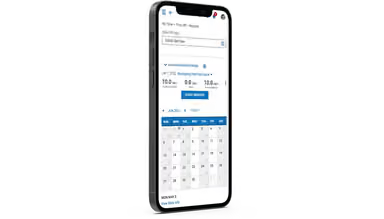
- Record and approve employee time through web, mobile, or timeclock options. Employees submit timesheets and time-off requests for manager review
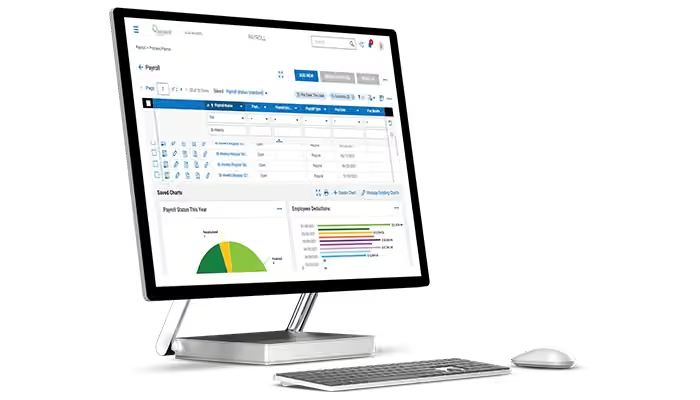
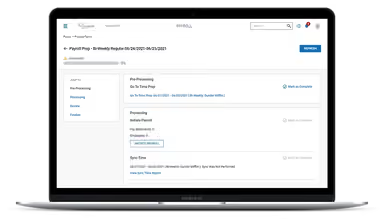
- Process payroll using continuous processing. Centrally HR supports regular pay, overtime, shift differentials, multiple roles, tax calculations, and government forms
- Manage benefits enrollment for new hires, open enrollment, and life events. Employees compare plans and make elections while administrators manage deductions and reporting
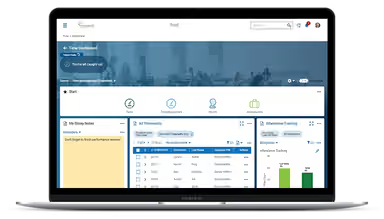
- Review workforce data through configurable dashboards and reports covering compliance, employee information, performance, and workforce trends
Who Is Centrally HR For?
Centrally HR is used by organizations across several industries and sectors, including:
- Construction
- Healthcare
- Manufacturing
- Legal and accounting services
- Wholesale distribution
Centrally HR Use Cases
Based on Centrally HR's current capabilities and user feedback, here are the organizational scenarios where the platform delivers the clearest fit.
1. Businesses Reassessing Their Current Payroll Provider
A payroll setup that works for a smaller business may start to fall short as the company grows. HR teams may need more than payroll, including closer coordination with HR, broader employee administration, or additional help during implementation. Centrally HR covers recruiting, onboarding, and performance management alongside payroll. This gives organizations an alternative to moving from one payroll-only provider to a broader one.
2. Employers With Shift-Based Staff
Centrally HR's scheduling tool builds shifts around demand, skills, and staff availability, then passes hours into time and attendance and payroll. That suits employers whose rosters change week to week. An RV dealership in a CBIZ case study used it to replace calendar-based scheduling, giving staff mobile access to schedules and two-way texting for shift changes.
3. Existing CBIZ Clients Consolidating Services
Organizations that already use CBIZ for accounting, benefits, or retirement plans could find Centrally HR a natural next step. Some reviewers chose it mainly because of that existing relationship, and one noted that its retirement plan and payroll now work well together. A senior living provider in CBIZ's case studies followed the same path from CBIZ's financial services.
4. Organizations Connecting HR And Finance Data
Businesses with established accounting or ERP systems may need payroll information to flow into their financial operations. When HR and finance use separate records, moving that information manually adds work. Centrally HR supports connections with financial platforms such as Acumatica and Sage ERP, allowing payroll and employee data to connect with the existing financial environment.
Is Centrally HR Right For You?
Centrally HR is built as a set of modules. A company can begin with payroll and time tracking, then add recruiting, benefits, learning, or compensation planning as it grows, all in the same system. Clients also tend to stay put. CBIZ puts the average client relationship at nine years, and its implementation staff average five years on the team.
On security, employee files and onboarding paperwork are kept in secure storage that only authorized staff can access, and CBIZ says the compensation module protects sensitive pay data. CBIZ's HCM group is also Nacha Certified for ACH processing, which is worth knowing if you pay people by direct deposit.
Still doubtful if Centrally HR is the right fit for you? Get in touch at (661) 384-7070, and we will help you make an informed decision.
Centrally HR Features
Recruiting Analytics And Candidate Sourcing
Jobs can be posted to Indeed or eQuest, and every applicant lands in a single candidate pool. Recruiters can see which sourcing channels bring people in and gather feedback in the same workspace. Once someone is hired, their application data moves straight into a new employee record.
Compensation Planning And Modeling
Compensation teams can plan pay changes against established budgets and model different compensation scenarios before decisions are finalized. Centrally HR also supports approval workflows and access controls for sensitive compensation information. This helps organizations evaluate proposed pay changes while maintaining oversight over budgets and compensation decisions.
Performance And Skill-Gap Analytics
Centrally HR gives HR teams a broader view of employee performance beyond individual review cycles. Managers can track goals and progress while HR teams use reporting to identify skill gaps and areas that may require development. This provides additional context for workforce planning and employee development decisions.
Built-In Learning Management System
The built-in learning management system lets organizations assign training and manage educational content from within Centrally HR. HR teams can upload their own materials or provide courses covering topics such as cybersecurity, workplace safety, harassment prevention, and HR compliance. Training activity can therefore remain connected to employee records.
Custom HR Forms
HR administrators can create forms around their organization's specific processes instead of relying solely on standard templates. Custom forms can support internal documentation and information collection across different HR activities. This flexibility is useful when an organization's approval requirements or administrative procedures do not fit predefined HR forms.
Personalized Dashboards And Reports
Centrally HR allows HR teams to create dashboards and reports around the workforce information they need to monitor. Reporting can provide visibility into areas such as employee data, compliance, and engagement, while configurable views allow different users to focus on the information relevant to their responsibilities.
Pros And Cons of Centrally HR
Pros
Responsive customer support resolves issues promptly
The integrated suite brings all HR processes together in one place
Customizable dashboards and reports provide insights
The intuitive and easy-to-use interface simplifies workflows, providing high efficiency
Cons
Contacting an account administrator could be a bit complex for beginners
Sometimes, data processing is slow and consumes time, as per user reviews
Centrally HR Reviews
Total 12 reviews
4.9
All reviews are from verified customers
Rating Distribution
5
Stars92%
4
Stars8%
3
Stars0%
2
Stars0%
1
Stars0%
Share your experience
Transportation/ Trucking/ Railroad, 500+ employees
More than a year
“useful training”
Pros
I really value the extra resourcing whenever they roll out new features or updates. On top of that their training courses have helped me learn new things even after using the system for more than two years which I didn't expect.
Cons
Overall it's been a strong experience and I mostly like how things work. The one area I'd tweak is the reporting side, it could be a bit simpler to navigate.
Rating Distribution
Ease of use
8
Value for money
10
Customer Support
9
Functionality
8
Legal Services, 11-50 employees
More than a year
“HR onboarding and benefits done right”
Pros
Having a single place where employees can jump in for anything HR-related has been incredibly helpful. Working with their team has also been a positive experience, they took the time to walk us through the full range of features and made it easier for us to understand what's possible. We ended up improving and customizing our onboarding flow and also refining how benefits are managed which made a real difference for our team.
Cons
It can be a bit annoying when the training modules show certain features and settings but the user I'm working with doesn't actually have access to them. That means I have to contact our customer support team to make changes. I get why access needs to be controlled to avoid unexpected issues but it would still be nice to be able to make quick adjustments without always going through support.
Rating Distribution
Ease of use
10
Value for money
9
Customer Support
8
Functionality
8
Staffing and Recruiting, 51-100 employees
Less than 6 months
“good for collaboration”
Pros
This lets us capture the employee information we actually need and it's been a great help for collaborating across departments. Our managers also have simple access to employees which makes day-to-day employee management feel much more organized. On top of that CBIZ provides really strong customer support, any questions we've had are answered and the training resources have been genuinely helpful.
Cons
When I joined the company was only using the payroll and the most basic employee maintenance features. Since then, I've been working through adding Recruitment, ACA Compliance and Performance Management. Once those modules are in place, we should have a more complete platform and better visibility for tracking data and keeping information up to date.
Rating Distribution
Ease of use
8
Value for money
8
Customer Support
8
Functionality
7
Frequently Asked Questions
Does Centrally HR offer an API?
Yes, the Centrally HR software does offer an API.
What languages does Centrally HR support?
The software supports the English language.
What other apps does Centrally HR integrate with?
Centrally HR integrates with different tools, including Twilio, Acumatica, and Sage Intacct.
Does Centrally HR support mobile devices?
Yes, the software supports mobile devices and provides a mobile app.
What types of pricing plans does Centrally HR offer?
Centrally HR pricing is estimated to range between $5–$8/employee/month. You can contact us for a personalized Centrally HR cost quote.
Who are the typical users of Centrally HR?
Centrally HR features are used by organizations across several industries and sectors, including construction, healthcare, manufacturing, legal, and wholesale distribution.
What level of support does Centrally HR offer?
Centrally HR offers multiple levels of support to assist you, including help center, phone support, chat, and email.