


DevSkiller
Last Updated

Key Takeaways
Generated from the text of customer reviews
DevSkiller is a skills management platform that helps teams map, assess, and track workforce skills. HR, L&D, and technical recruiting teams use it, mainly in Information Technology (IT) and software companies. Users highlight its evaluation capabilities into talent gaps. Some find customization difficult to work with. Recent updates include AI training courses tied to its skills map.
Our Verdict
DevSkiller is a reliable option for mid-size and enterprise organizations that manage IT-heavy workforces and want recruitment and development data in one place. Per-employee pricing starting at $1 monthly keeps entry costs manageable for departmental rollouts. Teams needing only basic candidate screening may find the scope broader than required. We recommend it for skills-led talent strategies.
Overall Rating
Based on 24 users reviews
4.9
Rating Distribution
Positive
100%
Neutral
0%
Negative
0%
Starting Price
$1
per employee per month
DevSkiller Specifications
- Performance Management
- Training and Development
- Workforce Analytics
- Alerts/Notifications
What Is DevSkiller?
DevSkiller, which now operates under the SkillPanel name, is a skills intelligence platform. It helps organizations understand what their people can do and what each role requires. The platform's assessment capabilities allow firms to evaluate technical knowledge through practical testing rather than relying solely on self-reported qualifications. Through its features, DevSkiller gives managers a basis for prioritizing development activities, identifying internal candidates for roles, and planning reskilling initiatives.
What Is DevSkiller Best For?
DevSkiller stands out for its 'AI Training Courses', which allow users to tie AI literacy directly to workforce skills data. Teams can establish a baseline of employee AI knowledge and highlight gaps across roles and teams. Users can also link learning back to the skills map, so progress can be monitored over time. The curriculum covers LLM fundamentals, practical prompting, verifying AI output, responsible use at work, and working with AI agents. Additionally, DevSkiller enables teams to stay vendor-neutral across ChatGPT, Claude, Copilot, and Gemini. Courses are delivered as SCORM 2004 packages, so organizations can run them inside an existing LMS.
How Much Does DevSkiller Cost?
DevSkiller cost starts at $1/employee/month. It follows a modular pricing structure, enabling teams to add more products as they grow.
In addition to the base subscription costs, organizations should account for the following potential expenses:
- Implementation And Onboarding: Guided onboarding is included in every plan, so extra cost is minimal. Budget $1,000–$5,000 only if custom configuration is needed
- Skills Data Import And Skills Map Setup: $1,000–$5,000, based on the number of roles, skills frameworks, and employee records loaded
- Admin And Manager Training: $500–$3,000, mostly for large rollouts beyond the included onboarding
- Add-On Modules (AI Readiness, AI Training Courses, Multi-Source Assessments): $0.50–$2/employee/month on top of the base rate
- Coding Test Catalog (Technical Screening): $5,000–$25,000/year, depending on hiring volume and the number of assessments
Disclaimer: The pricing is subject to change.
DevSkiller Integrations
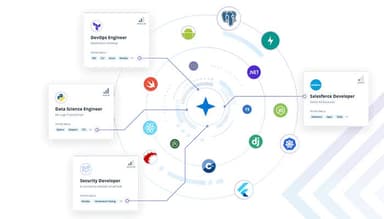
DevSkiller software supports integration with multiple systems, such as:
How Does DevSkiller Work?
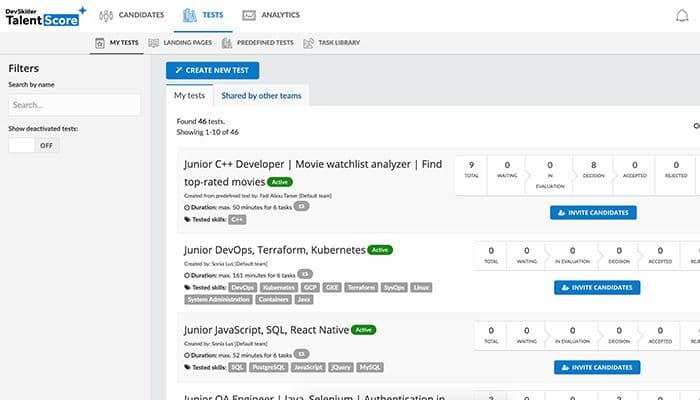
Once you have logged into the software, here’s how you can navigate it further:
- Define the skills each role requires, using the predefined library of digital and IT skills or profiles matched to internal frameworks
- Connect HRIS, ATS, learning, payroll, or communication tools so workforce data stays in sync
- Assess employees through self-assessments, peer reviews, manager input, and technical evaluations
- Review the skills map to compare current skills with future requirements and spot gaps
- Create goals linked to skill priorities or OKRs, and assign milestones, owners, and deadlines
- Run AI courses through your LMS and track progress as completed goals update skill ratings
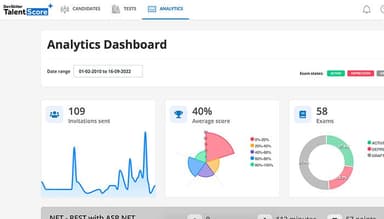
- Open dashboards and reports to review team and company trends and identify internal candidates for new roles
Who Is DevSkiller For?
DevSkiller serves the following:
- Telecommunications
- Retail
- Healthcare
- Finance
- Education
DevSkiller Use Cases
DevSkiller features make it a potential fit for several use cases across HR, L&D, and technical recruiting teams:
Software Companies Screening Developer Candidates Before Interviews
Engineering teams that receive a high volume of applicants can send tasks from DevSkiller's coding test catalog before anyone books an interview. Candidates can complete real-project exercises, and automatic scoring provides recruiters with results. Senior developers then spend interview time only on applicants who have already shown relevant ability. Users praise DevSkiller’s coding tests' flexibility in particular.
Recruiting Teams Running Technical Assessments Inside Their ATS
Talent acquisition teams working in tools such as Greenhouse, Lever, or Workable can trigger test invitations from DevSkiller’s candidate record. Scores return to the same profile, so recruiters avoid switching systems. Teams hiring across regions also gain one testing process that hiring managers can share. Reviewers also appreciate its third-party integration capabilities.
IT Services Firms Staffing Billable Projects From Internal Talent
DevSkiller helps services firms that bill clients for engineering time identify which employees hold the skills a project needs. The skills map shows coverage by role and department, so resource managers can check internal availability before opening a requisition. HR can also run assessments, which keeps billable staff on client work. L&D managers highlight DevSkiller’s map skilling tool that simplifies skills’ presentation across the firm.
Enterprises Linking Training Plans To Internal Mobility
Large organizations that fund training often struggle to connect it with where talent is needed next. DevSkiller lets HR compare current skills with future needs and flag skills at risk of becoming obsolete. Development goals can then be tied to company OKRs, while a points-based system encourages employees to pursue moves into other roles.
Is DevSkiller Right For You?
DevSkiller is worth consideration for organizations that need technical assessment alongside broader workforce skills management. It supports skills mapping, multi-source assessment, and technical assessments, allowing HR and technology teams to connect hiring and employee development activities.
The platform is GDPR compliant and ISO 27001 certified, and its infrastructure runs on Google Cloud. Its environment access requires a VPN with second-factor authentication. DevSkiller uses SSL encryption to maintain security procedures covering access, storage, and processing. Its customer base includes Orange, Volkswagen, Roche, Lufthansa, and Schneider.
Skills-based workforce planning is becoming increasingly important as AI changes the required capabilities. Gartner reports that 95% of CHROs have active AI initiatives, while organizations face challenges of keeping skills aligned with evolving requirements. The World Economic Forum identifies skills gaps as a major barrier to business transformation, with 85% of employers prioritizing workforce upskilling through 2030.
SkillPanel supports this shift by mapping role requirements, identifying skill gaps, and assessing employee capabilities.
Need help deciding if DevSkiller fits your needs? Call us at (661) 384-7070 for personalized guidance.
DevSkiller Features
Skills Map
The software's interactive skills map gives HR leaders a live view of where expertise sits across roles, departments, and teams. DevSkiller's library of over 5,000 predefined digital and IT skills also helps teams speed up setup. Plus, its customizable profiles let organizations mirror their internal frameworks. These capabilities allow managers to compare coverage between groups at any point.
Employee Development
With DevSkiller, each employee can see which skills their target roles require, which turns career planning into a visible path instead of guesswork. Users can connect personal goals to business outcomes. Additionally, the platform's points-based system encourages participation and internal mobility, so development effort stays aligned with company priorities while progress remains transparent to managers.
Multi-Source Assessments
Teams can measure skills by combining self-assessments, peer reviews, manager input, and technical evaluations, which replace single-opinion judgments with a fuller picture of each person. DevSkiller's standardized methods enable admins to keep ratings consistent from one team to the next. This way, the resulting data gives HR more credible support when making promotion and placement decisions.
Goals Setting And Monitoring
DevSkillers enables teams to turn assessment findings into trackable objectives linked to skill priorities or OKRs. Managers can break each goal into milestones with owners and deadlines, then follow progress through dashboards and reminders. Additionally, completed goals can be used to update related skill ratings and confidence levels in real time. This approach helps keep development records current without manual edits.
Skills And Performance Insights
The platform provides users with live team and company-wide trend views, which help leaders direct training investment where it matters most. DevSkiller also helps surface qualified internal candidates for newly created roles and supplies clear performance metrics and ROI figures. This data enables HR to back business cases for development budgets and strategic decisions.
Pros And Cons of DevSkiller
Pros
Better workforce visibility allows users to improve recruitment efficiency
Clearer skills data supports more informed hiring decisions
Centralized talent data helps reduce hiring time and improve candidate matching
Structured skills overviews make workforce strengths and gaps easier to identify
Allows candidates to work in their preferred IDE for a more practical assessment
Cons
Candidate management becomes difficult when handling large applicant pools
Narrow Excel exports can restrict detailed analysis outside the software
Fewer content formats may restrict how teams deliver learning materials
DevSkiller Reviews
Total 24 reviews
4.9
All reviews are from verified customers
Rating Distribution
5
Stars92%
4
Stars8%
3
Stars0%
2
Stars0%
1
Stars0%
Share your experience
Manufacturing, 500+ employees
More than a year
“Hiring candidates with devskiller”
Pros
devSkiller offers unparalleled flexibility in test types, an exceptional in-browser developer experience, and a vast array of regularly updated pre-defined tests. It has become our go-to platform for assessing and enhancing candidate skills in our projects.
Cons
Managing candidates becomes challenging when dealing with a large volume. It would be beneficial to have features like note-taking and grouping to streamline the process.
Rating Distribution
Ease of use
10
Value for money
10
Customer Support
10
Functionality
10
IT, 11-50 employees
Less than 6 months
“Great product overall”
Pros
The user interface is simple and easy to understand. It includes all the essential features we need. As a smaller company with specific requirements, DevSkiller provided exactly what we were looking for.
Cons
While I understand that DevSkiller focuses on developer and technical assessments, I would have liked to see more built-in questions related to soft skills, architecture and best practices. Since we aren't looking to recruit experts in specific languages and value overall knowledge in object-oriented development, many of the questions aren't relevant to us. Additionally, many programming questions are too lengthy. Shorter, more targeted questions would have been preferable. However, since you can create your own questions, it is essential to have the internal expertise to craft the questions you need.
Rating Distribution
Ease of use
10
Value for money
9
Customer Support
10
Functionality
8
IT, 11-50 employees
Less than 6 months
“Easy to implements”
Pros
I found the buying process to be excellent. The customer success team was quick and the best to work with.
Cons
Since my interactions are mostly related to purchasing and subscribing to the product, I cannot provide much detail. Everything was pretty simple and easy for me. However, I expected better branding options. Even with the Essential plan, I would have liked to have the option to brand our company alongside DevSkiller in tests and landing pages. From the candidates perspective, they are testing for our company, not DevSkiller.
Rating Distribution
Ease of use
10
Value for money
10
Customer Support
10
Functionality
10
Frequently Asked Questions
Is DevSkiller suitable for large enterprises with multiple departments?
Yes. DevSkiller is designed to support growing teams and enterprises. It provides visibility into skills at the employee, team, and organization levels, allowing businesses to compare capabilities across departments and plan workforce development as their needs change. Organizations can also start with a single department and expand later.
Does DevSkiller offer onboarding and implementation support?
Yes. Guided onboarding is included with every SkillPanel plan. The company provides assistance with setup, best practices, and early adoption. It also offers integration setup guides and support for connecting the platform with existing business systems.
Does DevSkiller offer a free trial?
No, the software does not offer a free trial. Instead, DevSkiller offers a three-month money-back guarantee with its plans.
Does DevSkiller offer onboarding?
Yes. Guided onboarding is included with every plan, with DevSkiller providing setup guidance, best practices, and early adoption support.
Does DevSkiller support internal mobility?
Yes. DevSkiller can compare employee skills with job requirements, helping organizations identify employees who may fit other roles and support internal career development.