


Ease Central
Last Updated

Overview
Ease Central helps businesses manage employee benefits, onboarding, enrollment, and HR information through a centralized digital platform. While pay schedules require spreadsheet uploads, its reporting tools help teams organize benefits and payroll deduction data. Overall, it suits insurance brokers and small to midsize employers seeking simpler benefits administration.
Overall Rating
Based on 7 users reviews
4.6
Rating Distribution
Positive
86%
Neutral
14%
Negative
0%
Starting Price
Custom Pricing
Ease Central Specifications
- Employee Information Management
- Employee Onboarding
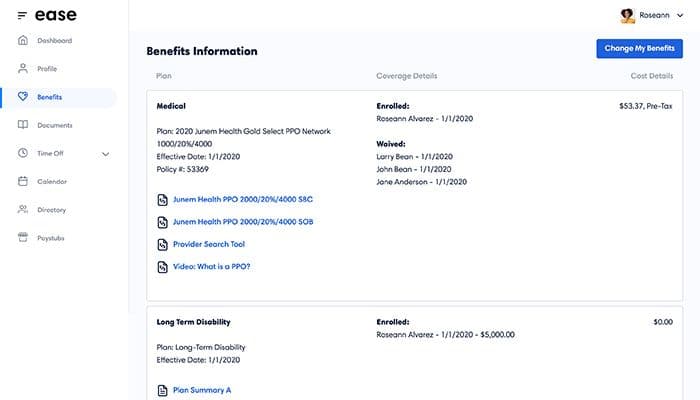
- Benefits Administration
- Employee Self-Service Portal
Ease Central Features
Real-Time Enrollment Tracking
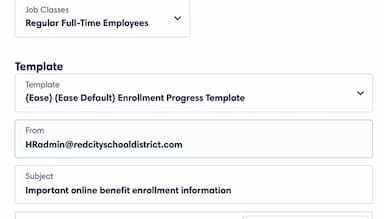
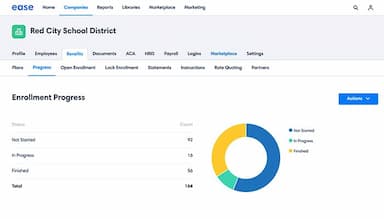
Ease Central features an enrollment progress dashboard that shows which employees have started, completed, or still need to complete their elections. Teams can identify outstanding enrollments and send reminders directly through the platform. This gives HR and benefits administrators a clearer view of enrollment status without manually tracking individual employees.
Automated Benefits Changes
The platform’s benefits change capability lets employees submit qualifying life events and demographic updates digitally, while administrators receive notifications about changes that may affect coverage. Digital forms and carrier connections help move these updates through the appropriate workflow, reducing the need to manage paper forms and manually re-enter employee information.
Digital Onboarding
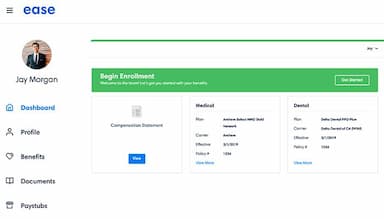
Ease Central supports onboarding by allowing employers to generate and send offer letters, collect required forms, and obtain electronic signatures for policy documents. New hires can then move from onboarding into benefits enrollment within the same environment, giving HR teams a connected process instead of managing separate paperwork and enrollment workflows.
ACA And Benefits Compliance Tools
Ease provides compliance capabilities that track employee eligibility, support ACA reporting, and help manage required benefits documents. Its ACA tools can calculate eligibility, verify reporting codes, track employee data, and support electronic filing. This helps HR teams handle recurring compliance requirements using employee and benefits information already maintained within the platform.
Pros And Cons of Ease Central
Pros
Makes enrollment tasks easier through an intuitive interface
Useful census, payroll deduction, and compliance reports
Helps users find benefit information quickly and easily
Organizes benefit records in a clear structure
Quick employer setup and enrollment rollout
Cons
Requires users to learn features during initial setup
Lacks some employee enrollment notification capabilities
Manual syncing can be unreliable
Ease Central Pricing
Pro | Agency | Enterprise |
|---|---|---|
Custom Pricing | Custom Pricing | Custom Pricing |
|
|
|
Disclaimer: The pricing details were last updated on Sep 14, 2026 from the vendor's website. Please contact us for a tailored pricing list.
Ease Central Reviews
Total 7 reviews
4.6
All reviews are from verified customers
Rating Distribution
5
Stars71%
4
Stars14%
3
Stars14%
2
Stars0%
1
Stars0%
Share your experience
Not Specified, N/A employees
“clean benefits portal experience”
Pros
Getting introduced to this platform through my company meant I was using it for the first time and it turned out to be more convenient than I expected. Once I got the hang of it, the navigation felt easy and the clean layout made it simple to manage benefits and find the information I needed. I also didn't run into any security problems and whenever questions came up, customer service was available to help.
Cons
At first the toughest part was not knowing my company's exact URL or login link. As a new user, it was frustrating trying to figure out which portal I was supposed to use and where to access it. After I finally got the correct link though, everything worked without any issues.
Rating Distribution
Ease of use
10
Value for money
10
Customer Support
10
Functionality
10
Not Specified, N/A employees
“Clear annual benefits enrollment”
Pros
Signing up for annual benefits was very easy with this. The different sections were laid out neatly and made everything clear to follow.
Cons
I still had to go back several times to double-check that my benefit selections had been submitted and chosen correctly.
Rating Distribution
Ease of use
10
Value for money
10
Customer Support
10
Functionality
10
Not Specified, N/A employees
“benefits and payroll work well”
Pros
Handling benefit enrollment is much simpler with this and the integration with our payroll software is a big help.
Cons
One thing it's missing is automatic enrollment emails for new hires so those still have to be sent manually.
Rating Distribution
Ease of use
10
Value for money
10
Customer Support
10
Functionality
9
Frequently Asked Questions
Are EaseCentral and Ease the same thing?
Yes. Initially, the company was launched as Enrollease. It was later rebranded to EaseCentral. The vendor official shortened the name to Ease in 2019.
Does Ease Central offer a free trial?
There’s no mention of a free trial on the official website.
What training is available for employer administrators?
Employer administrators can access Ease Academy modules, Help Center articles, recorded training videos, and a weekly overview webinar covering onboarding, enrollment, and administrative capabilities.
Is there a mobile app for Ease benefits?
Yes, it offers a mobile app for Android and iOS devices.
How will Ease’s planned retirement in 2027 affect existing customers?
New companies cannot be added from January 1, 2027. On July 1, 2027, Ease will become read-only: historical data and reporting will remain accessible, but integrations and support will end. Employee Navigator offers migration tools and training to support the transition.
What is ease HR?
Ease HR is the HR functionality within Ease that helps small and midsize businesses manage employee onboarding, time-off requests, payroll and benefits data synchronization.