


EPay HCM

Last Updated

Overview
Do you find manually managing employee record, onboarding, and payroll processing hectic? EPAY HCM offers convenient digital solutions for core HR tasks. The software is designed to streamline diverse HR administrative services and provide workers with self-service portals to track their performance and time.
EPay HCM Specifications
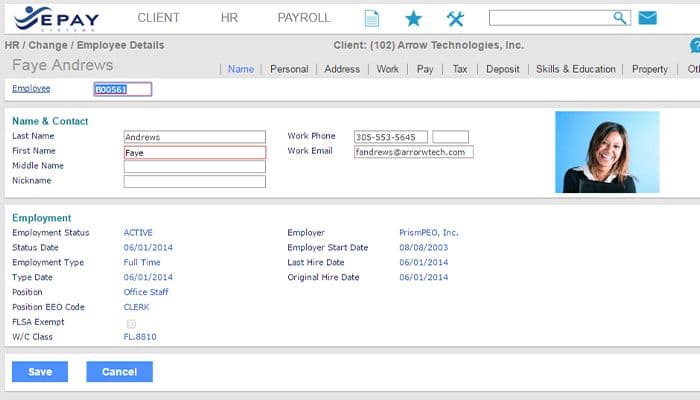
- Employee Information Management
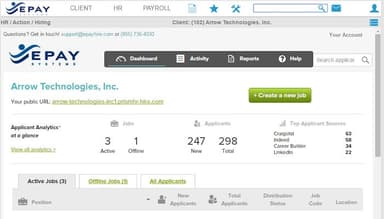
- Recruitment and Applicant Tracking
- Performance Management
- Attendance and Time Tracking
EPay HCM Features
Time And Attendance Tracking
EPAY human capital management includes advanced time and attendance tracking functionalities, enabling organizations to monitor employee work hours, manage schedules, and ensure accurate timekeeping for payroll and compliance purposes.
Payroll Management
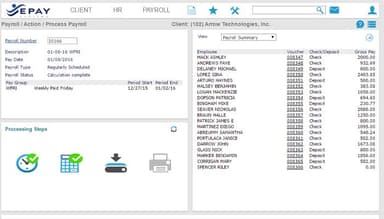
The software offers comprehensive payroll processing capabilities, allowing midsize and large companies to track, manage, and pay their employees effectively. It includes features for wage calculations, tax management, and compliance with payroll regulations.
Benefits Administration
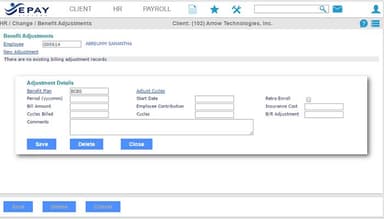
EPAY HCM empowers businesses to optimize the management of employee benefits packages and simplify the enrollment process. By offering customizable workflows and ensuring regulatory compliance, it streamlines operations while granting works self-service portal to manage their benefits.
Reporting And Labor Analytics
The platform provides complete visibility into labor data, even when businesses are miles away from workforce activity. The analytics tools enable proactive decision-making by providing insights into employee records, labor costs, compliance, and performance.
HR Management
The software eliminates manual HR processes and enables businesses to focus on strategic initiatives. It offers features such as employee onboarding and applicant tracking, learning and performance management, and employment verification, which help streamline recruitment processes and reduce administrative costs.
Pros And Cons of EPay HCM
Pros
User-friendly interface
Great customer support
Efficient functionality
Comprehensive payroll system
Seamless HR management
Cons
Customization complexity
Potential information overload, as per some EPAY HCM reviews
EPay HCM Reviews
Total 61 reviews
4.7
All reviews are from verified customers
Rating Distribution
5
Stars74%
4
Stars23%
3
Stars0%
2
Stars2%
1
Stars2%
Share your experience
Mid-Market, 500+ employees
“simple and user friendly interface”
Pros
Interface is incredibly simple and I picked it up right away. Everything feels easy and user friendly.
Cons
sometimes when I open the interface it freezes up on me though that issue seems to have been resolved now.
Rating Distribution
Ease of use
9
Value for money
10
Customer Support
10
Functionality
9
small-Business, 11-50 employees
“easy timekeeping and employee management”
Pros
Learning this system was surprisingly easy for everyone on our team. Staff members can log in without issues and track their hours easily. Looking up employee details, monitoring time and making adjustments happens smoothly. Workers from different age groups and backgrounds pick it up quickly. Problems with clocking in or accessing paystubs are extremely rare. Navigation feels simple for me since everything is clearly laid out. Clocking in at shift start and managing meal breaks works easily. Checking pay history and updating tax info or personal details is easy too. Compared to other platforms we've used, this one has a much gentler learning curve for data entry and modifications. The more I work with it daily for timekeeping, the smoother everything becomes. Haven't had any complaints so far. Having the mobile app option so employees can clock in and out from there phones adds real convenience.
Cons
There isnt much I'd complain about honestly. The system does exactly what we need it to do. Sometimes it runs a bit slow but that's probably our internet connection acting up. Employees occasionally forget there login info which creates some headaches. Nothing major with Epay functionality though. My main issue is that my company limits what I can access. Not being able to view complete details can be frustrating when I need that information.
Rating Distribution
Ease of use
8
Value for money
10
Customer Support
10
Functionality
9
Enterprise, 500+ employees
“Responsive support team”
Pros
support team is really helpful whenever I run into issues and need to troubleshoot something.
Cons
Recent update made entering PTO hours frustrating, for me the icon is positioned way too close to the timesheet approval button, causing constant misclicks.
Rating Distribution
Ease of use
9
Value for money
10
Customer Support
10
Functionality
8
Frequently Asked Questions
Does epay HCM offer an API?
Yes, the software does offer an API.
What language does epay HCM support?
EPAY HCM supports English and Spanish language.
What other apps does epay HCM integrate with?
The platform integrates with a number of third-party applications, including Sage, Microsoft Dynamics, Oracle, Desjardins, and Paycom.
Does epay HCM support mobile devices?
Yes, EPAY HCM supports mobile devices.
What types of pricing plans does epay HCM offer?
The software offers varying pricing plans catering to diverse business needs. Get a customized EPAY HCM cost!
Who are the typical users of epay HCM?
EPAY HCM serves different industries, including retail, manufacturing, healthcare, agriculture, and construction.
What level of support does epay HCM offer?
The platform offers a help desk, email, FAQs, and customer support.
Are there any epay HCM alternatives?
Some of the EPAY HCM alternatives are Bamboo HR, Paycor, and Gusto.
Are EPAY systems good for workforce management?
Yes, as per EPAY HCM reviews, EPAY systems are good for workforce management.