
Last Updated

Key Takeaways

Generated from the text of customer reviews

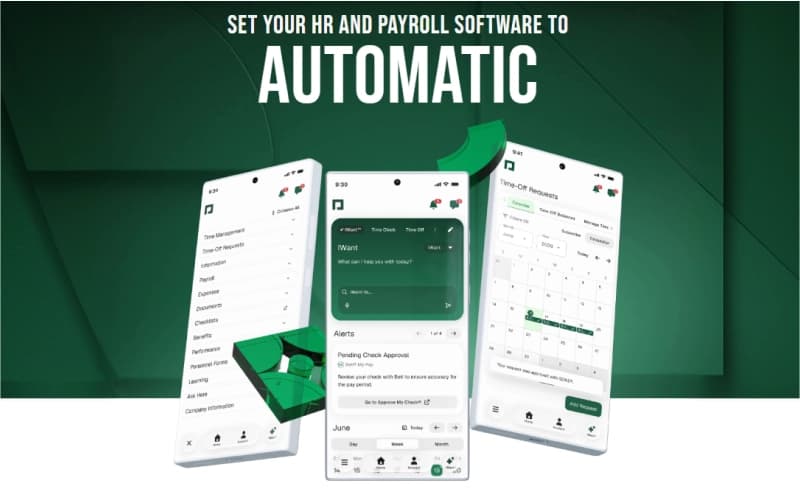
Paycom is a cloud-based human capital management software used by HR and payroll teams across industries such as retail, healthcare, and finance. Users consistently highlight payroll accuracy and ease of use as strengths, while occasional system glitches are repeatedly mentioned as concerns. Recently, Paycom introduced IWant, which is its command-driven AI engine.

Our Verdict

Paycom is a reliable option for organizations seeking streamlined payroll and HR oversight. It fits teams managing complex compliance requirements and distributed workforces, where accuracy and employee self-service are priorities. Pricing is often seen as high for smaller firms but offers long-term value at scale. We recommend Paycom for growing enterprises needing centralized workforce management.

Get A Firsthand Look At Software
Watch Free Demo

Overall Rating

Based on 502 users reviews

4.6

Rating Distribution

Positive

91%

Neutral

7%

Negative

2%

Starting Price
Custom

Paycom Specifications

Employee Information Management

Recruitment and Applicant Tracking

Performance Management

Attendance and Time Tracking

View All Specifications

What Is Paycom?

Paycom is a cloud-based human capital management (HCM) software that unifies payroll and HR functions in a single database. It automates the entire employee lifecycle, from recruitment and onboarding to payroll, talent management, and compliance. With tools like Beti® for employee-driven payroll and Direct Data Exchange® for ROI tracking, Paycom reduces administrative workload, improves accuracy, and empowers employees through self-service access. This makes it a comprehensive solution for businesses seeking efficiency and streamlined workforce management.

What Is Paycom Best For?

Paycom is best for payroll management through its automated, single‑database system. By allowing employees to review and correct errors before submission, it reduces administrative workload and minimizes costly post‑payroll adjustments. This efficiency makes payroll management faster, more accurate, and less resource‑intensive, positioning Paycom as a strong solution for organizations seeking reliable payroll automation.

How Much Does Paycom Cost?

The vendor offers customized pricing plans, depending on businesses’ unique requirements and size. Get in touch with us for a personalized Paycom cost estimate.

Paycom Integrations

Paycom offers automated job post integrations with job boards like

How Does Paycom Work?

To begin using Paycom, follow these steps:

  • Log in securely through the web or mobile app
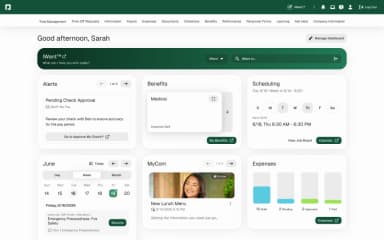
  • Access the employee self‑service dashboard for HR and payroll tasks
  • Enter or update personal, payroll, and benefits information
  • Managers review and approve timesheets, requests, and performance data 
  • Automate payroll processing with integrated compliance checks
  • Track attendance, leave, and scheduling in real time
  • Generate reports for workforce analytics and HR compliance
  • Use mobile features for on‑the‑go approvals and notifications
Schedule your Paycom demo today to learn more about the software's capabilities.

Who Is Paycom For?

The software caters to businesses of all sizes. Industries using paycom include the following:

  • Education
  • Healthcare
  • Hospitality
  • Manufacturing
  • Nonprofits
  • Retail

Paycom Use Cases

Based on our analysis of user reviews and Paycom’s current capabilities, we have identified key scenarios where this software is a good fit for HR and payroll teams:

Mid-Sized Companies Managing Complex Payroll

Organizations with growing headcounts often struggle with payroll accuracy and compliance. Paycom’s centralized system helps HR teams manage multiple pay schedules, reduce errors, and ensure timely processing across diverse employee groups.

Businesses With Distributed Workforces

Companies operating across multiple locations or with remote staff benefit from Paycom’s ability to unify payroll and HR processes. By consolidating data into a single database, managers can oversee workforce operations consistently, regardless of geography.

Industries With High Compliance Demands

Healthcare, finance, and other regulated sectors face strict reporting and compliance requirements. Paycom supports these organizations by automating compliance tasks, reducing manual oversight, and minimizing risk of costly errors.

Organizations Focused On Employee Self-Service

Firms seeking to empower employees with direct access to payroll and HR functions find Paycom effective. Staff can review and correct payroll data before submission, which further improves transparency and reduces administrative workload for HR teams.

Companies Scaling HR Operations

Businesses experiencing rapid growth often need scalable HR systems. Paycom adapts to expanding operations by integrating talent acquisition, onboarding, and workforce management into one platform, helping HR teams maintain efficiency during expansion.

Paycom User Sentiment

Most Positive Sentiments

Least Positive Sentiments

Ease of Use and Workflow

System Errors and Glitches

  • 85% were Positive
  • 10% were Negative
  • 5% were Neutral/Mixed
  • 15% were Positive
  • 65% were Negative
  • 20% were Neutral/Mixed

Users consistently highlight Paycom’s intuitive interface and straightforward workflows. Once learned, payroll and HR tasks become smooth and efficient.

Users report issues with employee setup, PTO accruals, and tax calculations. Updates sometimes break workflows, requiring intervention from support teams.

Payroll Accuracy and Automation

Mobile App Experience

  • 82% were Positive
  • 13% were Negative
  • 5% were Neutral/Mixed
  • 25% were Positive
  • 45% were Negative
  • 30% were Neutral/Mixed

Users appreciate its automation function that ensures payroll runs are accurate, with employees able to catch errors before submission. This reduces costly corrections and builds trust in payroll reliability.

While adequate for basic tasks like clock‑in/out, the app is clunky for complex functions. Layout issues and limited features compared to the web version are recurring complaints.

Employee Self‑Service

Customization and Flexibility

  • 80% were Positive
  • 14% were Negative
  • 6% were Neutral/Mixed
  • 30% were Positive
  • 45% were Negative
  • 25% were Neutral/Mixed

Staff value direct access to pay stubs, benefits, and PTO requests. This transparency saves HR time and empowers employees to manage their own data.

Reviewers highlight limited flexibility in tailoring workflows and reporting. Some processes require workarounds, and customization depth lags behind enterprise competitors.

Is Paycom Right For You?

Paycom is built for scalability, supporting organizations from small practices to large enterprises with a single, unified HR and payroll system. Its ISO and SOC certifications and Tier IV data centers ensure industry‑leading security and compliance. Paycom has earned industry recognition and trust through its certifications, secure infrastructure, and adoption by well‑known companies across different sectors. For businesses seeking secure, scalable workforce management backed by proven reliability, Paycom stands out as a strong choice.

Still not sure about the software? Contact our customer support team at (661) 384-7070 for guidance.

Paycom Features

IWant is an AI engine within Paycom that leverages data stored in a single employee database to deliver immediate, accurate responses to user queries. Accessible on both mobile and desktop, it supports efficient information retrieval and ensures consistency across HR and workforce management processes.

See How It Works

Paycom’s payroll processing system automates core payroll functions, including tax calculations, direct deposits, and check printing. It also supports the management of employee deductions, benefits, and other payroll‑related requirements, providing a centralized and efficient approach to workforce compensation.

See How It Works

Talent Acquisition tools help businesses streamline their recruiting, hiring, and onboarding processes to attract top talent and ensure compliance with legal and regulatory requirements. With Paycom software, companies can create job openings on various job boards and social media platforms. Hence, users can reach a wider pool of candidates, tracking job applications for informed hiring decisions.

See How It Works

Paycom helps businesses build and manage their workforce, retain top performers, and improve employee engagement. With its performance management tools, companies can set goals and track employee progress, and coach employees to grow. Talent management tools can help businesses create a skilled and motivated workforce, leading to a sharper, competitive edge.

See How It Works

Paycom's HR management tools can help businesses ensure efficient HR processes and provide insights into workforce trends, leading to better decision-making. These tools allow organizations to ensure efficient HR processes and investigate workforce patterns.

See How It Works

Time and Labor Management tools help businesses manage labor costs, improve efficiency, ensure compliance with legal and regulatory requirements, and engage employees. Using a single software can help companies avoid the costs associated with manual processes and outdated technology.

See How It Works

Additionally, Paycom Employee Self-Service feature enables employees to access and manage their personal information, view pay stubs, request time off, and enroll in benefits without HR assistance. It empowers employees to handle various HR-related tasks independently, streamlining the workforce management process.

See How It Works

Beti automates payroll by pulling live employee data, notifying staff of errors, and empowering them to preview and approve paychecks before submission for greater accuracy.

See How It Works

This tool automates compensation planning by factoring performance ratings and merit matrices, ensuring fair raises, bonuses, and compliance while simplifying fiscal planning and pay equity management.

See How It Works

Position Management standardizes job titles, salary ranges, and workflows, tying data to roles instead of individuals, improving workforce planning, payroll accuracy, and organizational clarity across departments.

See How It Works

Pros And Cons of Paycom

Pros

  • Offers automated payroll, reducing admin work and errors

  • Single database streamlines HR tasks and compliance

  • The software can be customized for different business needs

Cons

  • System errors disrupt setup, PTO accruals, and taxes

  • LMS module is clunky, reducing training efficiency

Paycom Reviews

Total 502 reviews

4.6

All reviews are from verified customers

Rating Distribution

5

Stars

70%

4

Stars

21%

3

Stars

5%

2

Stars

1%

1

Stars

2%

Share your experience

CB

Chelsea B.

Non-Profit Organization Management, 51-100 employees

More than a year

4.0
December 2025

simple for staff and employers

Pros

It is easy for both staff and employers! It only takes a few clicks for staff to clock in and out. We can see our paycheck in real time as we work through the pay period. We can request time off and update our schedules easily. For employers it's simple to fix issues or run payroll. And since staff can input their own info it takes a huge burden off the employers we can do it ourselves!

Cons

I've been pretty lucky with Paycom not many issues! Sometimes it feels like there are too many new updates or trainings to keep up with but overall it's been great.

Rating Distribution

Ease of use

10

Value for money

9

Customer Support

9

Functionality

9

L

Lissa

Non-Profit Organization Management, 500+ employees

Less than a year

4.0
December 2025

higly customizable solution

Pros

The customization was great. I could customize how different pages worked together and set up my templates and pages exactly the way that worked best for me.

Cons

Sometimes when I submit a change for an employee the effective date doesn't carry over properly to other areas like benefits or payroll. It can be a bit of a problem.

Rating Distribution

Ease of use

7

Value for money

7

Customer Support

9

Functionality

7

M

Mike

Retail, 500+ employees

More than a year

5.0
December 2025

best customer service around

Pros

hands down it has the best customer service out there. they make sure that everyone from regular users to admins can do their tasks easily without needing constant help. Both sides of the platform are simple to learn even if you're new to it. we're loyal customers and don't plan on even looking at other platforms.

Cons

there are occasional hiccups but the support team is awesome. they reply fast and make sure any problem gets fixed quickly.

Rating Distribution

Ease of use

10

Value for money

9

Customer Support

10

Functionality

10

Frequently Asked Questions

Paycom supports around 20 languages, including English, Dutch, French, and more.

Paycom integrates job postings with major boards, including Indeed, LinkedIn, Glassdoor, SimplyHired, and Resume.com.

Yes, Paycom offers a mobile app.

Paycom offers custom pricing plans to users, depending on their needs. Get in touch with us for a custom Paycom pricing estimate.

Typical users of Paycom include professionals working in the education, hospitality, and healthcare sectors.

Yes, Paycom offers an API.

Paycom supports its users through a comprehensive knowledge base.

Yes. Paycom enables organizations to run their own payroll directly within the platform. Hence reducing reliance on third parties and ensuring greater accuracy through employee-driven verification tools.

The Paycom mobile app allows employees to access pay stubs, submit time off requests, and update personal information. Headquartered in Oklahoma City, Paycom ensures these tools are available anytime, anywhere.