


GoCo
Last Updated

Key Takeaways
Generated from the text of customer reviews
GoCo is an all-in-one HR platform covering onboarding, benefits administration, and payroll for small and mid-sized businesses, particularly in software and SaaS sectors. Users commonly appreciate its ease of use and embedded payroll, though some report slow customer support and delayed feature releases. Recently, Intuit acquired GoCo to expand its HR and workforce management offerings alongside QuickBooks and TurboTax.
Our Verdict
GoCo is a suitable choice for growing companies with lean HR teams seeking structured people management without any enterprise overhead. Its $5/employee/month, starting pricing may appeal to smaller organizations; while the overall cost may increase depending on the features and services included in the selected plan. We recommend it for small and midsize businesses seeking an integrated HR platform.
GoCo Specifications
- Time And Attendance Tracking
- Leave And Absence Management
- Employee Surveys And Feedback
- Performance Management
What Is GoCo?
GoCo is a cloud-based Human Resource (HR) platform for small and midsize businesses. It is now part of Intuit, the global financial technology behind Quickbooks and Mailchimp. The platform brings employee management, payroll, benefits administration, time tracking, compliance, and reporting into one system. It also supports onboarding through digital paperwork, benefits enrollment, and customizable workflows. Employee self-service tools let staff access relevant information and manage routine HR tasks, while reporting capabilities help HR teams monitor workforce data and maintain records.
What Is GoCo Best For?
The platform is best known for its ‘Workflow Automation’ capability, particularly for managing multi-step HR processes such as hiring. Administrators can assign tasks to appropriate team members, while employees can initiate workflows and complete assigned tasks through the platform or its mobile app. This makes GoCo useful for businesses that need to coordinate responsibilities across HR teams and employees.
How Much Does GoCo Cost?
GoCo pricing ranges between $5-$8/user/month for its entry plan, according to third-party sources for similar solutions. This range is intended for general budgeting purposes, and actual costs may differ based on the number of employees, chosen plan tier, and add-on modules.
In addition to this, organizations should also account for the following potential expenses:
- Payroll Add-On (Gusto-Powered): $49-$80/month base plus $6-$12/employee/month, GoCo’s payroll runs on Gusto, so Gusto’s list prices are used as the benchmark
- Benefits Administration (Add-On): $3-$8/employee/month
- Time Tracking (Add-On): $2-$6/employee/month
- Faster Payroll Deposit: Starts at $15/month + $3/employee/month for next-day pay, or $90-$100 per payroll for same-day or instant pay
- Plan Tier Upgrade: Ranges from $3-$6/employee/month
Disclaimer: Pricing references are based on publicly available third-party information and industry benchmarks. Actual costs may vary.
GoCo Integrations
The software supports integration with multiple third-party systems and platforms, such as:
How Does GoCo Work?
Follow the steps below to start using the software:
- Log in to your account to access the platform and view the HR tools available to your role
- Set up company details, organizational information, HR policies, and user permissions to match your business requirements
- Create employee records by entering personal details, employment information, compensation data, and relevant documents
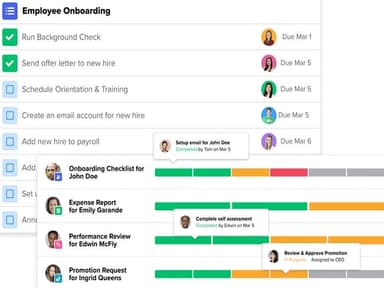
- Manage recruitment and onboarding by tracking candidates, preparing offer letters, collecting new-hire paperwork, and assigning onboarding tasks
- Configure automated HR workflows with Magic Flows to assign responsibilities, collect information, set deadlines, and trigger recurring processes
- Administer benefits, payroll-related information, employee attendance, time tracking, and time-off requests through the relevant HR processes
- Coordinate HR activities by assigning tasks, routing requests for approval, and tracking progress across employees, managers, and HR teams
- Generate reports to review workforce data, monitor HR processes, and identify organizational trends
Who Is GoCo For?
The software is ideal for organizations across a wide range of industries and sectors, including:
- Technology
- Healthcare
- Manufacturing
- Retail
- Professional services
- Education
- Nonprofit organizations
GoCo Use Cases
Based on GoCo’s HR management, workflow automation, onboarding, and talent management capabilities, the platform supports organizations in healthcare, education, nonprofit services, and technology. Each sector has different workforce challenges, from managing staff documentation to coordinating employee growth and handling frequent changes in team structure:
Healthcare Organizations Managing Employee Credentials And HR Documentation
Healthcare organizations need to keep employee records and hiring documents organized while managing staff across different roles and departments. GoCo helps HR teams centralize employee information, collect documents, and automate recurring tasks such as onboarding and document follow-ups through Magic Flows. This gives HR staff a view of outstanding tasks and helps reduce the administrative burden of managing a large volume of employee records. Healthcare-specific clinical credentialing capabilities should be verified separately.
Educational Institutions Coordinating Hiring And Staff Onboarding
Schools and other educational institutions may recruit teachers and administrative staff around academic calendars, when several hires need to be processed within a short period. The software helps teams collect new-hire information, distribute paperwork, assign onboarding tasks, and track completion through a structured workflow. By standardizing these steps, institutions spend less time chasing forms and coordinating administrative requirements, leaving staff better prepared for the start of a term.
Nonprofit Organizations Working With Limited Administrative Resources
Nonprofits often operate with small administrative teams that must manage employee records, time off, documentation, and internal requests alongside their core mission. GoCo’s workflow automation organizes recurring processes, assigns responsibilities, and tracks progress without relying on scattered emails or manual checklists. The main benefit is better visibility into routine HR work and allows limited staff capacity to be used.
Technology Companies Managing Rapid Team Growth
As technology companies expand, frequent hiring, role changes, promotions, and departures can create a stream of updates for teams. It centralizes employee records and uses Magic Flows to coordinate tasks associated with these changes and its talent management tools to support goal tracking, performance reviews, and employee feedback. This helps growing companies maintain processes as teams evolve and gives managers a structured way to support employee development.
Is GoCo Right For You?
GoCo may suit small and midsize businesses that need to coordinate HR processes while keeping pace with changing employment requirements. Its configurable workflows support tasks such as onboarding and offboarding, while payroll, benefits, and time-tracking tools help teams manage routine workforce administration. The platform also offers compliance resources for federal and state requirements, including ACA support and E-Verify integration.
For security-conscious businesses, GoCo’s offers SOC 2 Type I and Type II certifications, two-factor authentication, data encryption, and audit trails. These measures are relevant for organizations handling sensitive employee records and payroll information. As HR teams increasingly adopt automation and digital self-service tools, GoCo’s employee-access features help reduce manual coordination.
Still doubtful if GoCo is the right fit for you? Contact us at (661) 384-7070 for further guidance.
GoCo Features
Payroll Management
The platform supports payroll processing, payment management, and payroll data synchronization with other systems. HR teams import work hours, reimbursements, and bonuses into payroll runs and also manage recurring payments, one-time earnings, and deductions. Employees access their pay stubs and tax documents, and administrators review payroll reports and address issues that arise during processing.
Employee Account And Profile Management
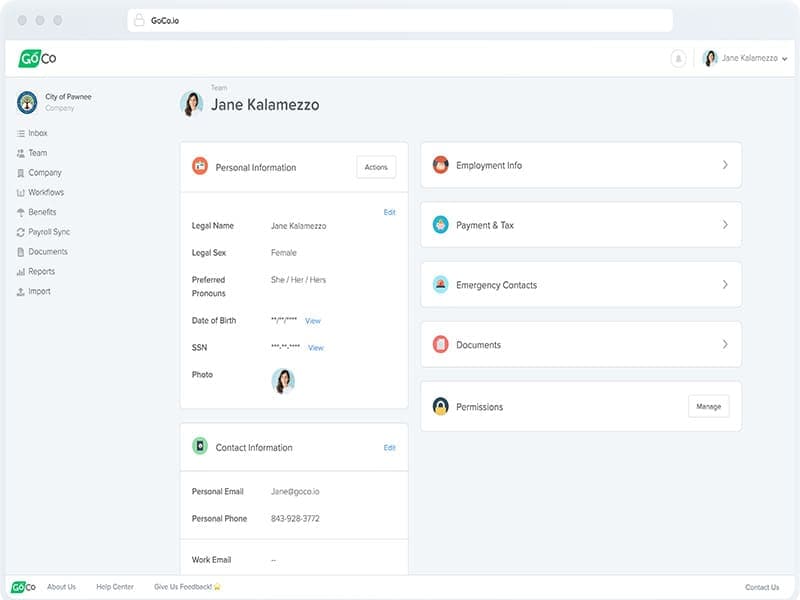
The software allows employees to access their accounts, update personal details, and manage information such as direct deposits and state tax details. It maintains employee records, updates employment information, changes roles or employment types, and manages hiring, rehires, and terminations. Two-factor authentication adds another layer of account protection, and mobile access lets employees use supported GoCo features away from their desks.
Performance Management
GoCo features ‘Performance Management’ capability that helps organizations manage employee performance through goal setting, performance reviews, and ongoing feedback. Administrators create and customize review templates, including goals, to suit their company's evaluation process. Employees also create and update goals, track milestones, and complete performance reviews to give managers and staff a way to discuss progress and development.
Workplace Communication And Collaboration
This feature gives teams tools to share information, communicate updates, and coordinate everyday work. The software publishes company announcements, creates quick links to useful resources, and sends messages or reminders. Employees also participate in team surveys, submit expense requests, and keep routine communication and internal tasks organized in one place.
Pros And Cons of GoCo
Pros
Offer letters get signed without printing
Existing Word and PDF files become fillable
Stored employee data cuts repeat typing
Current payroll provider stays in place
Cons
Limited reporting options might restrict decision-making flexibility
Feature compatibility can vary across categories
Might require initial training for adoption
GoCo Reviews
Total 20 reviews
4.3
All reviews are from verified customers
Rating Distribution
5
Stars70%
4
Stars15%
3
Stars0%
2
Stars5%
1
Stars10%
Share your experience
CEO and CTO, N/A employees
“Exceptional HR and Payroll Solution with Outstanding Support”
Pros
Using GoCo's embedded payroll with the built-in time and attendance app has been proven highly useful for our team. The onboarding process for new employees is also the best and the workflows keep our procedures consistent. I also rely on it heavily for storing and updating employee documents. Customer service has been wonderful in my experience, with quick and helpful responses whenever I need them. Navigation is simple too which makes bringing new hires up to speed very easy. There are so many features that we could integrate into multiple areas of our operations without much trouble. I also love their partnerships, such as JazzHR for applicant tracking and Gusto for payroll processing, which have both been helpful. Another feature I particularly like is the easy Google SSO integration. Plus the Time Off app has saved me a lot of time by making balances and accruals simple to manage, largely because it ties into Time & Attendance and Payroll. With the broad set of configuration options and continuous improvements, using this tool has been a very positive experience. Their support team was excellent during setup, helping us get everything running in about six weeks.
Cons
I would prefer it if we could access the benefits configuration directly so I would not have to open a support ticket every time a change is necessary. For example we have a company policy that restricts how much time an employee can use each year and that specific option is the only configuration in the Time Off app we can't set ourselves at least not yet. It would be much more efficient to have that control in the admin settings rather than relying on support for these routine adjustments.
Rating Distribution
Ease of use
9
Value for money
10
Customer Support
10
Functionality
9
Non-Profit Organization Management, 51-100 employees
“Clean, User-Friendly UI Makes GoCo a Breeze”
Pros
The interface is clean and the whole system is user friendly and easy for me to learn quickly.
Cons
There is one feature from Deputy that lets employees post their shifts and automatically notify others when coverage is needed. If GoCo added this, it would be a more complete solution. Also I can't change pay period dates unless I use its payroll module and get help from support.
Rating Distribution
Ease of use
9
Value for money
9
Customer Support
8
Functionality
8
Insurance, 51-100 employees
“GoCo HRIS Review: Powerful HR, Paperless Simplicity”
Pros
GoCo feels like a modern, sleek and extremely capable HRIS that aims to deliver a white-glove service to mid-market firms and rapidly expanding small businesses. Plus it excels as a single repository for employee information, with a strong emphasis on automation and going paperless.
Cons
I honestly do not have anything to complain about. I enjoy every aspect of it and using the software was a fantastic experience.
Rating Distribution
Ease of use
10
Value for money
10
Customer Support
9
Functionality
10
Frequently Asked Questions
Does GoCo offer an API?
Yes, GoCo software offers an API.
What language does GoCo support?
GoCo supports multiple languages, such as English, Spanish, French, German, Arabic, Chinese, Hindi, Urdu, Portuguese, Japanese, Korean, and many others.
What level of support does GoCo offer?
The vendor offers support through contact form, email, and phone.
Can employees complete onboarding remotely through GoCo?
Yes. Employees can complete onboarding tasks online, sign documents electronically, submit required information, and enroll in benefits without relying entirely on paper-based processes.
What HR tasks can GoCo automate?
It supports configurable workflows for tasks such as hiring, onboarding, approvals, and recurring HR processes. Moreover, additional workflow automation and task reminders may be available as well.
Can GoCo manage HR tasks while a business keeps its existing payroll provider?
It offers HR management tools and payroll integrations that may allow businesses to retain an existing payroll provider. However, compatibility and available synchronization features depend on the provider and setup.