


HiBob
Last Updated

Key Takeaways
Generated from the text of customer reviews
Our Verdict
HiBob Specifications
- Employee Information Management
- Recruitment and Applicant Tracking
- Performance Management
- Attendance and Time Tracking
HiBob Features
Performance Management
The platform covers the full employee growth cycle, from reviews to succession planning. Teams can use it to run 360-degree performance reviews, set goals, and hold structured 1-on-1s. It also allows managers to use a drag-and-drop 9-box grid to reduce bias in evaluations. Engagement surveys come with options for anonymous responses and real-time analytics, helping HR act on feedback quickly.
Workforce Planning
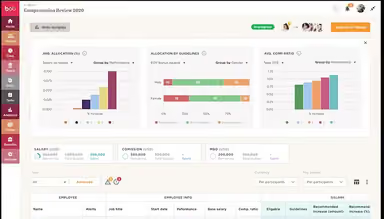
HiBob connects workforce planning data to HRIS, compensation management, and financial planning tools. This gives HR and finance the same headcount and budget numbers, instead of two separate systems that need reconciling. Interactive org charts show live data and are filterable by team or region. Before committing any budget, the software allows teams to model hiring scenarios in a sandbox environment first. Multi-step approval workflows govern position and budget changes, while real-time cost estimates support transparent budget planning across departments.
Workforce Analytics
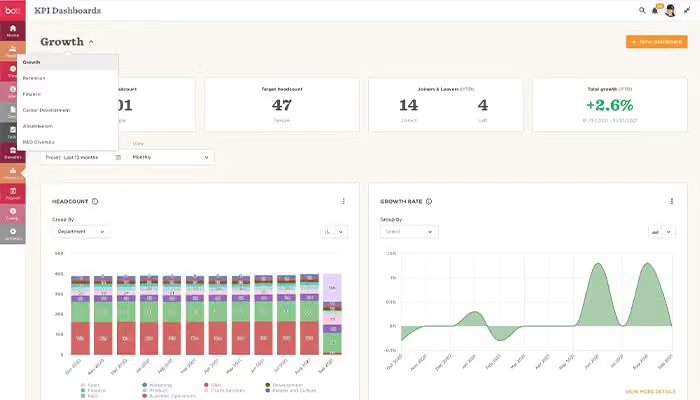
HiBob features an analytics module that tracks headcount, turnover, and other workforce metrics, turning them into insight-ready dashboards. Each dashboard filters by role, so mangers can see only their team’s data. Reporting lines and org charts update automatically as changes happen. The same data is fed into workforce planning and compensation, keeping numbers consistent across both modules.
Payroll Suite
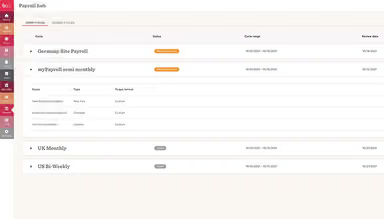
HiBob offers native payroll for the UK and US, with payroll and core HR data managed within the same platform. For companies using other providers, the platform’s Payroll Hub connects to third-party systems through Payroll Connect, a no-code setup wizard. It supports weekly, biweekly, bimonthly, or monthly pay cycles, including several running simultaneously. This setup helps down on duplicate data entry between payroll and HR teams.
Pros And Cons of HiBob
Pros
Efficient time tracking simplifies payroll processing and reduces manual work
Keeps employees informed with shoutouts, key links, anniversaries, and new hires
Find and manage employee information through user-friendly org charts
Cons
The menu bar is cluttered with too many options
Offers limited features in the mobile app
HiBob Reviews
Total 29 reviews
4.7
All reviews are from verified customers
Rating Distribution
5
Stars86%
4
Stars7%
3
Stars3%
2
Stars0%
1
Stars3%
Share your experience
HR Advisor, 500+ employees
“Simple HRIS That Actually Works”
Pros
This platform brought our HRIS into the modern era with its clean, simple design that feels familiar right from the start. There's no learning anxiety, everything just works smoothly. When I tackled my first project integrating the time-off function I managed the entire end-to-end process including getting our change-weary employees on board and ensuring compatibility with existing systems. I didn't need formal training after just an hour playing around in the sandbox environment, I felt confident enough to manage the whole project. Despite not having an IT background and generally struggling with technology, this tool made everything surprisingly manageable.
Cons
The workflows feel pretty rigid, I was shocked there wasn't a way to hide accrued personal leave. That said the support team is always ready to help and make adjustments when they can.
Rating Distribution
Ease of use
8
Value for money
10
Customer Support
10
Functionality
10
Human Resources Business Partner, 500+ employees
“Efficient Tool”
Pros
Really simple to work with! Everything can be customized exactly how we need it and they're always rolling out fresh features. People across our company consistently give positive feedback about using it.
Cons
I'm hoping these issues get addressed in future updates! It would be fantastic if we could send offer letters directly, doing it through esign feels pretty clunky. Also wish permission access was more granular, like giving managers access to specific templates instead of everything. Would love the ability to create standalone tasks that aren't tied to task lists, things like annual policy reviews or checking if documents are still current.
Rating Distribution
Ease of use
9
Value for money
10
Customer Support
10
Functionality
9
People Ops Specialist, 500+ employees
“Smooth transition from legacy software”
Pros
The automation features have been a total game-changer for how we handle task flows and information sharing. I love how customizable everything is, we can set things up exactly how our team needs them. Communication with new hires and managers has improved dramatically and the automated reminders keep us on track with important tasks. Once you get the hang of the categories, it's pretty user-friendly. What I really appreciate is being able to configure everything myself without constantly reaching out to support.
Cons
In my experience there are some limitations with field-level permissions, when you give someone access to a category, they automatically see every field in it which isn't always what we want. The reporting also has constraints where you cant pull all the information into one general report so we have to be pretty strategic about choosing the right report type.
Rating Distribution
Ease of use
9
Value for money
10
Customer Support
10
Functionality
9
Frequently Asked Questions
Does HiBob offer an API?
Yes, HiBob offers an API.
What language does HiBob support?
HiBob software supports the English language.
What other apps does HiBob integrate with?
The platform connects with various third-party tools and applications, including Slack, ADP Workforce Now, Google Workspace, Deputy, Qobra, EasyLlama, and more.
Does HiBob have a mobile app?
Yes, the vendor offers a dedicated mobile app for Android and iOS devices.
What types of pricing plans does HiBob offer?
HiBob pricing starts at $16-$25/employee/month. The platform’s final cost is customized as per business size and requirements. Get in touch with us for a personalized HiBob price quote today.
Who are the typical users of HiBob?
The software works well for professionals working across finance, payroll, IT, and HR.
What level of support does HiBob offer?
HiBob provides support through a ticket system and a help desk.