

HR Cloud
Last Updated

Key Takeaways
Generated from the text of customer reviews
Our Verdict
Overall Rating
Based on 26 users reviews
4.8
Rating Distribution
Positive
96%
Neutral
4%
Negative
0%
Starting Price
Custom Pricing
HR Cloud Specifications
- Employee Information Management
- Recruitment and Applicant Tracking
- Performance Management
- Attendance and Time Tracking
HR Cloud Features
Onboarding
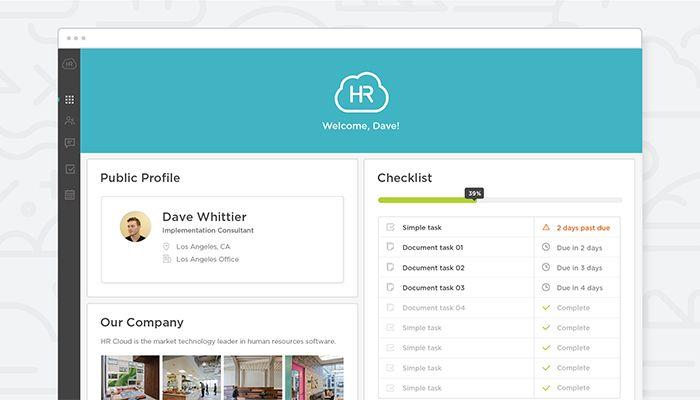
HR Cloud provides its users with mobile-first pre-boarding, branded new-hire portals, e-signature forms, and automated I-9 and E-Verify processing. It also supports SMS-based onboarding through Maya, and syncs with payroll systems like UKG and ADP. In addition, it provides task automation, manager handoffs, and a structured offboarding workflow.
Performance Management
This feature lets HR teams manage goal tracking, flexible review cycles, and ongoing feedback. The platform provides AI-driven insights that summarize reviews, flag gaps, and recommend the next best actions for managers. Teams can also access surveys and engagement analytics with tools that connect to the broader HR Cloud platform.
Time Tracking
With this feature, HR teams get access to mobile time entry, project and task tracking, and one-click timesheet and leave approvals. It supports automated reminders for missing entries, custom pay rules, and accrual policies. Users can also access detailed reporting for audits and record-keeping. In addition, employees can use it to manage their time and leave balances.
Employee Engagement
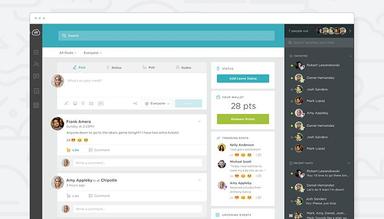
Workmates is a module within HR Cloud that gives its users peer-to-peer and manager recognition, custom awards and badges, and automated milestone celebrations. In addition, it offers support for AI-generated company announcements and kudos posts, live streaming, and internal communication tools that reach employees on their devices. It also provides engagement surveys and AI-driven analytics to users.
Pros And Cons of HR Cloud
Pros
Provides a smooth shift away from paper-based onboarding
Offers customizable onboarding content, including mission-specific material
Runs automated reminders to reduce missed onboarding steps
Supports remote and multi-state onboarding in the cloud
Centralizes core HR functions into one platform
Cons
Inconsistent mobile app experience
Field staff can have difficulty logging in
The system can be slow at times
HR Cloud Pricing
Onboard Suite | HR Suite |
|---|---|
Custom Pricing | Custom Pricing |
|
|
Disclaimer: The pricing details were last updated on Sep 14, 2026 from the vendor's website. Please contact us for a tailored pricing list.
HR Cloud Reviews
Total 26 reviews
4.8
All reviews are from verified customers
Rating Distribution
5
Stars81%
4
Stars15%
3
Stars4%
2
Stars0%
1
Stars0%
Share your experience
Design, N/A employees
Less than 6 months
“fast onboarding with real support”
Pros
Switching from paper-only onboarding to a fully digital process has been a big improvement for our team and this platform made that transition incredibly quick and simple. The usability has been a huge advantage and being able to handle E-Verify checks right inside the app saves us a lot of time while cutting down on unnecessary back-and-forth. Another thing that really stands out is how responsive our rep is, it's uncommon now to consistently reach an actual person instead of a bot. That level of personal support adds genuine value for the cost.
Cons
Honestly I can't point to anything I dislike. It's simple, adaptable and works exactly the way it's supposed to.
Rating Distribution
Ease of use
10
Value for money
10
Customer Support
10
Functionality
10
Human Resources, N/A employees
Less than a year
“welcoming onboarding from day one”
Pros
One of the best parts was how easy it made everything for new hires. From paperwork to welcome messages, the whole onboarding flow felt convenient and uncomplicated. It helped new employees feel included and part of the team right from the start.
Cons
Weakest part was the mobile experience which could feel a bit awkward at times. It still got the job done but I would have liked it to be a little faster and more responsive on a phone.
Rating Distribution
Ease of use
10
Value for money
10
Customer Support
10
Functionality
10
Non-Profit Organization Management, N/A employees
Less than 6 months
“Saves time!!!!”
Pros
Running the Space Debris Foundation, I needed a better way to bring new team members in and this made a big difference. We used to handle everything through paper forms and endless emails which took far too much time. Now new hires just log in and see a clear onboarding checklist with everything they need to complete. They can fill out forms and sign documents online which has saved us a lot of time and cut down heavily on paper. I also appreciated being able to customize the process with our own videos and mission-related content. That helped new engineers feel connected to the organization before their first day even started. The automatic email reminders are also really useful because people are less likely to miss steps. Since it's cloud-based, hires in other states can complete onboarding from home without any trouble. Overall, it has really sped up how we bring people into our space research projects.
Cons
Some of our staff work out in the field where internet service can be unreliable so logging in was harder for them whenever the connection was weak. It's a pretty minor issue but still worth noting. There was also a small learning curve at the beginning although everyone got comfortable with it fairly quickly. On top of that, the support team was responsive and helped us resolve things fast.
Rating Distribution
Ease of use
9
Value for money
10
Customer Support
10
Functionality
10
Frequently Asked Questions
Does HR Cloud offer an API?
Yes, HR Cloud offers an API.
What language does HR Cloud support?
HR Cloud software supports the English language.
What other apps does HR Cloud integrate with?
HR Cloud integrates with third-party software like ADP, UKG, Workday, Slack, and Zoom.
Does HR Cloud have a mobile app?
Yes, HR Cloud offers a mobile app for iOS and Android.
What types of pricing plans does HR Cloud offer?
HR Cloud pricing falls between $3,000 to $8,000/year based on industry benchmarks. Request a custom HR Cloud price quote today!
Who are the typical users of HR Cloud?
It is typically used by HR professionals across healthcare, retail, manufacturing, technology, and construction.
What level of support does HR Cloud offer?
HR Cloud offers assistance via support portal.