


Humaans
Last Updated

Key Takeaways
Generated from the text of customer reviews
Our Verdict
Humaans Specifications
- Employee Information Management
- Employee Database Management
- Employee Onboarding
- Performance Management
Humaans Features
Workflow Builder
The software lets HR teams create workflows from templates or build processes from scratch. Its event-based triggers can help users enroll employees automatically, while assigned tasks and emails assist in moving processes forward. Humaan's activity monitoring and workflow history also provide visibility into progress across onboarding, offboarding, compensation changes, training, and other People operations.
Employee Directory
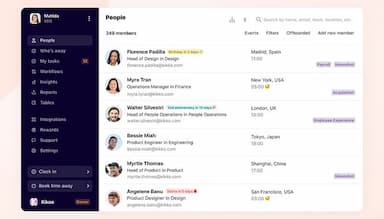
This feature provides every team member with a searchable public profile, complete with department, location, and project tags. Employees can see upcoming events such as work anniversaries, birthdays, and departures at a glance. The platform's search and filter tools also make it easy for users to find the right person across a growing, distributed organization quickly.
Employee Documents Management
Humaans allows users to store personal and company documents, including contracts, identification, and policy handbooks, in one secure location tied to each employee profile. Admins can set expiry reminders for passports and visas, mark documents as verified, and control access by role. Employees can also receive notifications whenever a new document is uploaded to their file.
Workforce Data Management
Businesses can capture every employment detail, from start date and contract type to role history and compensation changes, and store it centrally. Humaan's multi-currency compensation support and full historical tracking let admins view and export data as it stood at any past point. This removes the need to reconstruct employment history manually from old records.
Leaves Management
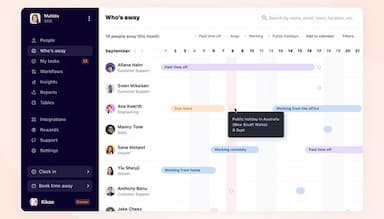
Employees can register time off, view team calendars, and check updated balances instantly through the software's self-service leave tools. Humaans enables companies to support numerous leave types, including sick days, parental leave, and remote work, with policies configurable by location or team. Teams and distributed offices can also build public holiday calendars and keep them current.
Analytics And Reporting
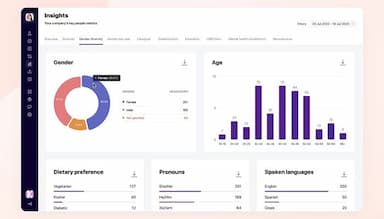
Humaans' reporting tools let HR teams pull any employee data point into a .csv export within a couple of clicks, including historical records like past salaries and job roles. Its predefined templates help managers cover payroll, dietary preferences, and time-away summaries, so they can generate the reports they need without manual formatting.
Pros And Cons of Humaans
Pros
Broader integrations connect HR systems, reducing manual data transfers
Flexible workflows automate approvals, reducing reliance on developers
Immutable audit logs preserve records, simplifying compliance reviews
Retention controls support PII management, aiding compliance efforts
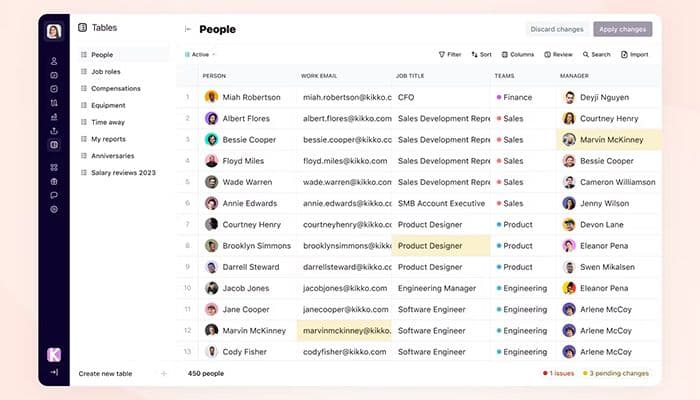
Spreadsheet-style Tables simplify data work without requiring formulas
Cons
Cached employee profiles can delay visibility into recent data changes
Basic reporting limits deeper analysis of workforce data and trends
imited mobile features restrict employee-record management on the go
Humaans Pricing
Growth | Enterprise | Athena |
|---|---|---|
Custom pricing | Custom pricing | Custom pricing |
|
|
|
Disclaimer: The pricing details were last updated on Sep 14, 2026 from the vendor's website. Please contact us for a tailored pricing list.
Humaans Reviews
Total 48 reviews
4.9
All reviews are from verified customers
Rating Distribution
5
Stars90%
4
Stars10%
3
Stars0%
2
Stars0%
1
Stars0%
Share your experience
Small-Business, 11-50 employees
“impressive design and effortless onboarding”
Pros
We're really impressed with this platform from the product itself (some of the best design I've seen) to the feature set and the onboarding felt effortless. We actually tried Rippling before and that turned out to be a mistake after several months of getting set up there we were left frustrated with a system that felt broken and unreliable.
Cons
No issues have arisen and I see that the team is actively rolling out new features
Rating Distribution
Ease of use
10
Value for money
10
Customer Support
10
Functionality
10
Small-Business, 11-50 employees
“automation improves HR operations”
Pros
For our company this solution has totally transformed how we run HR operations. The interface is remarkably simple which makes it feasible for our whole team to move around the system and get tasks done faster. The automation tools have honestly been a lifesaver, they align workflows and free up a lot of the time we used to spend on tedious administrative work. I rely on it for a huge range of HR activities, from onboarding new employees and managing absences to keeping track of performance reviews. The people behind the product are fantastic as well, they respond quickly, know their stuff and are always happy to help when we throw them unusual customization asks. They follow up with detailed attention and keep releasing updates that add features and improvements so it's clear the developers listen to customers and refine the platform to match our needs.
Cons
Honestly I can't think of anything negative. Ehenever we've had a problem or asked for changes they reply immediately and are continuously enhancing the platform.
Rating Distribution
Ease of use
10
Value for money
10
Customer Support
10
Functionality
10
Mid-Market, 500+ employees
“Powerful HR analytics”
Pros
I think this HRIS stands out as the best I've ever used. The user experience is top-tier, it's simple, clean and clearly designed with real people in mind which mattered a lot for our younger workforce. People pick it up quickly so we've greatly reduced training time. What really impresses me are the data capabilities, the real-time insights and analytics make answering questions and producing reports fast so I don't have to open Power BI all the time. The Tables feature has been especially helpful for me and our Finance team when we're handling compensation reviews. On top of that, the support team consistently goes the extra mile to help which feels like a refreshing change from the long ticket queues I've had to deal with from other vendors.
Cons
I have no real complaints. This is an excellent system supported by a remarkably helpful team that actively seeks customer feedback and actually incorporates those suggestions into their roadmap so I feel heard and confident the product will continue to improve.
Rating Distribution
Ease of use
10
Value for money
10
Customer Support
10
Functionality
10
Frequently Asked Questions
Does Humaans offer an API?
Yes, it offers a REST API.
What language does Humaans support?
Humaans software supports several languages, including English, Chinese, French, Italian, and Spanish.
What other apps does Humaans integrate with?
The platform supports integration with Papaya Global, Lattice HR, Slack, and Okta, among others.
Does Humaans have a mobile application?
Yes, it offers a mobile app.
What types of pricing plans does Humaans offer?
The software's price is estimated to range between $6 and $20/employee/month. Its plans include Growth, Enterprise, and Athena. You can also request a personalized Humaans pricing quote now.
Who are the typical users of Humaans?
Businesses across various industries and sectors, such as climate tech, e-commerce, technology and SaaS, fintech, and biotechnology, benefit from Humaans.
What level of support does Humaans offer?
The platform offers support through live chat and email.
Are there any Humaans alternatives?
Some of the Humaans alternatives are ELMO Software, Workday HCM, and WoCo.