



Last Updated
Key Takeaways
Generated from the text of customer reviews
Maptician, a cloud-based workplace management software, serves law firms, financial services firms, and corporate teams. While a few users report occasional bugs, most appreciate being able to locate coworkers easily, including across office locations. Recent updates include Crestron certification, which allows Maptician to run on compatible Crestron room scheduling devices.
Our Verdict
For organizations running hybrid offices across one or more locations, Maptician may be a suitable option. Feedback on pricing is mostly positive, with reviewers describing it as affordable relative to its capabilities. Some buyers also say its pricing influenced their decision to choose the platform. We recommend Maptician for teams that need an accessible office planning tool to help employees coordinate shared office space.
Overall Rating
Based on 18 users reviews
4.7
Rating Distribution
Positive
100%
Neutral
0%
Negative
0%
Starting Price
Custom Pricing
Maptician Specifications
- Attendance And Time Tracking
- Employee Self-Service Portal
- Workforce Analytics
- Alerts/Notifications
What Is Maptician?
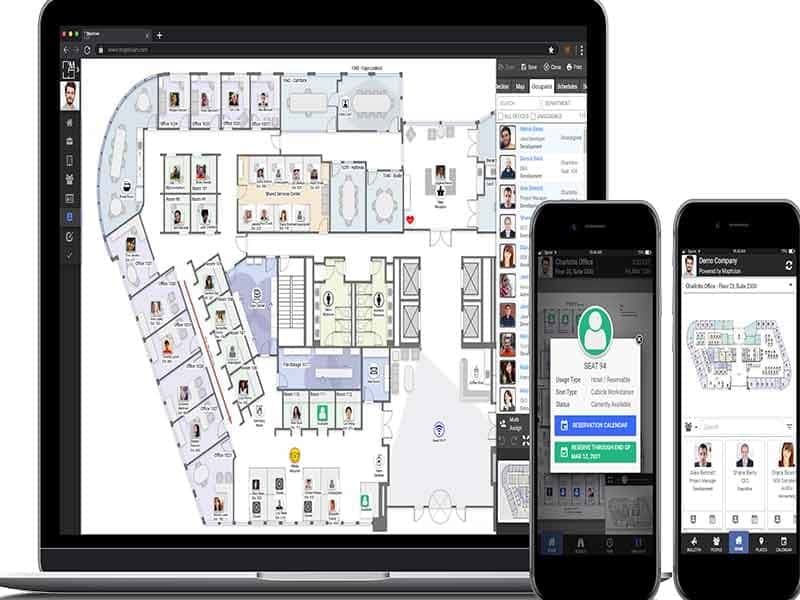
Maptician is a cloud-based workplace management platform for organizations managing hybrid offices and shared workspaces. It brings office layouts, desk and room reservations, visitor check-ins, employee presence, and space-use data into one system, giving workplace teams a clearer view of how offices are used day to day.
Instead of relying on fixed seating plans or separate booking tools, Maptician allows teams to compare planned attendance with actual space use and adjust seating, layouts, and office capacity as needs change. This can help organizations coordinate in-office days, make better use of available space, and base real estate decisions on usage patterns rather than assumptions. For organizations managing multiple teams or locations, Maptician also provides a more consistent way to oversee office use across the portfolio.
What Is Maptician Best For?
Maptician stands out for its 'Scenario Planning', which lets organizations test seating and space changes before they put them in place. Instead of making changes based on assumptions, teams can use layout simulations and usage forecasting to assess how proposed layouts might perform under different space and attendance needs. This helps workplace teams compare potential layouts, anticipate space requirements, and identify underused areas before committing to changes, which could make it easier to align office design with how employees actually use the space.
How Much Does Maptician Cost?
Maptician offers the following three subscription plans, each with custom pricing:
- Starter
- Professional
- Premium
Users generally view Maptician as good value for the money. Reviewers describe it as affordable and cite its pricing as a factor in their decision to choose the software. Some users also found the cost of converting office drawings into maps reasonable.
Disclaimer: The pricing is subject to change.
Maptician Integrations
Maptician integrates with multiple third-party software, including:
- Zoom Meetings
- Brivo Access
- Okta
- Citrix
- Microsoft Entra ID
- Microsoft Azure
- OpenPath
How Does Maptician Work?
Here's how you can use Maptician software to manage your workplace:
- Log in with your credentials to access the platform
- Explore interactive floor plans to understand office layouts, seating areas, and available spaces
- Configure seating assignments and booking rules to reflect how your organization uses its office
- Reserve a desk or conference room based on your in-office schedule and space availability
- Manage visitor registrations and check-ins to keep track of expected guests
- Track occupancy and space utilization through workplace analytics to see which areas are used most and which remain underused
- Plan future changes using scenario planning to assess proposed layouts and space requirements before implementing them
- Connect Maptician with supported calendars and single sign-on (SSO) services to align bookings and access with your existing tools
Who Is Maptician For?
The platform serves organizations across the following industries and sectors:
- Legal
- Financial services
- Corporate
Maptician Use Cases
Based on our examination of the platform, here are common ways organizations can use Maptician software to solve real workspace problems:
Law Firms Managing Client And Guest Arrivals Throughout The Day
Law firms host clients, witnesses, and outside counsel throughout the day, and many of those meetings are confidential. Unannounced arrivals or guests waiting in the wrong area may create confusion and disrupt reception staff. Maptician's visitor management feature lets teams handle guest check-ins, tracking, and badges in one place. This helps firms coordinate arrivals and keep visits discreet, even on days with many meetings.
Corporate Teams Coordinating Desk And Room Bookings Around Hybrid Schedules
With hybrid schedules, employees might not know whether a seat will be available when they arrive at the office. This can leave them searching for space and make it harder for colleagues to coordinate their in-office days. Using Maptician, employees can access an interactive floor plan to select an available desk before arriving. Presence information also helps them see who is in the office and where colleagues are seated, making it easier to plan shared office days and find teammates.
Financial Services Firms Evaluating Office Space Before Lease Renewals
Office space can be a major cost for financial firms, and leaders need reliable usage data before renewing a lease or reducing their floor space. Informal impressions of office occupancy may not reflect actual demand. Maptician's workplace analytics shows how desks and rooms are used, giving decision-makers a clearer basis for comparing real estate costs with actual usage space. This can help firms assess whether their current office capacity matches employee attendance before committing to a long-term property decision.
Law Firms Keeping Up With Attorney And Staff Moves
Depositions and large meetings often require specific room arrangements, with refreshments ready before attendees arrive. When requests are sent by email or phone, important setup details could be missed, leaving rooms unprepared. Maptician's conference room management lets staff submit amenity and catering requests through customizable forms, while daily setup worksheets show which arrangements each room requires. Buffer time between bookings also allows time for setup and clean-up, helping staff prepare rooms for meetings with specific requirements.
Is Maptician Right For You?
Maptician may be a suitable fit for firms struggling to coordinate hybrid work, manage shared office space, or track how effectively, or track how effectively they use their real estate. It supports organizations managing multiple offices, floors, and regions through centralized space planning, reporting, and workplace policies, while allowing local teams to adjust settings to their needs. This makes it relevant for growing organizations that need consistent oversight as their office footprint expands.
For teams with data protection requirements, the platform is SOC 2 and ISO certified and uses access controls, encryption, audit logs, and secure hosting to protect workplace data. Furthermore, according to its privacy notice, its servers are located in the United States, and Standard Contractual Clauses are used for transfers of EEA and UK data to group companies and service providers. Maptician also acts as a data processor for business customers with a data processing agreement. Buyers should still confirm that these terms meet their own audit and regulatory needs.
Its customers include Husch Blackwell, Fenwick, Reed Smith, Nelnet, and Christie's.
Still not sure if Maptician is right for you? Contact us at (661) 384-7070, and we will help you make the best decision.
Maptician Features
Trend Reporting
Maptician uses historical data to show how seat usage, space utilization, and office attendance change over time across teams, floors, or office areas. Business leaders can compare past and current usage patterns to identify trends and estimate future space needs, helping them plan office capacity based on actual demand.
Real-Time Logs
Visitor logs record visitor check-in times, on-site presence, and visit duration as guests arrive and leave. These records give teams a reliable reference for compliance reviews and audits.
IP Presence Logs
IP Presence Logs automatically record an employee as present when their device connects to the corporate network in the office, without requiring a manual check-in. This helps keep attendance records up to date with lesser effort from employees.
Visual Layout Tools
These tools let teams rearrange desks, meeting rooms, and department areas on interactive floor plans using drag-and-drag controls, then assign seats to employees. This helps workplace teams assess seating arrangements, keep collaborating departments near each other, and adjust office layouts as space needs change.
Department Insights
The platform's Department Insights show how often rooms are booked, the types of meetings they host, and which departments use them the most. These reports help facilities teams identify demand by department and make data-backed decisions about room allocation, upgrades, and booking policies.
Rule-Based Desk Booking
Maptician allows employees to reserve desks from the web or a mobile app, either in advance or on the same day, by searching for a location, team zone, or preferred seating area. Admins can set booking rules, access permissions, and desk availability. Moreover, desks that go unclaimed are released automatically for others to book. It helps organizations manage shared seating fairly and keep desks available as hybrid schedules change.
Space Efficiency Metrics
Space metrics combine seat utilization, cost per seat, and space density ratios to show how efficiently an organization uses its office space relative to its cost. These metrics help the senior management identify underused space, assess real estate spending, and evaluate whether office capacity matches demand.
Pros And Cons of Maptician
Pros
Brings booking, planning, presence, and visitor tools into one platform, so teams don't have to switch between separate systems
Lets staff view and edit floor plans directly, so seating changes are easy to reflect on the map
Handles guest check-ins digitally, so visits stay organized and easier to track
Shows how space is actually used, so leaders can make decisions based on data instead of guesses
Works well on mobile devices, so employees can book and check in on the go
Cons
Needs time for initial setup before teams can use it fully
New users may need time to learn all the features
Support response times may vary
Maptician Pricing
Starter | Professional | Premium |
|---|---|---|
Custom Pricing | Custom Pricing | Custom Pricing |
|
|
|
Disclaimer: The pricing details were last updated on Sep 25, 2026 from the vendor's website. Please contact us for a tailored pricing list.
Maptician Reviews
Total 18 reviews
4.7
All reviews are from verified customers
Rating Distribution
5
Stars67%
4
Stars33%
3
Stars0%
2
Stars0%
1
Stars0%
Share your experience
Engineering, 51-100 employees
Less than 6 months
“100% Satisfaction”
Pros
As our employees transitioned to a hybrid work schedule, we needed a transparent way to track who was in the office and when. This was key for collaboration and safety purposes. Maptician does it for us
Cons
I am hoping for a feature that allows programming a repeating schedule. This is something that is not present yet. Also since I have a fixed weekly schedule, it would be convenient to block the calendar for a amount of time instead of doing it daily.
Rating Distribution
Ease of use
10
Value for money
9
Customer Support
10
Functionality
8
Telecommunications, 500+ employees
Less than a year
“Maptician”
Pros
I love how effortless it is to create and edit maps. The ability to customize individual office spaces and seating charts really sets this product apart.
Cons
I would love to see additional desk and cubicle designs. it would be fantastic. and will go a step further by allowing reservations for cars and parking spots would elevate this product.
Rating Distribution
Ease of use
8
Value for money
8
Customer Support
8
Functionality
8
Not Specified, 500+ employees
Less than a year
“If you have hybrid or traveling employees Maptician will make your facilities planning much easier”
Pros
Setting up the product was not a problem at all. thanks to its seamless integration with Microsoft Azure. The Maptician team efficiently converted our office drawings into a usable format at a reasonable cost. Moreover my success manager has been excellent at keeping us informed about new features.
Cons
I would like to say that it will be great if Maptician had user and admin documentation, along with change logs that outline new features as they become available.
Rating Distribution
Ease of use
10
Value for money
10
Customer Support
10
Functionality
9
Frequently Asked Questions
How long does it take to set up Maptician?
Maptician can be fully deployed in about three weeks, though larger rollouts may take longer.
Can Maptician help with safety and emergency planning?
Yes, the platform includes emergency exit route planning and health and safety protocols. Teams have also used the maps to plan fire exits and set distancing zones.
Can guests be registered before they arrive?
Yes, visits can be pre-registered, followed by digital check-in, badge printing, and real-time tracking.
What happens if someone books a desk but doesn't show up?
The desk is released automatically when no check-in happens, so someone else can book it.
Does Maptician require a long-term contract?
An annual subscription is required, and longer terms are available. Organizations that commit to a longer term may qualify for extra discounts or benefits, depending on their size.