


PurelyHR
Last Updated

Key Takeaways
Generated from the text of customer reviews
PurelyHR is a modular HR management platform used by HR teams and managers across manufacturing, healthcare, construction to manage employee records, attendance, and leave. Users appreciate its easy document access, while some mention that limited bulk filtering can complicate absence and certification tracking. In September 2026, PurelyHR refreshed the Time-Off module’s interface to improve consistency across its screens.
Our Verdict
PurelyHR is a suitable option for small and midsize businesses seeking centralized HR administration across growing teams. Its modular pricing lets businesses select the tools they need, but costs can rise as they add modules and employees. This pricing structure is more may work well for organizations with focused HR requirements. We recommend it for businesses looking to organize core HR processes while keeping their HR software requirements specific.
PurelyHR Specifications
- Employee Information Management
- Performance Management
- Attendance And Time Tracking
- Employee Onboarding
What Is PurelyHR?
PurelyHR is a cloud-based human resource (HR) management software designed for small and midsize businesses and includes tools that help streamline employee management, leave administration, and time tracking. The platform offers seven modules: Staff for employee records and onboarding, Time-Off for leave management, Time-Clock for attendance tracking, and Time-Sheet for recording work hours. It also includes Performance for employee reviews and goal tracking, Warnings for documenting disciplinary incidents, and Talent for managing employee certifications and training. Businesses can select individual modules based on their requirements, allowing them to digitize HR workflows without adopting an unnecessarily broad system.
What Is PurelyHR Best For?
A strong function of PurelyHR is its ability to track employee work hours and project time through its Time-Sheet module. Employees can record daily totals, detailed shifts, or hours assigned to specific clients, projects, and tasks. Managers can review submitted timesheets and approve or lock entries before exporting the results. This can also help professional services teams reconcile billable hours and prepare payroll records without manually consolidating separate spreadsheets.
How Much Does PurelyHR Cost?
PurelyHR pricing starts at $5.75/employee/month for the Staff module, with the total cost depending on the number of employees and modules selected. The Staff module is mandatory, while Time-Off, Time-Clock, Time-Sheet, Performance, Warnings, and Talent can be added on. Its pricing is structured as follows:
- Time-Off: $28.75/employee/month
- Time-Clock: $17.25/employee/month
- Time-Sheet: $17.25/employee/month
- Performance: $28.75/employee/month
- Warnings: $5.75/employee/month
- Talent: $17.25/employee/month
The platform includes free setup, onboarding, and unlimited customer support, along with a 21-day free trial.
Users generally describe PurelyHR’s pricing as affordable for small businesses, with some users appreciating its cost-effectiveness for managing employee time off and HR processes. However, nonprofits and organizations operating on limited budgets may find the cost of accessing all features difficult to justify, despite pricing being comparable to other platforms.
Disclaimer: The pricing is subject to change.
PurelyHR Integrations
The platform allows approved leave to sync with Google Calendar and Outlook.
How Does PurelyHR Work?
Here is how users can access the platform and start using its features:
- Log in to PurelyHR using your account credentials to access the employee or administrator dashboard
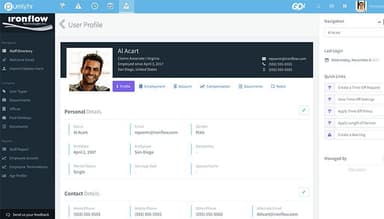
- Set up employee profiles and organizational details through the Staff module
- Configure the required modules, such as Time-Sheet, Time-Clock, or Time-Off, according to your HR processes
- Define timesheet formats, work periods, overtime thresholds, and project or task categories where applicable
- Review submitted timesheets, check recorded hours, and approve entries or return them for corrections
- Export approved time records and reports to PDF or CSV for payroll processing, invoicing, or internal reporting
Who Is PurelyHR For?
The platform is ideal for HR professionals working across the following industries:
- Nonprofit
- Technology
- Manufacturing
- Education
- Construction
PurelyHR Use Cases
Based on our analysis of user feedback and PurelyHR features, we identified the following scenarios where the software may be a good fit.
Manufacturing Companies Coordinating Shift-Based Workforces
Manufacturers managing production teams across shifts need a reliable view of employee attendance and absences. PurelyHR helps HR teams track working hours, monitor absences, manage leave requests, and review staffing availability across multiple sites. Its time-tracking, leave management, and reporting tools can help businesses identify attendance trends and spot potential gaps in shift coverage. This is particularly relevant to food and beverage processing, textiles, metals, paper and plastics, and industrial manufacturing companies that need to coordinate employees across production facilities.
Professional Services Firms Tracking Client-Billable Time
Consultancies, law firms, and other professional services businesses need to distinguish time spent on individual clients and projects. PurelyHR’s Time-Sheet module supports project- and task-based time entries, giving managers a way to review recorded hours before using them for billing or internal cost analysis. This is useful when employees divide their working time across multiple engagements and finance teams need a consistent record of project effort.
Construction Companies Managing Employees Across Job Sites
Construction firms may have office staff, field crews, and specialist tradespeople working across multiple projects. PurelyHR can help centralize employee information and track attendance, absences, and relevant certifications across geographically dispersed teams. Managers can also maintain employee-facing policy documents and export HR reports without relying entirely on site-specific spreadsheets. This is particularly applicable to general contractors, electrical companies, and mechanical service providers that need visibility into workforce availability.
Healthcare Organizations Managing Staff Credentials And Availability
Healthcare providers often coordinate employees with different schedules, roles, and training requirements. PurelyHR can help administrators maintain employee records, track certifications and training, and monitor leave that may affect staffing availability. These workflows are relevant to medical practices, home care providers, and community health clinics that need an accessible record of staff qualifications.
Is PurelyHR Right For You?
Are you looking for an HR platform that can accommodate changing workforce needs as your business grows? PurelyHR may suit small and midsize businesses seeking a flexible approach to HR management. Its modular structure allows organizations to start with employee record management and add capabilities such as time tracking, leave management, and performance reviews as their requirements expand.
PurelyHR reports SOC 2 Type II compliance and ISO 27001 certification, alongside support for multi-factor authentication (MFA) and single sign-on (SSO). The software supports GDPR compliance with features for breach notifications, employee data access and correction, permanent deletion of disabled user accounts, data portability through employee data exports, and account policy consent tracking.
Still unsure whether PurelyHR meets your needs? Call our experts at (661) 384-7070 to discuss your requirements, explore your options, and make an informed decision.
PurelyHR Features
Performance Management
PurelyHR’s Performance module manages employee review cycles, structured feedback, and goal tracking. Administrators can create reusable review templates, customize questions and competencies, and schedule reviews according to their organization’s review frequency. Employees can complete self-evaluations, while peers and managers contribute feedback through 360-degree reviews. Completed reviews can be digitally signed and stored alongside previous evaluations.
Talent And Certification Tracking
This module tracks employee qualifications, certifications, licenses, training, and other professional attributes. Administrators can assign qualifications to employees, mark certain qualifications as mandatory, record expiration dates, and upload documents when requirements are completed. The system sends automatic reminders for upcoming qualifications and approaching expiration dates
Employee Warnings
PurelyHR’s Warnings module documents workplace incidents and disciplinary actions in structured employee records. Managers can record descriptions, severity, comments, and consequences. Organizations can configure violation categories and warning actions to match their internal disciplinary policies. Employees acknowledge warnings through digital signatures, which are timestamped and stored with the record.
Time-Clock And Attendance Tracking
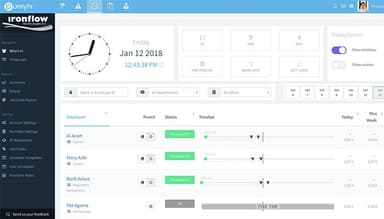
This feature records employee clock-in and clock-out times through a browser. Its live dashboard displays attendance statuses, including employees who are present, late, missing, or on leave. Administrators can configure work schedules, grace periods, rounding rules, break deductions, and daily or weekly overtime thresholds. IP restrictions can limit clock-ins to approved networks, which is relevant for businesses that require employees to record attendance from designated locations.
Time-Off And Leave Management
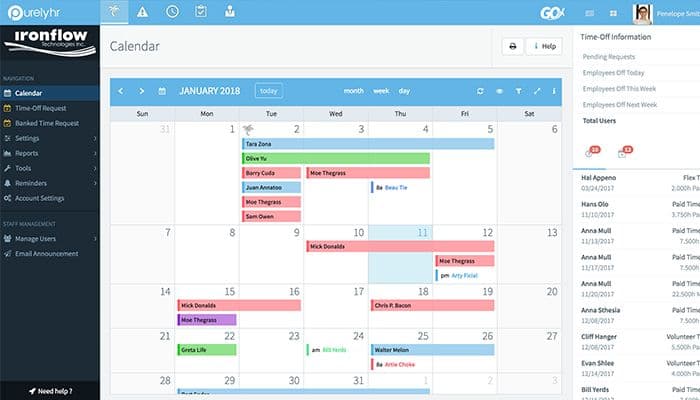
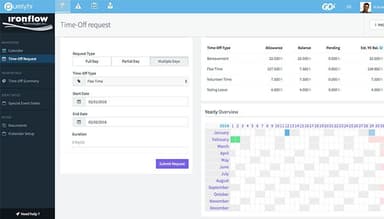
PurelyHR’s Time-Off module manages employee leave requests, balances, accruals, and approval workflows. Administrators can configure leave categories such as vacation, sick leave, paid time off, and banked time, then define accrual schedules, annual renewals, carryovers, and prorated balances for new hires. The system supports full-day, partial-day, and multi-day requests, with approval rules and notifications for employees and managers. Blackout periods and daily request limits can restrict overlapping absences during busy periods.
Pros And Cons of PurelyHR
Pros
Simplifies leave requests and approvals through a centralized dashboard
Displays team availability to help prevent scheduling conflicts
Customizes performance reviews to match specific employee roles
Cons
Lacks dedicated volunteer management tools for tracking shifts and training
Reporting may require manual data compilation for staffing summaries
PurelyHR Reviews
Total 306 reviews
4.5
All reviews are from verified customers
Rating Distribution
5
Stars61%
4
Stars34%
3
Stars5%
2
Stars1%
1
Stars0%
Share your experience
Enterprise, 500+ employees
“convenient and hassle-free”
Pros
One thing I really appreciate about it is that it doesn't impact the applications so I can integrate it without disrupting other teams. On top of that, there's nothing I need to build myself and it doesn't require any installation. That makes it a very convenient tool to work with.
Cons
Nothing to say here.
Rating Distribution
Ease of use
10
Value for money
8
Customer Support
8
Functionality
9
Human Resources, 51-100 employees
More than a year
“Fast to learn and use”
Pros
even without any expert to train me, I found it simple to operate and easy to learn. I managed to figure it all out by myself.
Cons
I wish it would show past years records of leave taken by staff. It would be helpful if it could display that previous history.
Rating Distribution
Ease of use
8
Value for money
8
Customer Support
8
Functionality
7
Civic & Social Organization, 11-50 employees
More than a year
“Quick setup”
Pros
Setting up the web-based system was very smooth. There was no setup needed for end users, which was a huge relief.
Cons
finding the time-off summary a bit hard to follow. the information about total time taken also isn't very clear.
Rating Distribution
Ease of use
8
Value for money
9
Customer Support
10
Functionality
9
Frequently Asked Questions
Can employees access PurelyHR on mobile devices?
Yes. Employees and managers can access PurelyHR through a mobile browser on smartphones and tablets.
Can businesses customize time-off types and policies in PurelyHR?
Yes, PurelyHR allows organizations to create unlimited time-off types, including vacation, sick leave, and parental leave. Businesses can customize accrual rules, carryover limits, and renewal dates, then assign specific policies to departments or individual employees.
Does PurelyHR offer a free trial?
Yes. PurelyHR offers a 21-day free trial with no credit card required. Users can explore their selected modules before upgrading to a paid subscription.
How can managers approve or reject time-off requests in PurelyHR?
Managers can approve, reject, or cancel employee time-off requests through the Time-Off calendar, pending requests menu, or reports section. They can also add notes and choose whether to notify employees by email.
How long does it take to implement PurelyHR?
PurelyHR can be set up in few hours, depending on the organization's requirements and configuration needs. The vendor provides complimentary onboarding assistance and technical support to help businesses configure the platform and get started.