


SubItUp
Last Updated

Overview
SubItUp helps organizations keep teams aligned with smart scheduling, live updates, and effortless task coordination across locations. While the mobile app has limited features compared to the web platform, the platform’s AI-driven tools optimize productivity, save time, and ensure shifts and projects run smoothly.
Overall Rating
Based on 5 users reviews
4
Rating Distribution
Positive
80%
Neutral
20%
Negative
0%
Starting Price
$1.23
per employee per month
SubItUp Specifications
- Attendance And Time Tracking
- Employee Onboarding
- Workforce Analytics
- HR Compliance
What Is SubItUp?
SubItUp is a cloud-based workforce management and employee scheduling software that helps organizations track attendance, manage scheduling conflicts, and automate shift coverage. It is widely used in higher education by university departments, including those at Arizona State University, The Ohio State University, and Purdue University. The platform is also suited to organizations with large numbers of hourly or part-time employees working frequently changing shifts.
What Is SubItUp Best For?
The platform stands out for its Social Scheduling™ feature. It provides a mobile-based shift marketplace where employees can drop, swap, and pick up available shifts based on their schedules and availability. Smart filters can prevent changes that would create overtime, scheduling conflicts, or other staffing issues. Unlike traditional scheduling processes that may require managers to manually find replacements, Social Scheduling™ allows employees to manage eligible shift changes themselves. The system automates the process while applying the organization’s scheduling rules, reducing the administrative work involved in handling shift swaps and open shifts.
How Much Does SubItUp Cost?
SubItUp pricing starts at $1.23/employee/month under the Simplify plan, with minimum 10 employees. Additional pricing tiers of the software are as follows:
- Unite - $3.05/employee/month (10 employees minimum)
- Empower - $5.08/employee/month (10 employees minimum)
Time Clock software can be added to Simplify or Unite as an add-on, raising Simplify to $3.21/employee/month and Unite to $5.08/employee/month.
Beyond the monthly per-employee fee, organizations should also budget for setup costs:
- Onboarding And Data Migration: $500–$20,000+, depending on deployment size and whether data is migrated from spreadsheets or legacy systems
- Time Clock And HR setup: $250–$10,000+, for punch rules, geofencing, certifications, and payroll-report configuration
- Multi-Department Configuration: $500–$20,000+, rising with separate departments, unions, and location-specific rules
- Manager Training: Up to $10,000+ for enterprise-wide live sessions
- Custom Payroll Or HRIS Integration: Up to $25,000+ for custom API or SSO setup
Disclaimer: The pricing is subject to change.
SubItUp Integrations
The vendor integrates with over 200 back-office tools across HCM, HRIS, payroll, and operational platforms, including:
- Workday
- ADP Workforce Now
- PeopleSoft
- Guesty
- IMLeagues
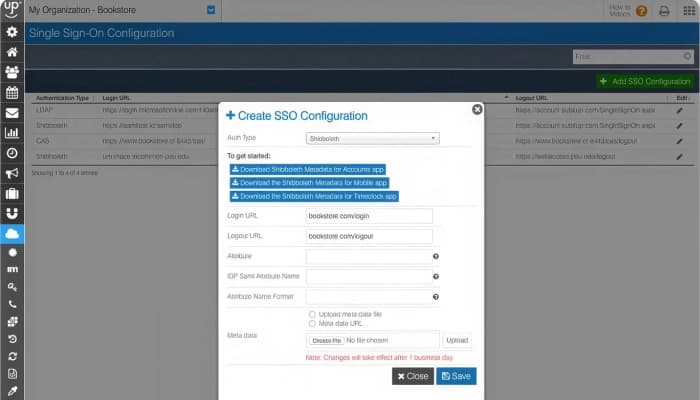
- Azure AD
How Does SubItUp Work?
Here's how you can get started with SubItUp software:
- Create your account and select your industry during setup
- Define positions, the job qualifications required for staff to work specific shifts
- Add your employees and assign them to their qualified positions
- Add managers and set selective or unrestricted access permissions
- Set employee availability and configure shift-block preferences
- Auto-generate your first schedule, then fine-tune it and copy it forward for recurring weeks
- Publish the schedule so all employees can view it
- Schedule a personal training session with a dedicated specialist to fine-tune your account setup
Who Is SubItUp For?
The software is primarily built for organizations with large, shift-based, or part-time staff including:
- Higher education and campus departments
- Sports, events, and entertainment
- Franchises and retail
- Healthcare and public safety
- Government and municipalities
SubItUp Use Cases
Based on our analysis of SubItUp features, capabilities and market positioning, we have identified key scenarios where this software is a strong fit:
Colleges Scheduling Part-Time Students Around Changing Class Times
Higher education departments (like Stony Brook University campus recreation or Liberty University student unions) employ part-time students. These students usually have complex, ever-changing class timetables or exam blocks, which makes it impossible for employers to maintain fixed shift patterns. The software cross-references individual class timetables with departmental staffing needs. It automatically blocks managers from scheduling a student during a lecture and lets students trade shifts on their phones when unexpected exams pop up.
Event Venues Staffing Games And Concerts With Fluctuating Headcounts
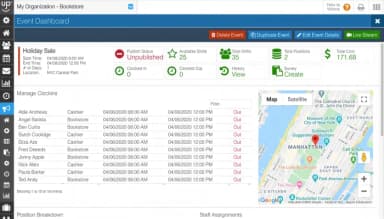
Sports arenas, concert venues, and event coordinators (like Race Day Events) do not operate on static 9-to-5 models. They require custom staff deployments (ushers, ticket-takers, parking attendants, and security) that fluctuate depending on individual booking dates, variable athletic calendars, and ticket sales. Schedulers connect SubItUp directly to external Event Management Systems (EMS) or tournament platforms like IMLeagues. When a new football game or concert is booked, the software reads the reservation parameters, autogenerates the required shift positions, surveys workers for immediate availability, and builds a dedicated event staff roster automatically.
Universities Managing Federal Work-Study Funding Caps
Universities utilizing Federal Work-Study funding face strict regulatory caps on the maximum hours or total dollar amounts an individual student can earn per semester. Accidentally over-scheduling a student leads to severe institutional compliance penalties or budget overages. But the software tracks individual financial limits in real time. It automatically blocks a student from picking up a shift—or clocking in—the exact moment they are projected to breach their legal funding cap.
Gyms And Studios Staffing On-Demand, Appointment-Only Instructors
Gyms, aquatic centers, and tutoring programs employ specialized staff (like personal trainers, private swim coaches, or peer tutors) who operate on an on-demand, appointment-only basis. And managers who belong to these programs cannot manually track every single ad-hoc private booking. SubItUp allows qualified instructors to independently build their own shifts and private sessions within a pre-approved window. The system caps their minimum and maximum self-assigned hours, automatically opening up the slot for client booking while maintaining labor budget boundaries.
Is SubItUp Right For You?
If you are a university department director, event venue manager, or supervisor overseeing a flexible, hourly workforce, then SubItUp is the right pick for you. It provides you with automated conflict resolution, self-service shift swapping, and integrated time-tracking tools. However, if your operational schedule is predictable, static, and managed within a single department, then it may fall short.
The platform is designed primarily around shift-based, hourly, or student workforces rather than traditional salaried corporate office environments. On the security side, SubItUp is fully compliant with ADA Section 508 standards. That means buyers are protected against discrimination claims. So, visually or physically impaired employees can safely use the scheduling app, keeping the organization legally insulated.
Still not sure if SubItUp is the right choice for you? Contact us at (661) 384-7070, and our team will help you decide based on your requirements.
SubItUp Features
Employee Scheduling
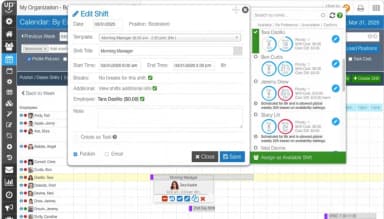
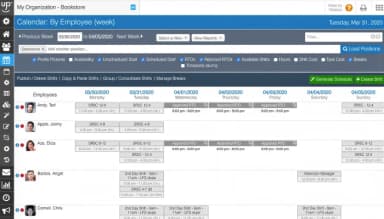
It includes Social Scheduling™ for employee-led shift trades, automated conflict-free shift template generation, and better availability tracking to collect exact hours staff can work. Besides, it has event scheduling and shift rotations for repeating and emergency-pattern shifts.
Project Management
This module combines task allocation and the employee schedule so that the work continues without interruptions. It allows managers to allocate and track actual progress of the physical tasks or projects for the particular employee depending on his/her presence at the workplace. It will most benefit operations supervisors because all the staff members will have their daily tasks delivered without a need for manual micro-management.
AI Digital Worker
SubItUp has its own AI module that runs on the unique FlowAI framework. It works all the time on its own managing the heavy load of administrative work, identifying the areas of operation that may be improved, pointing out the issues concerning labor regulations, educating managers about the correct ways of working.
Time Clock Software
It is a web-based, integrated time tracking system that connects directly to the active employee schedule. It tracks employee clock-ins and supports restricted entries (preventing early clock-ins). And if there is a need to track remote employees using GPS, and if the internet connection is bad, the system can still be used in an offline mode. That completely eliminates 'buddy punching’ (fraudulent clock-ins) and stops employees from working unapproved, off-schedule hours.
Back-Office And HRIS Integrations
The software has automated data export loops, which syncs finalized time and labor costs directly into core payroll, HR, and accounting systems like ADP, Oracle PeopleSoft, and so on. It eventually reduces the administrative burden of running company-wide payroll by wiping out manual data entry and human rounding mistakes.
Pros And Cons of SubItUp
Pros
Users like being able to manage shift swap and drop requests themselves
Schedule imports help reduce the time spent creating shifts manually
Email reminders help employees keep track of upcoming shifts
Mobile clock-in and clock-out support employees working remotely
Cons
Some users find the administrator interface dated and less user-friendly
Users have reported mobile app glitches, crashes, and slow performance
SubItUp Pricing
Simplify | Unite | Empower |
|---|---|---|
$1.23 per employee per month | $3.05 per employee per month | $5.08 per employee per month |
|
|
|
Disclaimer: The pricing details were last updated on Sep 25, 2026 from the vendor's website. Please contact us for a tailored pricing list.
SubItUp Reviews
Total 5 reviews
4
All reviews are from verified customers
Rating Distribution
5
Stars20%
4
Stars60%
3
Stars20%
2
Stars0%
1
Stars0%
Share your experience
Accounting, N/A employees
Less than 6 months
“Keeps us organized”
Pros
Having everyone's availability in one place is the biggest plus. It keeps scheduling organized, helps avoid shift conflicts and even manages swaps automatically which saves a lot of time. The whole process feels fair, transparent and much easier to handle.
Cons
The interface can feel a bit cluttered and it may take an extra moment to locate the exact tab or option Im looking for. It's not a major problem but a cleaner layout would make the system even more convenient to use.
Rating Distribution
Ease of use
10
Value for money
10
Customer Support
10
Functionality
10
Non-Profit Organization, N/A employees
Less than a year
“Conflict detection is a stand out feature”
Pros
It is very simple to use and the conflict detection is the feature I value most. It helps me prevent issues with scheduling and stay in line with contractual rules and agreements.
Cons
There is a slight learning curve specially when it comes to understanding all of the customization options available.
Rating Distribution
Ease of use
8
Value for money
9
Customer Support
8
Functionality
8
Sports, N/A employees
More than a year
“Made scheduling easy”
Pros
Scheduling with it is really simple. The reminders it sends to staff about an hour before a shift starts are especially useful, whether someone forgot or picked up the shift later. It also helps a lot that employees get notified when there are shift changes.
Cons
PTO feature is the part I don't care for. It seems to assume PTO is automatically approved but in our organization we have to make sure no more than three people per department are out on PTO at the same time.
Rating Distribution
Ease of use
9
Value for money
8
Customer Support
8
Functionality
8
Frequently Asked Questions
Does SubItUp have a mobile app?
Yes, SubItUp offers a dedicated mobile app for both iOS and Android.
What level of support does SubItUp offer?
The vendor offers support via phone and online channels, along with guided onboarding and dedicated personal training.
What types of pricing plans does SubItUp offer?
SubItUp price starts at $1.23/employee/month for the Simplify plan, with a 10-employee minimum. The Unite and Empower plans cost $3.05/employee/month and $5.08/employee/month, respectively. Contact us for a custom SubItUp price quote.
Does SubItUp offer an API?
Yes, SubItUp offers a full API.
What language does SubItUp support?
The software supports the English language.
What other apps does SubItUp integrate with?
The vendor integrates with several payroll and HR platforms, including ADP, QuickBooks, Oracle PeopleSoft, Workday, and Paychex.
Who are the typical users of SubItUp software?
Typical users of SubItUp include organizations in sports and entertainment, higher education, retail, healthcare, private recreation and aquatics, and government and municipalities.