


Teamtailor
Last Updated

Key Takeaways
Generated from the text of customer reviews
Teamtailor is a recruitment and applicant tracking platform. It is used by hiring teams across all business sizes to manage candidates, job postings, and hiring workflows. Its website chat features support direct communication with candidates. However, the career page offers limited customization options. Recently, Teamtailor has updated career sites to work with AI agents like Comet, ChatGPT, Perplexity, and Claude, to enable candidates to access job postings across AI-powered platforms.
Our Verdict
The software works particularly well for small and mid-sized talent acquisition teams managing regular hiring across several departments. Users generally rate its value for money highly, but some enterprise features come at an additional cost. We recommend Teamtailor for teams that will actively use its career site, automation, candidate database, and collaboration tools, rather than those looking only for basic applicant tracking.
Teamtailor Specifications
- Recruitment and Applicant Tracking
- Employee Onboarding
- Workforce Analytics
- Alerts/Notifications
What Is Teamtailor?
Teamtailor is a cloud-based applicant tracking system (ATS) that helps businesses manage hiring from job posting to candidate onboarding. It addresses common hiring problems many companies face. This includes scattered candidate information, manual follow-ups, and limited visibility into where applicants are in the recruitment process.
The platform brings together job advertising, candidate management, communication, and recruitment workflows in one system. For hiring managers and recruitment teams, this makes it easier to track open positions and monitor candidate progress. This results in hiring decisions that are made using a clearer view of the recruitment pipeline.
What Is Teamtailor Best For?
The platform is best known for its candidate management capabilities. It enables hiring teams to manage their candidates end-to-end. From the moment an application lands in the system, 'AI Suggestion' marks potential top applicants. Recruiters can rate candidates, hide personal information to reduce unconscious bias, and compare candidates side-by-side based on their skills and experience. Once a candidate is selected, custom job offer letters can be sent with one click.
How Much Does Teamtailor Cost?
Teamtailor pricing starts at roughly $199 to $229 a month for small teams, but that entry-level figure is just the starting point. The platform offers custom quotes based on company size and hiring volume. So, the number you actually pay depends on your usage. Usually, the pricing comes around the following figures based on company size and hiring operations:
- Small Business: $199-$229/month
- Mid-Sized Business: $500–$1,250/month
- Enterprises: $2,500-$6,000/month
Other than base subscription, buyers should also keep an eye on annual contract renewals that usually come with increases of 3% to 8%.
Teamtailor generally receives positive feedback for its value for money, with users often considering the features and ease of use worth the cost. However, since pricing is not publicly listed, buyers need to request a custom quote before knowing their actual cost. Some reviews also suggest that the price can become harder to justify as hiring needs and team size grow.
Disclaimer: Pricing references are based on publicly available third-party information and industry benchmarks. Actual costs may vary.
Teamtailor Integrations
The software is integrated with more than 500 integration partners, including:
How Does Teamtailor Work?
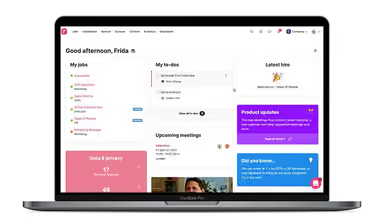
Once logged into Teamtailor, you will find a dashboard that serves as the center for all recruitment processes and activities. Here’s a step-by-step guide to work through the platform:
- Navigate to the job section to create, edit, or view job postings
- Customize job ads and manage candidate applications from this portal
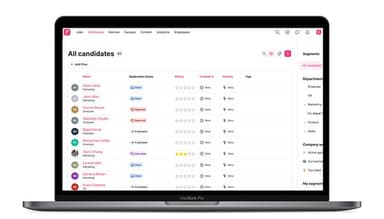
- Access the candidate section to track candidates through your customized recruitment process and pipeline
- Use the team section to add or manage team members, assign roles, and collaborate on the process of hiring candidates
- Visit the analytics section for insights and reports on your hiring performance and metrics
Who Is Teamtailor For?
The platform is suitable for businesses of all sizes, operating in many industries and sectors, including:
- Information technology
- Fintech
- Real estate
- Financial services
- Marketing and advertising
Teamtailor Use Cases
Based on our analysis of user reviews and Teamtailor's current capabilities, we have identified key scenarios where this software is a good fit:
Talent Acquisition Teams Managing High-Volume Pipelines
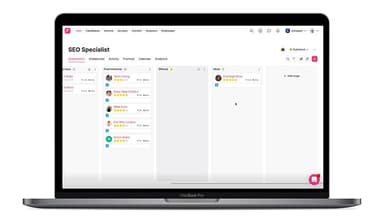
It becomes difficult to track each candidate's stage (screened, interviewed, offer pending) once hiring teams start getting applications from multiple job postings. They need a centralized dashboard for proper tracking. Teamtailor's pipeline view lets recruiters see where each candidate stands. It also moves them through different stages of hiring without losing track of older applications. For talent acquisition teams managing several open roles at once, this centralized candidate sorting becomes extremely useful.
Lean Recruiting Teams Automating Repetitive Work
Recruiters often lose hours doing simple, repetitive tasks. This includes sending status updates, scheduling follow-ups, and moving candidates between stages. Teamtailor's automation triggers can handle recruitment actions and candidate communications automatically. Teamtailor users often give positive feedback on this feature, especially smaller or stretched-thin recruiting teams that use the platform to reduce manual follow-up work.
Employer Branding Teams Building A Careers Site
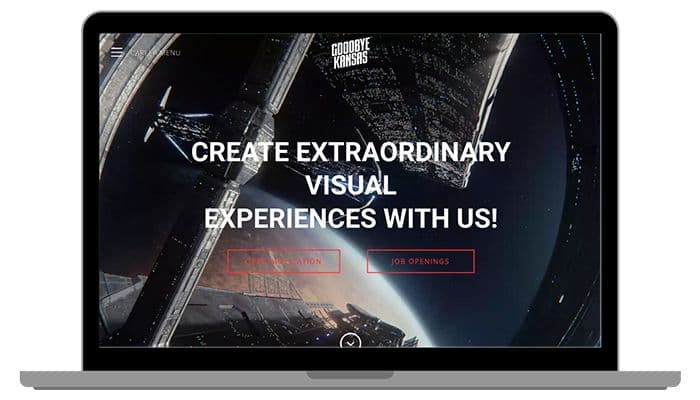
Companies trying to attract candidates can use a strong careers page to communicate their culture and bring in applicants. Teamtailor's built-in career site builder lets employer branding teams create and maintain this page within the same platform used to manage applications. This works well for companies that want their careers site and recruitment process managed in one place.
Recruiters Keeping Candidates Engaged Through the Hiring Process
Candidate drop-off can happen when applicants receive few updates or have no easy way to ask questions during the hiring process. Teamtailor supports ongoing communication within its platform. This includes a built-in job chat feature that lets candidates engage with hiring team. One user mentioned that communicating back and forth with candidates felt easier on Teamtailor than with tools they had used before. This review suggests that this is a practical strength for teams focused on candidate communication.
Hiring Managers Collaborating On Candidate Evaluation
Hiring decisions rarely rest with recruiters alone. Hiring managers and other team members often need to review candidates and share their feedback. Teamtailor's shared candidate notes let them take part in the evaluation process without having to manage the entire recruitment platform. This collaborative feature makes the software useful for companies where recruiters and hiring managers share responsibility for hiring decisions.
Growing Companies Sourcing Candidates Across Multiple Channels
Relying on a single job board can limit the number of candidates a company reaches, particularly for competitive roles. Teamtailor supports different sourcing channels, including job advertising sites, LinkedIn, employee referrals, and talent pools for future openings. Bringing these sources into one system also gives recruiters a single place to track candidates and see where applications are coming from.
Is Teamtailor Right For You?
Teamtailor may be worth considering if you need an ATS that also includes tools for employer branding and candidate communication. Companies such as Porsche, Veoneer, Greenpeace, and Ponsse use the platform to manage their hiring operations.
Security side is another consideration for companies handling sensitive candidate information. On that front, the platform is GDPR compliant and holds ISO 27001and 27701 certification along with SOC 2 Type 2 standards. The software's extensive add-ons, including requisitions, enterprise calendar, and job offer approvals, makes it scalable for growing companies as well.
Still unsure whether Teamtailor is the ideal platform for your requirements? Contact us at (661) 384-7070, and we will help you make a well-informed decision.
Teamtailor Features
AI Co-Pilot
AI Co-pilot adds several AI-based tools to Teamtailor's ATS. It can summarize recorded video meetings, assess candidates against defined criteria, and find matching candidates from the existing talent pool. It also drafts job ads and suggests interview questions based on the role. After an interview, it can answer interview kit questions using the job description and recorded conversation.
Analytics And Reporting
Analytics and Reporting gives recruitment teams a view of metrics such as time-to-hire, sourcing performance, funnel conversion, apply rate, and candidate drop-off. Users can create custom snapshots, use charts to see where candidates leave the hiring process, and identify which sources produce the most hires. Reports can also be exported or shared across the organization.
Recruitment Automation And Triggers
Recruitment Automation lets teams set actions to run automatically when specific events occur. For example, Teamtailor can send a thank-you email after an application or remind a hiring manager to review a candidate. Recruiters can also automate scheduled messages, reference requests, interview scheduling, stage changes, surveys, comments, to-dos, and reminders, reducing the amount of manual follow-up.
Career Button
The 'Career Button' adds a floating button to a company's website to increase its traffic. It allows visitors to browse job openings, team profiles, and departments without leaving the page. Admins can choose its position, color, and language. It displays the three latest jobs, employees, and departments, with links to the full careers site.
Enterprise Calendar
This feature connects employee calendars to Teamtailor without requiring each employee to authorize their calendar individually. Admins control which calendars are connected and what information is shared. It supports Office 365/Exchange and Google Workspace. Users can also book meeting rooms and video calls through Teams, Meet, Zoom, and Teamtailor Video. This gives recruiters one place to manage interview scheduling.
Candidate Onboarding
Candidate Onboarding manages the steps that begin after a candidate is marked as Hired. Admins can create templates with messages, forms, tasks, and documents, then customize them by role, location, or department. New hires receive a dashboard where they can complete tasks, sign documents, and track progress. Teamtailor can also sync onboarding information with supported HR systems.
Pros And Cons of Teamtailor
Pros
Makes it easy to find and reuse candidates from the database
Automates repetitive recruitment tasks with customizable triggers
Lets recruiters build and manage career pages without technical skills
Keeps candidate communication in one place through website chat
Makes it easy to post jobs across multiple job boards
Cons
Customizing workflows, permissions, and deeper analytics may require workarounds
Candidate notes lack flexible sharing controls
Video-call integrations don’t work sometimes
Teamtailor Reviews
Total 15 reviews
4.1
All reviews are from verified customers
Rating Distribution
5
Stars13%
4
Stars87%
3
Stars0%
2
Stars0%
1
Stars0%
Share your experience
Education, 51-100 employees
Less than a year
“The ultimate hr tool”
Pros
I find it really easy to use, and the setup and maintenance come with simple technical instructions that make it hassle-free.
Cons
Sometimes navigating to the area you need can be a bit tricky, and it's not always simple.
Rating Distribution
Ease of use
6
Value for money
4
Customer Support
8
Functionality
8
Healthcare, 11-50 employees
Less than 6 months
“A great new product”
Pros
Loved how user-friendly it is. It has a modern feel and their support team is always super helpful towards us.
Cons
It somehow feels like a newer tool and as you set it up, it becomes clear that some key features are missing.
Rating Distribution
Ease of use
10
Value for money
10
Customer Support
10
Functionality
8
Media, 500+ employees
Less than 6 months
“very advanced and user-friendly”
Pros
It's super easy to use and customize. I love the colors and GIFs. The sales team and account manager have been fantastic to work with.
Cons
The scheduling feature could use some improvement. Some parts feel a bit clunky, and the "Connect" feature can't be turned off. Also, emails sent through the system come from Teamtailor rather than your work email, which can be a bit confusing.
Rating Distribution
Ease of use
8
Value for money
9
Customer Support
9
Functionality
8
Frequently Asked Questions
Does Teamtailor offer an API?
Yes, Teamtailor offers an API.
What language does Teamtailor support?
Teamtailor software supports more than 50 languages, including English, Spanish, Swedish, Chinese, French, Italian, and more.
What other apps does Teamtailor integrate with?
Teamtailor integrates with 500+ third-party apps including 2Secure, Adobe Sign, Ascend, CareerBuilder, DevSkills, WeSuggest, Workday, and many more.
Does Teamtailor have a mobile app?
Yes. Teamtailor offers a dedicated mobile app.
What types of pricing plans does Teamtailor offer?
Teamtailor pricing is estimated to range between $199 to $229 a month for small teams with monthly subscription fees reaching up to $6,000 for enterprises. Get a detailed Teamtailor cost breakdown to make an informed decision.
Who are the typical users of Teamtailor?
Teamtailor is used by HR teams in businesses of all sizes across industries such as IT, healthcare, fintech, real estate, and more.
What level of support does Teamtailor offer?
Teamtailor offers customer support options by email, phone, and live chat.