


Last Updated
Overview
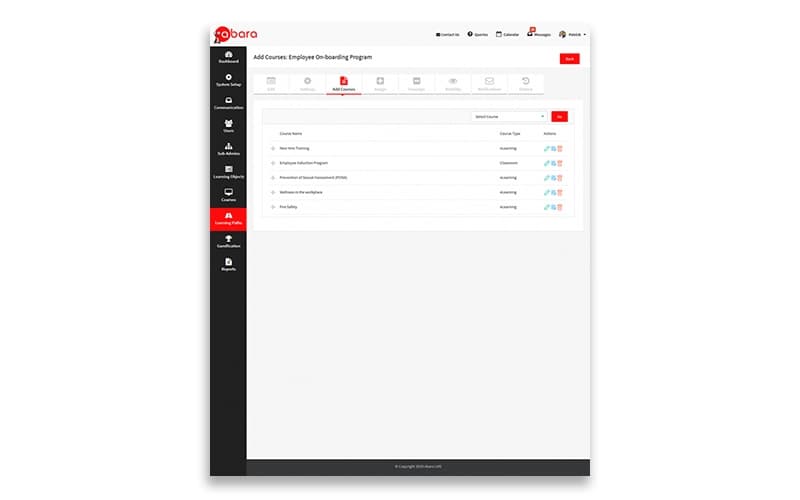
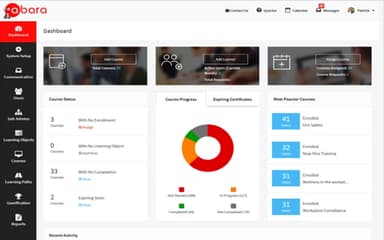
Challenges in managing workforce training hinder organizational growth. Traditional LMS systems fall short in flexibility and efficient administration. Enter Abara LMS, a cloud-based, mobile-first solution offering streamlined training scalability, simplified administration, and robust workforce development. Explore Abara features now to enhance the company’s workforce productivity.
Overall Rating
Based on 12 users reviews
4.7
Rating Distribution
Positive
100%
Neutral
0%
Negative
0%
Starting Price
$450
per month
Abara LMS Specifications
- Activity Dashboard
- Asynchronous Learning
- Activity Tracking
- Access Controls/Permissions
Abara LMS Features
Assessment Analytics
This feature enables users to treat assessments as primary learning objects and reuse them across courses. The advanced analytics functionality goes beyond what typical SCORM-compliant LMS systems offer. Abara LMS offers a deeper analysis of close-ended questions.
Advanced Reporting
Abara software enables administrators to track, assess, and monitor learner progress efficiently. It has a powerful reporting capability that generates standard and custom reports. Administrators can also set up advanced reports and apply filters with just a few clicks.
Video Hosting And Playback
A robust video hosting and playback feature promotes video-based learning content. This feature enables users to choose from various methods of adding video-based training content. Moreover, users can effortlessly upload MP4 videos directly from local storage.
White Labelling
The platform maintains a distinct brand identity with white labeling options. Users can customize and brand all aspects of their Abara LMS according to their organization’s needs. The quick access bar lets users manage all the white labeling, branding, and customization.
Automated Administrative Tasks
Abara simplifies the jobs of LMS administrators by automating repetitive and time-consuming tasks such as enrollment, reminders, and notifications. It frees up administrators’ time to focus on other important tasks.
Pros And Cons of Abara LMS
Pros
Hassle-free and truly mobile-first learning experience
SCORM-compliant, allowing for easy integration of SCORM packages
White labeling options for customization and branding
Efficiently track, assess, and monitor learner progress with reporting features
Maintain brand identity with customizable white-labeling option
Cons
Limited customization options
Steep learning curve as per some reviews
Initial set-up may take some time
Abara LMS Pricing
Starter | Growth | Large | Advanced | Enterprise |
|---|---|---|---|---|
$450 per month | $650 per month | $990 per month | $1,450 per month | Custom Pricing |
|
|
|
|
|
Disclaimer: The pricing details were last updated on Aug 21, 2026 from the vendor's website. Please contact us for a tailored pricing list.
Abara LMS Reviews
Total 12 reviews
4.7
All reviews are from verified customers
Rating Distribution
5
Stars67%
4
Stars33%
3
Stars0%
2
Stars0%
1
Stars0%
Share your experience
Dheeraj K.
Small Business, 11-50 employees
“Offer top support”
Pros
Using it is not a hassle, the automation handles a lot of the work and saves us plenty of time and the customer support has been outstanding.
Cons
When it comes to the platform's features, the support team and how quickly they respond, we honestly haven't run into any problems at all.
Rating Distribution
Ease of use
10
Value for money
10
Customer Support
10
Functionality
10
Sandeep S.
Mid Market, 101-500 employees
“everything we needed built in”
Pros
Right from the beginning, the portal already had all the features we needed so there was no need for any customization. Tushar ji has been excellent in understanding our requirements and his explanations and training have been a very good part of the overall experience.
Cons
Since we've only just started working with it, things have been going well so far and I haven't come across any major negatives yet. One area I do feel could be improved is during assessment creation for short-answer questions. If an answer is entered, the auto-checking system should be able to assign marks accordingly. It may seem like a small enhancement but it would still be quite useful and would take the portal a step further.
Rating Distribution
Ease of use
10
Value for money
10
Customer Support
10
Functionality
10
Paul W.
Mid Market, 101-500 employees
“versatile and easy to use”
Pros
Abara LMS is versatile and easy to use. Learners get a really positive experience accessing training on any device which makes it convenient wherever they are. It also scales well, whether you are a small SME or a large international corporate with full enterprise needs. Another strong point is being able to track a learner's training journey from day one through to completion.
Cons
Honestly there are no real drawbacks with the system. The team keeps improving the platform, is always open to suggestions and upgrade ideas and continues to enhance it over time. Their development team is very forward-thinking as well.
Rating Distribution
Ease of use
10
Value for money
10
Customer Support
10
Functionality
10
Frequently Asked Questions
What types of pricing plans does Abara LMS offer?
The software has five pricing plans: Starter at $450 per month, Growth at $650 per month, Large at $990 per month, Advanced at $1,450 per month, and Enterprise with custom pricing. Get a personalized Abara LMS pricing quote for more information about the pricing plans.
Who are the typical users of Abara LMS?
The typical users of Abara LMS include non-profit organizations, coaching and training companies, and customer services and sales teams.
What language does Abara LMS support?
Abara LMS supports several languages, including English, Chinese, French, German, Spanish, Russian, and Japanese.
Does Abara LMS support mobile devices?
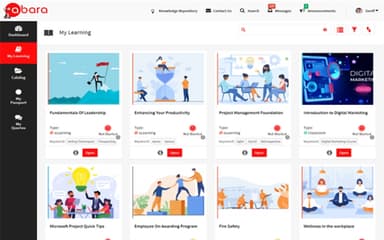
Yes, Abara LMS is accessible on Android and iOS mobile devices.
Does Abara LMS offer an API?
Yes, the software offers an API for its customers.
What other apps does Abara LMS integrate with?
Abara LMS integrates with several third-party applications, including Google Analytics, Zapier, GoToWebinar, GoToMeeting, and GoToTraining.
What level of support does Abara LMS offer?
Abara LMS offers FAQs, forums, a knowledge base, email, a help desk, chat, and phone support options.