


eFront
Last Updated
Overview
Introducing eFront LMS, an adaptable learning management system with a private cloud catering to diverse organizational needs. With features like course management, assessments, certifications, and gamification, it offers comprehensive solutions for effective training programs. Though praised for its intuitive interface, some users note complexity in customization and overwhelming advanced functionality.
Overall Rating
Based on 13 users reviews
4.5
Rating Distribution
Positive
92%
Neutral
8%
Negative
0%
Starting Price
$720
per month
eFront Specifications
- Activity Dashboard
- Asynchronous Learning
- Activity Tracking
- Access Controls/Permissions
What Is eFront?
eFront is an enterprise Learning Management System (LMS) developed by Epignosis. It is built to help organizations plan, deliver, and manage training for employees, customers, business partners, and other groups. Rather than handling training separately across departments or locations, businesses can use eFront to bring their learning activities into one platform. They can organize courses, decide who should have access to them, and adapt the learning environment to suit different audiences. Using the platform, learners can access their assigned training online, while administrators can manage course content and monitor progress.
What Is eFront Best For?
Among different capabilities, eFront stands out for 'TalentCraft', its AI course generator. This feature helps learning and development teams turn existing documents or simple prompts into structured learning material. These include step-by-step guides, images, and multiple-choice assessments based on the course content. Teams can also build courses around an entire subject, with units arranged in a logical learning sequence, rather than preparing every lesson and assessment manually.
This can be useful for enterprises that regularly create employee onboarding, product training, or internal process documentation. That said, TalentCraft-generated content is designed for use within eFront and cannot be exported to other software.
How Much Does eFront Cost?
eFront price starts at $720/month for the Registered plan. It includes 300 registered users and is suitable for simultaneous training usage.
Other plans include:
- Active: $1,600/month
- On-Premises: Custom Pricing
These plans are billed annually. Besides the base subscription cost, users should budget for the following potential expenses:
- TalentLibrary Course Add-On: $3,600/year for 750+ ready-made skills courses
- Data Migration From Another LMS: $2,500 one time if you hire an outside specialist
- Custom Integrations: $5,000 one time for HRIS, SSO, or CRM connections that need developer work beyond the standard integrations
- Custom Development And Customizations: $7,500 one time
- Administrator And Instructor Training: $1,500 one time for external training on advanced reporting and course design
- On-Premises Infrastructure: $12,000/year for servers, backups, and security upkeep, plus about $15,000 one time for installation and deployment
Disclaimer: The pricing is subject to change.
eFront Integrations
eFront integrates with several third-party apps, including:
- Outlook calendar
- Open Sesame
- Math.js
- Braintree
- Google Analytics
How Does eFront Work?
Here’s how you can get started with eFront:
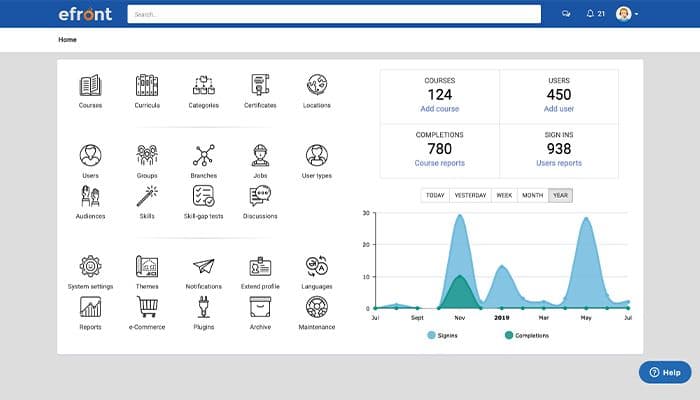
- Log in to the platform and access the main dashboard
- Set up organizational branches, define administrator permissions, and decide how different groups will access their training
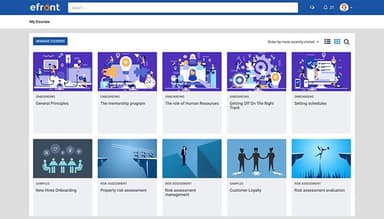
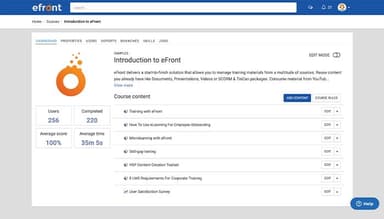
- Create courses using new learning material or existing resources such as documents, videos, and supported e-learning content
- Organize related courses into learning paths or programs so learners can work through the material in a planned sequence
- Assign training to employees, partners, or customers according to their roles, locations, or learning requirements
- Deliver the courses online, allowing learners to access their assigned material and complete the required activities
- Assess learners through quizzes, tests, or assignments, and issue certificates when the relevant completion requirements are met
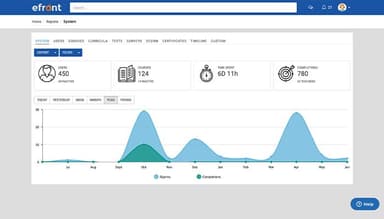
- Review training records and reports to identify incomplete courses, follow up with learners, and determine whether additional training is needed
Who Is eFront For?
eFront suits different businesses operating in different industries and sectors. These include:
- Healthcare
- Education
- Manufacturing
- Retail
- Aviation
eFront Use Cases
According to eFront features and user feedback, it is particularly relevant in the following situations:
HR Teams Onboarding Employees Across Multiple Locations
Organizations onboarding employees across different locations can use eFront's learning paths to arrange introductory and role-specific courses in a planned sequence. HR teams can group relevant material, assign learning paths to new hires, and provide access to the training they need for their roles. This allows employees to work through onboarding content online, while administrators can monitor course completion and learner progress through reports.
Compliance Teams Managing Recurring Training Requirements
Organizations with recurring compliance training requirements can use eFront's Certifications feature to issue certificates and set expiry dates for completed training. Administrators can configure automatic certificate expiration and, where applicable, re-enroll learners in assigned courses when certificates expire or a specified number of days before expiration. Weekly training-not-completed reminders can also notify learners about outstanding courses. Users particularly appreciate how it enables them to create, organize, and track training programs.
Businesses Training Distributors And External Partners
Businesses that need to provide training to external partners can use eFront's multi-tenancy portals to create separate learning environments. It enables administrators to configure branch-specific training and customize the learning experience for different organizational branches. This capability allows businesses to manage training content and access across their organizational structure without maintaining entirely separate LMS installations.
Learning And Development Teams Building Skills Over Time
Learning and development teams can use eFront's learning paths to organize courses into structured training sequences. Administrators can arrange introductory, intermediate, and advanced material so employees can progress through relevant subjects over time. Reports provide access to learner activity and course completion records, which allows teams to review training progress and identify courses that remain incomplete.
Is eFront Right For You?
eFront is a suitable option for organizations that need structured training records and recurring certification management. Its ability to create distinct learning environments is particularly relevant to enterprises with multiple business units or regional offices.
The platform describes several security measures, including encryption for data in transit and at rest, two-factor authentication, IP allowlisting, and protections informed by OWASP guidance. The company also refers to third-party penetration testing and lists GDPR-related information and ISO certifications, including ISO/IEC 27001:2022.
eFront's published customer stories include organizations such as Schneider, Fujitsu, Supermac's, Lenzing, American Water College, Emberin, and Gateway Ticketing.
The EU AI Act is also relevant to businesses planning employee training programs. AI-literacy obligations began applying on February 2, 2025, while the Act's general application date was August 2, 2026, subject to exceptions and transitional provisions. eFront can distribute AI-literacy courses, assess learner understanding through tests and assessments, and maintain training records. These capabilities can support organizations documenting their AI-related training activities.
Still doubtful if eFront is the right fit for you? Connect with us at (661) 384-7070 for further guidance.
eFront Features
Learning Paths
eFront lets administrators arrange related courses into a defined sequence. They can organize learning around employees' roles, individual requirements, or other relevant attributes. This capability gives learners a clearer route through their training. For example, an organization can structure onboarding so that new employees work through introductory material before moving on to role-specific courses.
Certifications
This feature allows organizations to issue certificates when learners complete the required training. Administrators can configure expiry dates and, where applicable, use reminders and re-enrollment to manage recurring requirements. With this capability, eFront gives training teams a way to keep certification-related learning organized and identify learners who may need to renew their training.
Multi-Tenancy
eFront lets organizations represent their organizational structure through separate sub-portals. Administrators can branch the main portal into sub-portals and offer branch-specific training. Each branch can have its own learning environment, which allows organizations to manage training across different parts of their structure while retaining oversight through the central platform.
Reports
The platform helps administrators review learner activity, course progress, and other information recorded in the platform. Depending on the reporting setup, teams can use these records to identify incomplete training, examine activity, and prepare information for internal reviews. eFront also documents audit-log capabilities that can support investigations into recorded platform activity.
White Label
eFront gives organizations options for adapting the learning portal to their own identity. The documented customization options include adding a logo, using a custom domain, and changing the appearance through custom CSS and JavaScript. Businesses can use these settings to present a branded training environment to employees, customers, or external partners.
Pros And Cons of eFront
Pros
Easy to create, organize, and track training programs
Offers flexible course customization and learner management
Helps monitor progress through reports and the gradebook
Supports multiple client portals and large learner groups
Receives regular updates and feature improvements
Cons
Requires technical knowledge for some advanced settings
May require manual correction of SCORM completion statuses
Offers limited gamification and virtual training options
eFront Reviews
Total 13 reviews
4.5
All reviews are from verified customers
Rating Distribution
5
Stars54%
4
Stars38%
3
Stars8%
2
Stars0%
1
Stars0%
Share your experience
Non-Profit Organization Management, 101-500 employees
Less than a year
“Highly customizable LMS !!!!”
Pros
eFront has been an incredibly customizable learning platform for us and setup and daily use have been easy. Since moving over to it, our completion rates for compliance courses have gone up and the complaints we previously had about our LMS have essentially disappeared. Whenever we needed it to handle a specific workflow, automation, course management, managing candidate profiles and even custom reporting, it's been able to do the job. On top of the feature set, the customer and technical support has been genuinely top-tier. For the price, it feels like very strong value for money.
Cons
Notification options do come with some restrictions but the gaps can usually be covered using workarounds like configuring curriculums or creating plugins.
Rating Distribution
Ease of use
10
Value for money
10
Customer Support
10
Functionality
10
Professional Training & Coaching, 11-50 employees
More than a year
“Quite a friendly training portal!”
Pros
This has been extremely easy to manage as an administrator. Our clients, along with their employees, seem to pick it up quickly too, training completion feels user friendly on their end as well. Also, the customer support from my team has been excellent. Whenever I have a question, it gets answered promptly and in a professional, helpful way.
Cons
Only part I haven't fully nailed yet is the notifications. That's likely more on me than the platform since I haven't spent enough time digging into how to set them up the way I want. I'd also appreciate more registration options for in-person events but I suspect a lot of that comes down to me needing to explore how to leverage the existing features more effectively.
Rating Distribution
Ease of use
10
Value for money
9
Customer Support
10
Functionality
9
Insurance, 1-10 employees
More than a year
“Strong scorm support”
Pros
It's really user-friendly and fits our needs well. The team has been responsive and after a few months of trouble with SCORM files and time counting, the issue is now resolved. There's also a fix available for other users and I'm genuinely happy to help contribute.
Cons
We did run into some problems with SCORM files and time counting for a few months but support addressed it and we're past the issue now. A few smaller fixes were also handled by the support team.
Rating Distribution
Ease of use
10
Value for money
10
Customer Support
9
Functionality
10
Frequently Asked Questions
Does eFront support mobile and offline learning?
Yes. eFront software offers mobile apps for Android and iOS, allowing learners to access training from their devices. Courses can be downloaded for offline use, and learning progress syncs when an internet connection becomes available again.
Does eFront support multilingual training?
Yes. eFront's interface is available in 22 languages, and administrators can create translated versions of course content for learners with different language preferences.
Which e-learning content standards does eFront support?
eFront supports SCORM 1.2, xAPI (Tin Can), and LTI 1.3. These standards help organizations use compatible learning content and connect external learning applications with their training environment.
How long does it take to set up eFront?
Organizations can set up eFront and ready to train within one business day. However, this refers to the vendor's stated setup timeframe; the time needed for data migration, custom development, integrations, and internal rollout may vary depending on the organization's requirements.
Can eFront be hosted on-premises?
Yes. eFront offers both on-premises deployment and managed private cloud hosting. With on-premises deployment, organizations can run the platform on their own infrastructure and retain greater control over their data and hosting environment. The managed private cloud option reduces the need for internal teams to handle infrastructure maintenance and storage upgrades.