



Last Updated
Overview
Facing challenges with outdated tools and limited resources impeding professional growth? Juno Journey provides an agile, versatile SaaS platform, facilitating learning experiences and simplifying relevant content creation. It supports a culture of continuous improvement seamlessly. Explore Juno Journey features to enhance your company’s employee productivity.
Overall Rating
Based on 28 users reviews
4.9
Rating Distribution
Positive
100%
Neutral
0%
Negative
0%
Starting Price
Custom Pricing


Juno Journey Specifications
- Activity Dashboard
- Asynchronous Learning
- Activity Tracking
- Access Controls/Permissions
What Is Juno Journey?
Overview
Juno Journey is a cloud-based learning and development (L&D) operations system designed to streamline employee training initiatives for enterprises of all sizes. The software empowers organizations to train, onboard, and engage employees effectively. It offers a host of useful features, such as automation tools, internal knowledge hubs, and a content editor.
Moreover, Juno Journey’s user-friendly interface and advanced suite of tools enable companies to personalize training programs, improve employee performance, and promote continuous learning and growth.
What Is Juno Journey Best For?
Juno Journey software stands out for its flexible and modular interface that can be divided into multiple different products, each designed to optimize a specific aspect of the learning and development journey. This unique approach allows for a tailored experience, catering to the diverse needs of individual learners and organizations.
Juno Journey Pricing
The software offers the following two Juno Journey pricing plans with customized pricing options for each:
- Juno LMS
- Juno LXP
Disclaimer: The pricing is subject to change.
Juno Journey Integrations
The following third-party applications use Juno Journey LMS:
How Does Juno Journey Work?
Here's how you can navigate the dashboard and its features after the installation:
- Log into the Juno Journey with your credentials
- Set up your organization's profile by providing relevant details
- Customize the software to align with your specific training and development needs
- Create and curate training content, including courses, modules, and assessments
- Utilize automation tools to streamline administrative tasks and course management
- Engage employees by delivering personalized learning experiences through Juno LXP
- Track employee progress and performance through analytics and reporting features
Who Is Juno Journey For?
Juno Journey is a comprehensive learning and development solution that caters to organizations of all sizes, including small and medium enterprises. The following industries use Juno Journey software:
- Telecommunication
- Recruitments
- Information Technology
Is Juno Journey Right For You?
Are you looking for a development and learning platform that enhances the flexibility of the learning process and allows for a high degree of customization? If so, Juno Journey might be the perfect fit for you.
It has been recognized for its excellence in the HR software category, receiving the Best HR Software award in 2023. The software prioritizes user safety with features designed to protect your security and help detect and fight spam, abuse, and other activities that violate Juno’s agreements and terms.
Still unsure if Juno Journey LMS is right for you? Contact our customer support team at 661-384-7070, who will help you make the best decision.
Juno Journey Features
Content Editor
Juno Journey empowers users to create, edit, and share training content with ease. It offers several built-in templates that serve as a convenient starting point for instructors and course creators, enabling them to develop engaging training materials efficiently. Additionally, the content editor seamlessly integrates various resources, media types, and content elements within a single course to enhance the overall learning experience for trainees.
Customizable Learning Paths
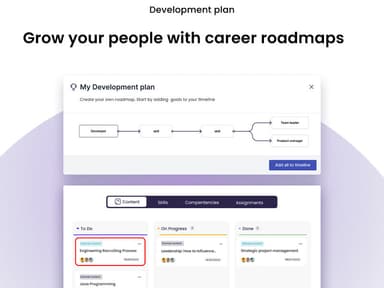
This feature enables organizations to create personalized learning journeys tailored to their employees' needs. Administrators can design based on individual or group-specific goals, ensuring a structured and targeted development journey.
Assessment Tools
Juno Journey’s LMS software features powerful assessment tools for creating and managing assessments in training courses. These tools enable the design of quizzes and exams to evaluate trainee comprehension. With customizable options, scoring systems, and feedback features, organizations can effectively measure the impact of their training initiatives.
Reporting And Analytics
The platform offers reporting tools, widgets, and dashboards that provide real-time data insights into employees’ progress. It enables organizations to make informed decisions and adjustments to their training processes based on performance metrics, completion rates, and learner engagement.
Built-In Templates
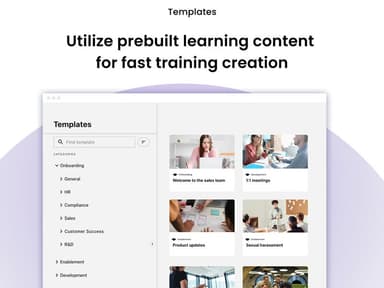
This learning management system comes equipped with a library of built-in templates that expedite the course creation process. These templates provide pre-designed structures and layouts, saving time and effort in building training content from scratch. Administrators can easily customize these templates to match their organization's branding and specific training requirements.
Pros And Cons of Juno Journey
Pros
Prompt and reliable assistance enhances user experience
Tailored recommendations for individual goals and skills
Access to a wide array of courses and materials for self-paced learning
Ability to create tailored content flows for employees' development
Intuitive dashboard for easy navigation and engagement
Cons
Initial setup might require guidance due to intricacies
Some users may find it takes time to fully grasp all the features
Customization options can be improved, according to some reviews
Juno Journey Pricing
Juno LMS | Juno LXP |
|---|---|
Custom Pricing | Custom Pricing |
|
|
Disclaimer: The pricing details were last updated on Sep 25, 2026 from the vendor's website. Please contact us for a tailored pricing list.
Juno Journey Reviews
Total 28 reviews
4.9
All reviews are from verified customers
Rating Distribution
5
Stars86%
4
Stars14%
3
Stars0%
2
Stars0%
1
Stars0%
Share your experience
Telecommunications, 101-500 employees
“Provide better visibility”
Pros
Keeping track of learning budgets and credits has become much more manageable with Juno Journey. It saves us a lot of time when we need to allocate budgets across different teams and it's simple to monitor how learning credits are being used throughout the company. We now have much clearer visibility into our overall learning spend which makes planning and decision-making a lot more informed. It's also been really encouraging to see employees making better use of their learning credits.
Cons
It handles our budget and credit management needs well overall, though I'd still love to see a more customizable dashboard.
Rating Distribution
Ease of use
10
Value for money
10
Customer Support
10
Functionality
10
Mid Market, 101-500 employees
“rich catalog and good UX”
Pros
There's a wide variety of content available, with a strong catalog of courses and the UX and search experience are both very good.
Cons
One issue came up when I tried to pay for some discounted Udemy courses. The price in my local currency on Udemy (ILS) didn't match the USD price shown in it. Though the support replied quickly which I liked but the problem still wasn't solved and I didn't get any follow-up afterward. It was also a little confusing to understand how to redeem the voucher and I'd prefer a more proper process maybe even a simpler way to copy the credit card details into Udemy.
Rating Distribution
Ease of use
7
Value for money
7
Customer Support
7
Functionality
8
Mid Market, 101-500 employees
“career growth with endless course options”
Pros
I like the fact that there's a huge range of courses and resources available which lets me look through and compare different options before deciding on one. That flexibility has really helped me stay focused on my career development.
Cons
It would be even better if there were more social features included.
Rating Distribution
Ease of use
10
Value for money
10
Customer Support
10
Functionality
10
Frequently Asked Questions
Does Juno Journey offer an API?
No, Juno Journey does not offer an API.
What language does Juno Journey support?
Juno Journey supports English and French languages.
What other apps does Juno Journey integrate with?
Juno Journey integrates with Slack, Google Drive, HiBob, Okta, and Microsoft Azure.
Does Juno Journey support mobile devices?
No, Juno Journey does not support mobile devices.
What types of pricing plans does Juno Journey offer?
The software has two pricing plans with customized pricing options for each: Juno LMS, and Juno LXP. Get a personalized Juno Journey cost per your company’s needs and size.
Who are the typical users of Juno Journey?
Typical users of Juno Journey include information technology, recruitments, and telecommunication industries.
What level of support does Juno Journey offer?
Juno Journey offers support options via email, a help desk, chat, FAQs, forums, and a knowledge base.
Does Juno Journey offer a free version?
No, Juno Journey does not offer a free version.
How does Juno Journey help companies onboard and retain employees?
Juno Journey assists companies in onboarding new employees by providing an agile and versatile platform that facilitates personalized learning experiences. It simplifies the creation of relevant content, making the onboarding process more efficient.