


LearnWorlds
Last Updated
Key Takeaways
Generated from the text of customer reviews
LearnWorlds is a cloud-based LMS for businesses to create and manage online training programs. Training providers, education teams, and learning businesses commonly use it. Users value its course creation tools and customization options, though some find the design editor less flexible. The platform has recently launched the ‘Sales Analytics’ feature for tracking revenue and subscription performance.
Our Verdict
LearnWorlds suits training businesses and teams that need substantial control over course design, learner experiences, and academy management. Its pricing is reasonable for the functionality provided, though smaller organizations may find it costly. We recommend it for businesses seeking an LMS that combines learning delivery with academy management and online course sales.
Overall Rating
Based on 21 users reviews
4.8
Rating Distribution
Positive
90%
Neutral
10%
Negative
0%
Starting Price
$29
per month

LearnWorlds Specifications
- Activity Dashboard
- Asynchronous Learning
- Activity Tracking
- Access Controls/Permissions
What Is LearnWorlds?
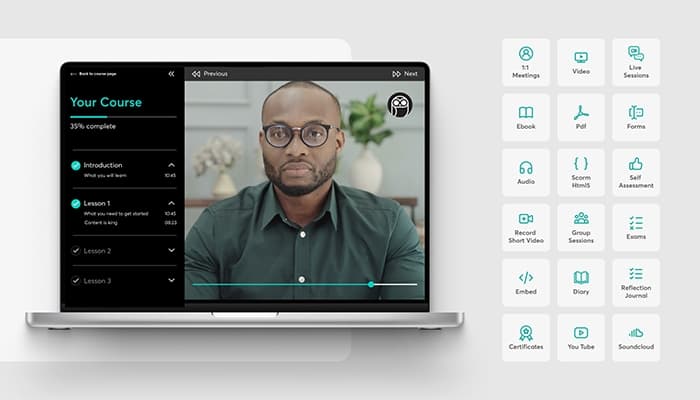
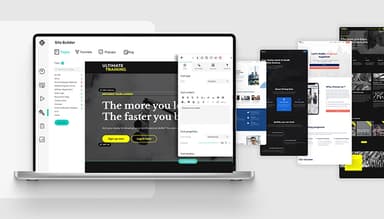
LearnWorlds is a cloud-based Learning Management System (LMS) for training businesses, coaching companies, and learning teams that run programs through a branded online academy. Teams can utilize its interactive videos, eBooks, live sessions, assessments, certificates, and SCORM content to create courses. Furthermore, the platform supports structured learning paths. It also includes a drag-and-drop site builder for shaping the academy website and course pages around the organization’s brand.
Beyond course delivery, it provides commerce tools for businesses that sell training through courses, memberships, subscriptions, or other paid learning programs.
What Is LearnWorlds Best For?
One of LearnWorlds’ standout features is its Interactive ‘Video Editor’. It lets trainers place questions, buttons, hotspots, transcripts, and chapter markers directly inside video lessons. The editor also tracks clicks, rewatches, and drop-off points, giving teams a clearer picture of how learners respond to each video. This removes the need to rely on separate quizzes or completion data to judge engagement.
How Much Does LearnWorlds Cost?
LearnWorlds price starts at $29/month + $5/paid enrollment for the Starter Plan. Key features included in this plan are 1 admin, 1,000 active learners/month, 300 AI credits/month, 24/5 email support, AI course builder, and course hosting on a personal domain. Other available plans include:
- Pro Trainer: $99/month
- Learning Center: $299/month
- Corporate: Custom pricing
The vendor offers a 30-day free trial as well.
In addition to the base fee, the organization should also factor in the following additional costs:
- Payment Gateway Processing Fees: 2.9% + $0.30/transaction
- Branded Mobile App Add-On: Roughly $149/month, plus a one-time setup cost of $1,000-$2,000
- VAT For Eu-Based Accounts: 20-25% added to the subscription for customers without a valid EU VAT number
Users generally describe LearnWorlds as reasonably priced for the features and support it provides, with several considering it cost-effective compared to alternatives. Some, however, note that higher-tier plans can feel expensive, particularly for newer buyers.
Disclaimer: The pricing is subject to change.
LearnWorlds Integrations
The LearnWorlds software supports integration with several third-party systems, such as:
How Does LearnWorlds Work?
Once you have logged in to the platform, access the main dashboard and start using its features by following these steps:
- Configure your school settings, branding, language, privacy preferences, and login options
- Design your website through ‘Theme Explorer’ and set up its branding
- Create your first course and add the learning activities you want to include
- Add team members and organize learners into user groups if you're managing multiple teams or departments
- Set up course access or payments based on how training will be delivered
- Test the learner experience before launching the program
- Track course completion and engagement from the dashboard and reports
Who Is LearnWorlds For?
LearnWorlds caters to multiple industries and sectors, such as:
- Healthcare
- Fitness
- Finance
- Nonprofit and NGOs
- Education
LearnWorlds Use Cases
Our analysis of LearnWorlds features and user feedback indicates that this software can be a suitable option for the following key scenarios:
Training Providers Delivering Programs To Corporate Clients
Corporate training programs can involve a mix of self-paced material and instructor-led sessions, which can become harder to manage when each format sits in a different system. LearnWorlds lets training providers combine self-paced content, live sessions, and other course activities within the same program. This is useful when corporate clients need a mix of independent learning and instructor-led training.
Businesses Combining Courses, Website Content, And Community
LearnWorlds can bring a training provider’s website, course content, and community into the same platform. Teams can build and manage these areas together rather than using separate systems for each one. Reviewers highlight the convenience of having the website, classes, and community under one roof.
Team Building Interactive Video-Based Training
Teams can use LearnWorlds to place questions and other interactive elements directly inside video lessons instead of separating the video from its follow-up activity. This gives learners a way to respond as they watch and lets trainers review engagement within the same lesson. User reviews mention that its interactive video features, including quizzes, buttons, and notes, help teams build interactive courses.
Organizations Segmenting Learners For Targeted Communication
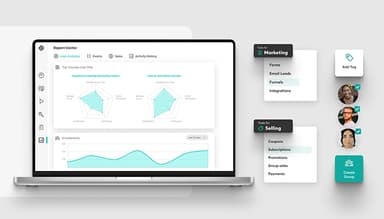
LearnWorlds lets administrators use tags to separate learners by team, customer group, or other criteria. Those tags can then support more focused communication and course actions as the learner base grows. Reviewers have highlighted automatic tagging and targeted messages as useful for managing different groups within an academy.
Is LearnWorlds Right For You?
LearnWorlds is a practical fit for organizations that need to expand training across growing learner bases, multiple teams, or separate client groups. Its multi-client training setup helps businesses manage separate learner groups within the same system. The platform is ISO 27001 certified and supports GDPR and WCAG compliance for learner data.
For organizations that sell training, it provides a built-in e-commerce engine with support for 12+ payment gateways. This gives training providers more flexibility in how they accept payments across different markets.
Accessibility has become more relevant for businesses selling digital training across the EU. The European Accessibility Act took effect on June 28, 2025, introducing broader requirements for covered digital services. LearnWorlds has since expanded native accessibility across parts of the learning experience and continues to work toward closer alignment with WCAG 2.2 Level AA.
Pennylane, Wagamama, and Workable are among the notable organizations that use this platform for customer, partner, or employee training.
Still deciding if LearnWorlds is the right fit for your training program? Call us at (661) 384-7070, and we'll help you figure it out.
LearnWorlds Features
AI Course Builder
The platform generates a structured course outline, along with learning activities and a launch page. It can do so using the material a user already has, such as slide decks, policy documents, or old course modules. The same source content can be used to keep the outline updated as material changes. Teams building a training program from scattered files get a working structure to start from instead of building one section at a time.
Affiliate Management
This program lets businesses create referral campaigns for their courses and training products. Administrators can set commission rates, cookie durations, payout rules, and promotional links for affiliates. The dashboard tracks referrals, sales, commissions, and affiliate performance from the same area.
Bundles And Subscriptions
LearnWorlds groups multiple courses into one package or sets recurring access through subscriptions. Businesses can use monthly, annual, or one-time pricing and add free trials where needed. It gives training providers more choice in how they package and sell ongoing learning programs.
White-Label Website Builder
This feature lets businesses customize domains, logos, fonts, colors, login screens, emails, and course pages. Teams can also set different designs and content for departments, partners, or client groups. This gives organizations more control over how each training environment appears under their brand.
Assessment Builder
The tool creates exams, self-assessments, surveys, and questionnaires with 16+ question types. It supports question banks, randomization, retake rules, automated grading, feedback, and certificates. Teams can use these controls to assess learner knowledge, record results, and manage completion requirements across training programs.
Pros And Cons of LearnWorlds
Pros
Simplifies course setup for new users
Speeds content creation across education teams
Organizes courses into clear learning modules
Makes course editing easy to manage
Supports interactive learning through video activities
Cons
Design editor needs more flexibility
Relies on external tools for certificates
Course groups may require repeated filtering
LearnWorlds Pricing
Starter | Pro Trainer | Learning Center | Corporate |
|---|---|---|---|
$29 per month | $99 per month | $299 per month | Custom pricing |
|
|
|
|
Disclaimer: The pricing details were last updated on Oct 05, 2026 from the vendor's website. Please contact us for a tailored pricing list.
LearnWorlds Reviews
Total 21 reviews
4.8
All reviews are from verified customers
Rating Distribution
5
Stars86%
4
Stars5%
3
Stars10%
2
Stars0%
1
Stars0%
Share your experience
Self-employed Photographer and Videographer, 11-50 employees
“Responsive support with practical solutions”
Pros
Their support team is available around the clock, even on weekends and typically resolves problems within a day. They go beyond basic troubleshooting by researching solutions and suggesting third-party integrations that might help. The service feels genuine and personalized. I've noticed the development team regularly rolls out new features based on user feedback which shows they're really listening to what we need.
Cons
Sometimes there's a glitch that pops up but the LW support team usually helps me sort it out pretty fast.
Rating Distribution
Ease of use
10
Value for money
10
Customer Support
10
Functionality
10
Not Specified, 11-50 employees
“Perfect coaching solution”
Pros
After wasting tons of time and money on two other popular coaching platforms that left us frustrated, this one is nearly flawless and keeps getting better. Having our own app option was incredibly valuable and the deciding factor for us. Support responds super fast and always goes above and beyond to help. Can't thank them enough!
Cons
The platform has tons of advanced features but there are still some gaps that would really help our workflow. A few essential tools we need just aren't available yet though I'm sure the dev team will address these missing pieces soon.
Rating Distribution
Ease of use
9
Value for money
10
Customer Support
10
Functionality
9
Administrator, 11-50 employees
“Mixed Experience Overall”
Pros
I can build a website, courses and community all in one place at a really reasonable price. After doing extensive research and working with other LMS platforms, I definitely recommend this over the competition. The website builder is outstanding, I created a sleek, modern site in just a few hours with incredible flexibility. Course design is equally impressive with tons of customization options. Having built-in video hosting is fantastic since I dont need Vimeo or other services. The ability to duplicate classes or import sections between courses saves me so much time. The community feature needs polish but I'm confident it'll improve. Having it included means no extra subscriptions to manage and I love how forums integrate directly into each class.
Cons
This platform has some serious quirks that'll test your patience. Photos vanish without warning and the community features are pretty buggy, you can't even respond to comments properly or use hashtags effectively. Students randomly lose the ability to post or comment because of system glitches. The Zoom integration they advertise is misleading. Sure, you can technically run meetings from class pages but the client is so stripped down it's frustrating if your used to actual Zoom functionality. Their calendar is useless for managing multiple recurring classes, I had to work around it by embedding an external calendar that links to my pages.
Rating Distribution
Ease of use
7
Value for money
8
Customer Support
10
Functionality
7
Frequently Asked Questions
Does LearnWorlds offer an API?
Yes, it provides an API.
What language does LearnWorlds support?
LearnWorlds supports several languages, including English, Chinese (Traditional), Danish, Dutch, Estonian, and French.
What other apps does LearnWorlds integrate with?
The platform integrates with various third-party applications, such as Quaderno, Calendly, Stripe, Zendesk, HubSpot, and Zoom.
Does LearnWorlds support mobile devices?
Yes, it has a dedicated mobile application for Android and iOS.
What types of pricing plans does LearnWorlds offer?
The vendor offers four pricing plans: Starter ($29/month), Pro Trainer ($99/month), Learning Center ($299/month), and Corporate (Custom Pricing). You can also request a personalized LearnWorlds cost today.
Who are the typical users of LearnWorlds?
The platform is mainly used by training providers, online course creators, educational institutions, coaches, and businesses.
What level of support does LearnWorlds offer?
LearnWorlds provides 360° support through its help center, along with phone, email, knowledge base, and live chat support.