


TeacherZone
Last Updated
Key Takeaways
Generated from the text of customer reviews
TeacherZone is lesson and class management software used by studio owners, administrators, and instructors, particularly in music and other skills-based education. Users often praise its ease of use and scheduling, while some report slow performance. TeacherZone recently updated its student app, which supports class chat, file sharing, and project discussion.
Our Verdict
TeacherZone works best for growing lesson-based studios and schools managing multiple instructors and students. It suits organizations that need to coordinate administration while keeping students engaged between classes. Pricing is reasonable for small multi-teacher schools. We recommend it for growing music schools and performing arts studios with several instructors and recurring lessons.
Overall Rating
Based on 12 users reviews
4.6
Rating Distribution
Positive
100%
Neutral
0%
Negative
0%
Starting Price
$99
per month
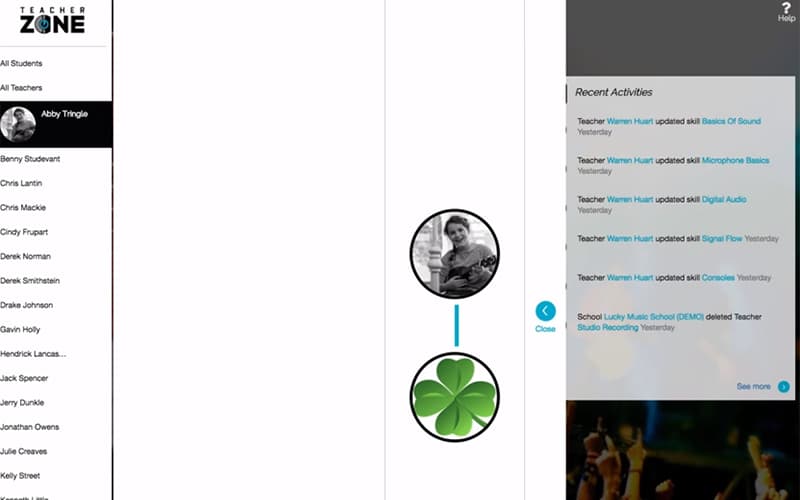
TeacherZone Specifications
- Activity Dashboard
- Asynchronous Learning
- Activity Tracking
- Attendance Tracking
What Is TeacherZone?
TeacherZone is lesson and class management software for studios and schools that need to coordinate teaching and business administration. It brings scheduling, attendance, and billing together with student communication and online learning materials, so owners can manage business tasks alongside instruction. Instructors can share videos and practice assignments for students to use between lessons. This helps studios coordinate classes and continue student practice outside scheduled sessions.
What Is TeacherZone Best For?
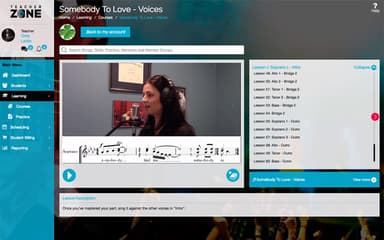
The platform's standout feature is the ‘Multimedia LMS’, which lets teachers create video courses, assign practice work, use multimedia learning tools, and provide virtual lessons. It extends instruction beyond the classroom and gives students materials they can revisit throughout the week. Students can work with supporting media alongside their regular instructions. This gives teachers more flexibility in how they present material and helps learners review content outside scheduled class time.
How Much Does TeacherZone Cost?
TeacherZone pricing starts at $99/month for up to 100 students, under the Growing plan. This plan includes features such as unique logins for every student and teacher, unlimited video hosting, scheduling and billing, etc. The other pricing tiers include:
- Established:$225/monthly
- Enterprise:Custom Pricing
Besides the monthly subscription costs, users should also account for additional charges to consider the total cost of ownership. It includes, but is not limited to, the following:
- Setup And Onboarding: $250-$5,000
- Data Migration:$0- $500
- SMS Beyond Included Time:$10-$50/month
Disclaimer: The pricing is subject to change.
TeacherZone Integrations
The platform integrates with multiple systems and platforms, such as:
How Does TeacherZone Work?
Here's how you can get started with the platform after you have logged in:
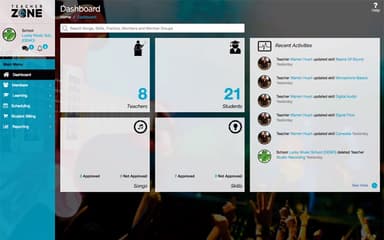
- Set up your branded dashboard, class schedules, and teacher availability through the admin app dashboard
- Create online lessons or video courses, then assign practice tasks to students
- Set tuition plans and recurring billing to collect student payments
- Record attendance and manage makeups, reschedules, and substitute teachers
- Send automated scheduling reminders via built-in SMS and email channels
- Engage students between classes using group messaging and chat features
- Manage lesson reschedules, makeup sessions, and instructor availability directly within the platform
- Connect tools such as Zapier, QuickBooks Online, and video conferencing services
Who Is TeacherZone For?
TeacherZone is suitable for:
- Team sports
- Language programs
- After-school electives
- Educational charities
- Independent schools
- Safety and tactical training
TeacherZone Use Cases
Based on our assessment of TeacherZone features and user feedback, we have identified several situations where the platform is well suited for organizations:
Teachers Using Practice Assignments To Keep Students On Track
Students can lose track of what they are supposed to practice between lessons, particularly when assignments are given verbally or on paper. Teachers can use TeacherZone to create practice assignments that students can access from the app or browser. It keeps a record of assigned work for future reference. Users particularly highlight students’ progress capabilities, as this helps them know whether students are completing their assigned practice and where they may need additional guidance.
Music Schools Using Video Courses To Extend Learning Beyond Lessons
Music schools can use TeacherZone to create video courses and combine them with multimedia learning materials. Instructors can give students additional content to review outside scheduled lessons. It lets students revisit course material for extra practice or to review previously taught concepts. Reviewers have commented on how adding YouTube videos has helped them improve the quality of their lessons.
Teachers Offering Multimedia Assignments So Students Have Ample Resources
Students may need additional guidance between classes rather than waiting until their next scheduled lesson. TeacherZone lets instructors provide multimedia assignments, daily practice reminders, and video-based learning materials. Students can use these resources throughout the week to continue learning beyond the classroom.
Instructors Using Virtual Lessons To Teach Students Remotely
Instructors can use TeacherZone to offer virtual lessons alongside video courses and other digital learning materials. This lets teachers deliver lessons remotely and provide practice assignments and multimedia content through the same platform. Students can access lesson materials and assignments between sessions, giving them a consistent way to continue learning outside scheduled classes.
Is TeacherZone Right For You?
TeacherZone is worth considering for small and growing lesson-based organizations that need to manage multiple teachers, students, schedules, payments, and learning activities. The software addresses flexible online delivery through its multimedia LMS, student app, and virtual lessons.
Its educational data is protected using TLS 1.3, with data stored on AWS and access controlled internally. The platform also states that customer data remains the property of the individual educators or institutions.
The child data privacy is also important for these organizations. The FTC’s amended COPPA Rule requires covered operators to obtain separate verifiable parental consent before disclosing children’s personal information to third parties. It also limits data retention to what is reasonably necessary. TeacherZone data privacy policy outlines its data-retention practices and use of TLS 1.3 for uploaded files. This helps to protect student’s files as they are transferred.
Want to learn more about TeacherZone? Contact us at (661) 384-7070 for detailed guidance.
TeacherZone Features
Video Courses
The platform lets teachers create multimedia courses that students can access as part of their learning. It gives instructors a way to organize instructional material beyond individual lessons. This allows students to revisit course content when practicing between scheduled sessions.
Loop And Slow Videos
TeacherZone allows users to loop videos and slow their playback speed. For skills that require students to observe or repeat a particular movement, technique, or passage, these controls provide a practical way to review difficult sections at a pace that suits the learner.
Virtual Lessons
The platform supports virtual lessons, allowing teachers to offer instruction remotely alongside their other learning materials. It provides schools and instructors another way to deliver live teaching when students cannot attend in person. They can keep virtual instruction within the same learning environment.
Student And Teacher Apps
TeacherZone has dedicated apps that let teachers manage student details, attendance, assignments, messages, notes, courses, and shared files from a phone or tablet. Students can use the platform to access assignments and learning materials. This makes the LMS available outside the classroom.
Points And Badges
TeacherZone includes customizable points and badges that instructors can use to track student progress. Teachers can use preset points and badges or customize their own recognition system. The system helps students track their progress and gives instructors another way to encourage continued practice.
Pros And Cons of TeacherZone
Pros
Helps users curate custom video lessons for students
Simplifies tracking student practice time and learning progress
Automates student scheduling and lesson cancellation workflows
Eases staff payroll reports based on attendance records
Facilitates direct chat communication between teachers and students
Cons
Lesson plan creation can be improved
Some multi-step tasks take time to learn
Student attendance can occasionally be difficult to record
TeacherZone Pricing
Growing | Established | Enterprise |
|---|---|---|
$99 per month | $225 per month | Custom Pricing |
|
|
|
Disclaimer: The pricing details were last updated on Oct 19, 2026 from the vendor's website. Please contact us for a tailored pricing list.
TeacherZone Reviews
Total 12 reviews
4.6
All reviews are from verified customers
Rating Distribution
5
Stars58%
4
Stars42%
3
Stars0%
2
Stars0%
1
Stars0%
Share your experience
E-Learning, N/A employees
Less than 6 months
“flexible billing option”
Pros
I appreciate having the option to set up monthly billing which makes managing finances easier for me.
Cons
It took me a while to learn all the features, as there was a definite learning curve.
Rating Distribution
Ease of use
8
Value for money
10
Customer Support
10
Functionality
10
Hospitality, N/A employees
Free Trial
“Easy for classes and training”
Pros
Using it for classes and training sections has been really simple for me. The app helps me handle tasks efficiently without feeling stressed in my daily work.
Cons
Sometimes the platform runs slowly and it can take a long time to load the files I send.
Rating Distribution
Ease of use
10
Value for money
10
Customer Support
8
Functionality
8
Music, N/A employees
Less than a year
“Automates tasks efficiently”
Pros
I don't like spending too much time on devices, so I love that this tool automates processes, is easy to use and offers amazing support whenever I run into issues.
Cons
I notice occasional slowdowns and glitches which can be frustrating when I'm trying to work efficiently.
Rating Distribution
Ease of use
8
Value for money
8
Customer Support
8
Functionality
7
Frequently Asked Questions
What types of pricing plans does TeacherZone offer?
The vendor offers three plans. These include Growing ($99/month), Established ($225/month), and Enterprise (custom pricing). Get a flexible TeacherZone cost today.
What other apps does TeacherZone integrate with?
TeacherZone integrates multiple third-party systems, including GoTo meeting, Zoom, and QuickBooks Online.
Does TeacherZone offer an API?
No, TeacherZone software does not offer an API.
Who are the typical users of TeacherZone?
TeacherZone is used by music, martial arts, and dance institutes.
What language does TeacherZone support?
TeacherZone supports the English language.
What level of support does TeacherZone offer?
TeacherZone offers support through phone and email.
Does TeacherZone have a mobile app?
Yes, TeacherZone has a mobile app available on iOS and Android devices.