


Pipedrive CRM
Last Updated
Key Takeaways
Generated from the text of customer reviews
Pipedrive CRM is a customer relationship management software used by small to mid-sized sales and revenue teams. Users appreciate it for its visual pipelines, ease of use, and automation. That said, it mostly draws criticism for its lack of reporting depth and advanced customization. It recently added an update that lets users track activities created by automation.
Our Verdict
Pipedrive CRM suits teams across IT, real estate, and banking that are seeking a practical CRM for repeatable sales operations. While the platform is fairly priced for the features and integrations it provides, its add-ons may increase costs. We recommend it for growing sales teams that prioritize usability and prefer consistency over advanced CRM customization.
Overall Rating
Based on 1232 users reviews
4.5
Rating Distribution
Positive
92%
Neutral
6%
Negative
1%
Starting Price
$24
per user per month
Pipedrive CRM Specifications
- Contact Management
- Lead Management
- Opportunity Management
- Sales Forecasting
What Is Pipedrive CRM?
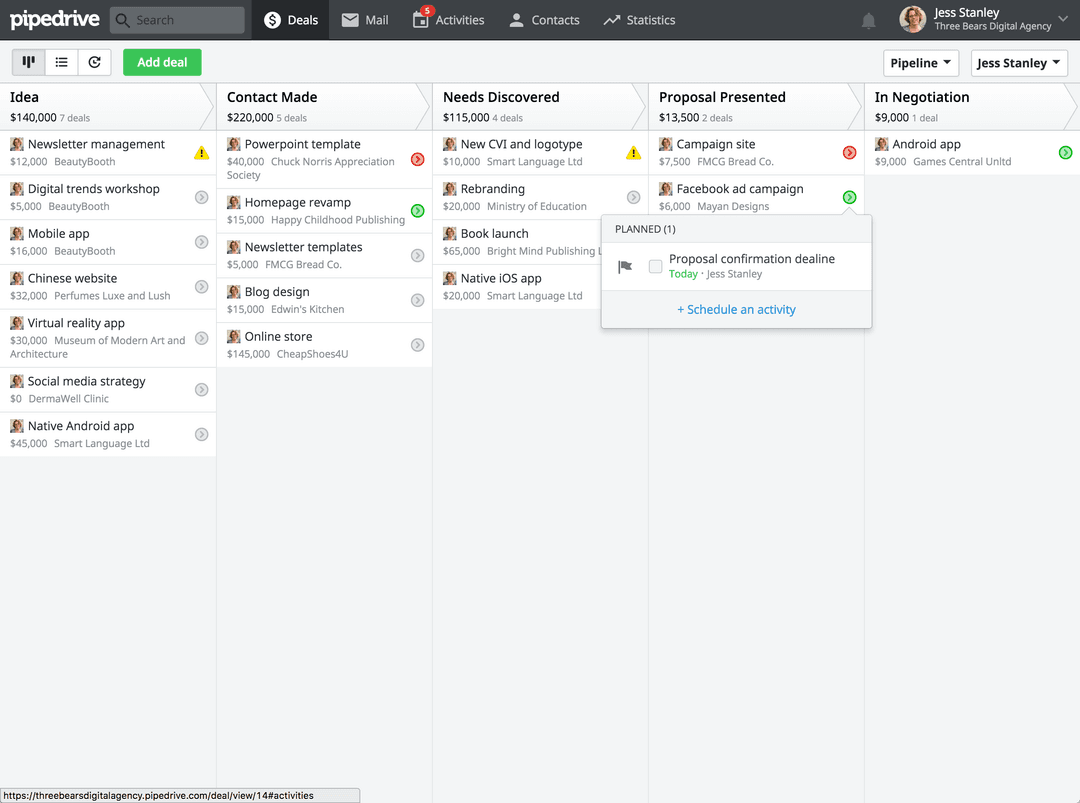
Pipedrive CRM is a platform built to help teams manage leads, deals, and customer interactions throughout the sales cycle. With its customizable Kanban pipelines, sales teams can clear view of deal progress. Meanwhile, centralized contact histories keep customer information accessible in one place. This helps teams understand past interactions and respond more efficiently to customer inquiries.
In addition, it provides lead nurturing automations, follow-up reminders, and AI-powered prompts. Together, these minimize repetitive work and help representatives prioritize promising opportunities. Its real-time sales reports, forecasting, and performance metrics help managers identify gaps and make informed decisions.
What Is Pipedrive CRM Best For?
This software is best known for 'Pipedrive AI', a sales assistant through which teams can minimize manual work and act on sales opportunities. Its AI notifications help identify high-potential deals and recommend the next actions. As a result, representatives can prioritize their workload. They can focus on promising sales opportunities and spend less time deciding which deals require immediate attention.
It also comes with an AI email generator that creates personalized messages from single prompts, reducing the time teams spend drafting emails. It also helps representatives communicate with prospects more easily. In addition, email summarization condenses lengthy conversations, fostering quicker reviews. AI-generated sales reports reinforce this by helping managers assess performance without setting up complex reports.
How Much Does Pipedrive CRM Cost?
Pipedrive CRM pricing starts at $24/user/month for its Lite Plan. The platform also offers a 14-day Free Trial. Subsequent plans are:
- Growth: $49/user/month
- Premium: $79/user/month
- Ultimate: $99/user/month
In addition to the base subscription cost, organizations should keep the following potential hidden costs in mind:
- Add-Ons: $135
- Implementation And Onboarding: $400
- Data Migration (complex/legacy systems): $5,000 to $40,000
- Ongoing Technical Support And Maintenance: $10,000 to $45,000 one-time/year
Reviewers typically rate the platform highly when it comes to value for money with its comprehensive features and integrations. However, some note that access to certain useful features may require additional add-ons.
Disclaimer: The pricing is subject to change.
Pipedrive CRM Integrations
Pipedrive CRM integrates with:
How Does Pipedrive CRM Work?
Here’s how you can get started with Pipedrive CRM after successful onboarding and setup:
- Log in with the credentials provided to access the main dashboard and monitor sales activities, deal progress, team performance, and key sales metrics
- Open the ‘Leads Inbox’ to review unqualified prospects and organize potential opportunities before moving them into the sales pipeline
- Create or import contacts and organizations to link them to relevant leads, deals, and activities
- Set up sales pipelines and then define stages that are aligned to your organization’s sales process
- Schedule your calls, meetings, tasks, emails, and other activities from the Activities section and link them to specific contacts or deals
- Review sales performance through Insights dashboards and reports that cover activities, deal progress, win rates, and other sales metrics
Who Is Pipedrive CRM For?
Pipedrive CRM typically caters to:
- Real estate
- Travel
- IT
- Banking
- Retail
Pipedrive CRM Use Cases
Based on our analysis of Pipedrive CRM features and marketing positioning, we identified some of its real-world use cases.
Real Estate Agencies Managing Parallel Listing And Buyer Pipelines
Pipedrive helps real estate teams that often have to track two distinct sales cycles at once: signing homeowners as clients and matching those listings with buyers. The platform’s ‘Pipelines’ can be used for each cycle so that agents are not forcing two different processes into one funnel. Deal-level notes and attached documents stay tied to the property itself. This is particularly useful when transactions involve months of back-and-forth.
Field Sales And Distribution Businesses Consolidating Multi-Channel Inbound Leads
Businesses that sell through phone, email, and social inquiries can make use of Pipedrive’s ‘Sales Inbox’ and ‘Lead Booster’ to centralize all channels before they become tracked deals. This is useful for teams that were previously losing leads between inboxes and spreadsheets as inquiry volume exceeded what they could manually handle. Users particularly how it visually represents a lead’s current stage.
Small Sales Teams With Straightforward And Repeatable Sales Processes
Pipeline’s ‘Sales Automation’ is useful for teams whose process is not dependent on conditional branching or multi-path logic. The function is built around a simple trigger-action logic, such as moving a deal to a stage and firing off an email or task reminder. It fits best when sales motion is consistent enough that basic automation covers most day-to-day handoffs.
Businesses Building A Lightweight Sales Stack Around Existing Tools
Pipeline can be used as a sales hub in a broader tool stack through its integrations with platforms like Google Workspace, Microsoft 365, and QuickBooks. It suits businesses that already have marketing, accounting, or communication tools in place and requires a CRM that connects into an existing tech stack.
Is Pipedrive CRM Right For You?
Pipedrive CRM is a strong option for sales teams that need a central platform to manage leads, deals, customer information, and sales activities. Its CRM includes visual pipeline management, contact management, sales reporting, workflow automation, and AI-powered tools that help sales teams organize their work and identify potential opportunities.
On the security front, it offers two-factor authentication, role-based access controls, and GDPR compliance. The platform is also ISO 27001- and ISO 27701-certified. Its notable clients include renowned companies like Cascade Energy, the TE Group, Enviria, and Kemper Sports.
As AI adoption continues to shape sales management, Pipedrive has introduced AI-powered capabilities, including sales assistance and tools for generating content and analyzing sales data. These features can help sales teams reduce manual work and make more informed decisions using their CRM data.
Still unsure about Pipedrive CRM? Connect with us at (661) 384-7070 for further guidance!
Pipedrive CRM Features
Pipeline Management
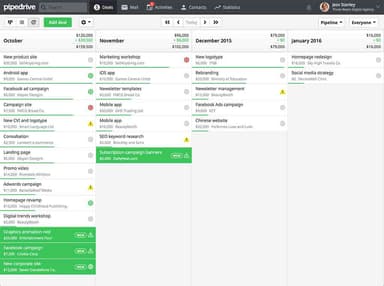
This feature allows sales teams to customize pipelines with deal stages, fields, and workflows to match different sales processes and products. They can visualize each deal’s position, assign tasks to specific stages, and track calls, demos, and follow-ups through the activity calendar. Workflow automation can trigger actions as deals move through stages. Meanwhile, Insights provide dashboards, sales metrics, conversion rates, and data visualizations for pipeline analysis.
Email Sync And Tracking
Pipedrive helps businesses manage contacts by linking people and organizations to deals. It also helps users view histories of calls, emails, and other activities. They can track email opens and link clicks and send group emails to around 100 contacts. It also offers calls, e-sign quotes, proposals, and contracts with SmartDocs.
Lead Management
Pipedrive CRM lets users capture and organize leads through customizable pipelines. They can also filter, sort, and qualify leads. The platform allows them to add activities, convert qualified leads into deals, and prioritize best-fit prospects through custom scoring. Teams can import leads in bulk, track website visitors, and manage messaging conversations. They can use color-coded labels and deal-rot notifications to identify opportunities that can prove valuable.
Reporting And Analytics
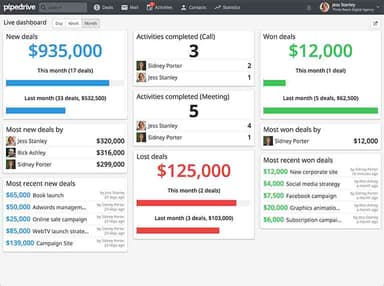
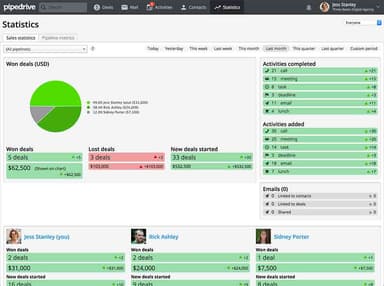
The platform allows teams to use real-time CRM data. This can be used to track deals, revenue, leads, conversions, and team performance. These reports can be turned into interactive dashboards with charts, graphs, and tables, which can be further filtered and shared as live dashboards with stakeholders. It lets teams set deal- and activity-based goals, forecast projected revenue, and utilize AI-powered reporting.
Pros And Cons of Pipedrive CRM
Pros
Simplifies pipeline management with swim-lane deal views
Supports customizable pipelines that are adaptable to different sales processes
Helps teams prioritize sales opportunities and keep track of upcoming tasks
Keeps customer and deal information organized
Provides strong scheduling capabilities to arrange customer meetings
Cons
Occasional email integration and deliverability issues
Limited reporting options for teams needing deeper analytics
Lacks early funnel contact management
Pipedrive CRM Pricing
Lite | Growth | Premium | Ultimate |
|---|---|---|---|
$24 per user per month | $49 per user per month | $79 per user per month | $99 per user per month |
|
|
|
|
Disclaimer: The pricing details were last updated on Sep 25, 2026 from the vendor's website. Please contact us for a tailored pricing list.
Pipedrive CRM Reviews
Total 1232 reviews
4.5
All reviews are from verified customers
Rating Distribution
5
Stars59%
4
Stars33%
3
Stars5%
2
Stars1%
1
Stars1%
Share your experience
Real Estate, 11-50 employees
Less than 6 months
“Campaign limits hold it back”
Pros
One thing they do well is customer support, they respond quickly. The interface is also confusing at the beginning but after spending a few days with it, it turns out to be fairly great and works pretty well.
Cons
After signing up for the Campaigns email feature, I spent a full month building my CRM around it. Then because of the way 25 contacts were sourced, the system forced double opt-in on my entire account and blocked campaigns to all of my roughly 560 contacts, including people I've had business relationships with for 25 years. These are legitimate contacts, nothing purchased or scraped, and I'm not violating any laws. In the US, email rules are opt-out, not opt-in. This is simply their own internal policy and it's stricter than the law without being clearly disclosed in their marketing. The frustrating part is that they sell prospecting tools meant to help you find complete strangers yet they won't allow me to email people I've known and worked with for years. It ended up costing me significant time, money and energy.
Rating Distribution
Ease of use
3
Value for money
2
Customer Support
2
Functionality
2
Retail, 1-10 employees
Less than 6 months
“Poor support experience”
Pros
The interface is easy to navigate, the deal pipeline is displayed clearly and the automation tools are helpful for smaller sales teams.
Cons
Customer issues are handled poorly and the way feature access was managed felt misleading. It was very disappointing that the problem was never truly resolved.
Rating Distribution
Ease of use
2
Value for money
3
Customer Support
1
Functionality
1
Education Management, 500+ employees
Less than a year
“Flexible workflows and integrations”
Pros
Having a Kanban-style work board makes the workflow easy and practical which really helps staff manage customer and client support efficiently. It also connects well with other tools we already use especially for email management. Another nice addition is the AI Sales Assistant feature.
Cons
There are times when the software feels a bit laggy and the mobile app is somewhat limited in how much you can do with it. Also, the features included in the lower-priced plan can feel insufficient on occasion.
Rating Distribution
Ease of use
8
Value for money
10
Customer Support
9
Functionality
7
Frequently Asked Questions
Does Pipedrive CRM offer an API?
Yes, Pipedrive CRM offers an API.
What language does Pipedrive CRM support?
The platform supports multiple languages, including English and German.
What other apps does Pipedrive CRM integrate with?
Pipedrive CRM integrates with third-party software like Docusign, QuickBooks, and Asana.
What types of pricing plans does Pipedrive CRM offer?
Pipedrive has a starting price of $24/user/month for its Lite Plan. Its Growth Plan costs $49/user/month, and its Premium and Ultimate Plans cost $79 and $99/user/month, respectively. Request a tailored Pipedrive CRM pricing quote today!
What level of support does Pipedrive CRM offer?
Pipedrive CRM offers support through its knowledge base, academy, and live chat.
Does Pipedrive CRM have a mobile app?
Yes, Pipedrive CRM offers a mobile app for Android and iOS
Who are the typical users of Pipedrive CRM?
It is typically used by sales teams across banking, IT, and real estate.