Last Updated
Key Takeaways
Generated from the text of customer reviews
Pilera software is a property management platform for HOAs and rental communities. It simplifies resident communication, maintenance requests, and daily operations through a centralized system. While the email feature lacks customization, it provides the essential tools needed for efficient community management.
Our Verdict
Pilera is a good fit for HOA management companies, condo associations, and residential communities. It helps teams manage resident communication, maintenance requests, and daily operations from one place. Its resident portal and engagement tools are key strengths. Overall, it is a strong choice for organizations that want a more organized approach to community management.
Overall Rating
Based on 28 users reviews
4.8
Rating Distribution
Positive
100%
Neutral
0%
Negative
0%
Starting Price
Starting at $75
per month
Pilera Software Specifications
- Tenant Management
- Lease Management
- Rent Collection
- Maintenance Requests
What Is Pilera?
Pilera is a cloud-based property management software designed for community managers of condominiums, Homeowner's Association (HOA), and the rental industry. It enables property managers to communicate effectively with residents, helps track and manage maintenance requests and work orders, and provides timely and effective customer support to help them manage everyday operations efficiently.
What Is Pilera Best For?
The platform stands out for PileraEngage, its resident-focused portal that centralizes self-service and community engagement in a single experience. It is designed for HOAs that want to strengthen resident participation while reducing administrative workload.
PileraEngage also provides residents with a centralized hub for accessing community information, allowing them to participate in neighborhood activities. This allows associations to maintain consistent feeedback across their communities.
Pilera Pricing
Pilera pricing starts at $75/month for up to 25 doors on its Single Community Basic plan. Features offered by this plan include 1GB document storage, support ticketing, 2 managers, and a basic portal. Other plans, arranged into two modules, include:
Single Community:
Professional: Starting at $125/month for 25 doors
Enterprise: Starting at $175/month for 25 doors
Management Company:
Basic: Starting at $250/month for 100 doors
Professional: Starting at $500/month for 100 doors
Enterprise: Starting at $1,000/month for 100 doors
Before deciding on the platform, users should consider the following additional charges that are estimated to be associated with the total cost of ownership:
Website Hosting: $50-$150/month
Additional Training Sessions: $150/month
Data Migration: $500–$5,000+ One time
Implementation And Onboarding Services: $500–$10,000+ One time
Communication Credit Bundles: $30–$100/1,000 credits
Community Website Setup: $100–$500
Disclaimer: The pricing is subject to change.
Pilera Integrations
It integrates with various third-party applications, including:
- QuickBooks
- Vantaca
- Amsi
- CINC systems
- Jenark
How Does Pilera Work?
Here’s how the platform can be used for community and property management activities:
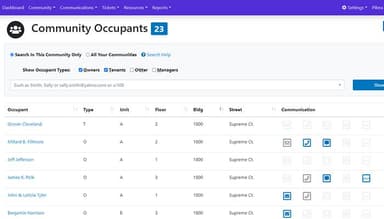
Log in and set up communities, properties, units, and resident records to create a centralized database for day-to-day operations
Configure user roles and access permissions for managers, board members, residents, and vendors based on their responsibilities
Import or set up resident and property information from connected management or accounting systems to keep records current
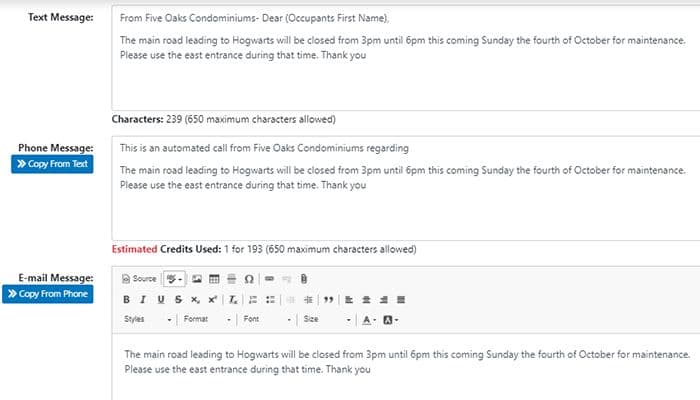
Manage resident communications by sending announcements, notices, and updates through email, text, phone, or other supported channels
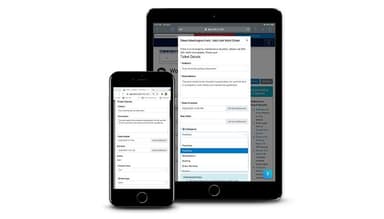
Track maintenance requests, work orders, and service issues by assigning tasks, monitoring progress, and recording updates in one place
Monitor compliance activities by documenting violations, maintaining records, and managing follow-up actions throughout the resolution process
Provide residents with portal access so they can submit requests, review documents, view community information, and check request statuses
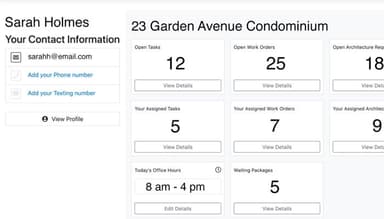
Review dashboards, reports, and activity records to track operations, resident interactions, and ongoing community management tasks
Who Is Pilera For?
It caters mainly to small and large property management businesses. Pilera users include:
Condo associations
Apartment managers
Home-owners associations
Pilera Use Cases
Based on our understanding of user feedback and Pilera’s capabilities, we have identified several scenarios where this software is a strong fit.
HOA Management Companies Coordinating Multiple Communities
Property management firms responsible for several homeowner associations often need a consistent way to manage resident communications and community records across different properties. Pilera fits the needs of organizations that want a centralized operational workflow while maintaining visibility into each community’s activities. This approach can help managers reduce time spent switching between disconnected systems and manual processes.
Condominium Associations Handling High Resident Communication Volumes
Condominium communities with frequent resident inquiries, announcements, and maintenance updates require structured communication processes. Pilera is well-suited for boards and managers that need to distribute information to large resident populations while maintaining a record of interactions. The platform’s ability to keep residents informed without relying solely on email chains or paper notices is particularly useful in this case.
Communities Managing Maintenance Requests And Vendor Coordination
Pilera works well for communities seeking a structured workflow for assigning tasks, monitoring progress, and documenting completed work. Associations that handle a steady flow of maintenance issues can use the platform when it comes to tracking requests from submission through resolution. This is particularly relevant for properties where managers, maintenance teams, and external vendors need to collaborate on service-related activities.
Large-Scale Residential Communities Managing Compliance And Resident Engagement
The platform supports organizations that require visibility into community activities while maintaining documentation for board decisions and resident interactions. Master-planned communities and larger residential developments have need of formal processes for handling architectural reviews, compliance matters, and resident participation. Pilera is suited for this workflow as it offers control over resident portals and ticketing systems for issues.
Is Pilera Right for You?
The size and requirements of a property business will help it determine whether Pilera is a good choice of software. Numerous property managers use Pilera to improve and enhance resident contentment. Its features are designed to help streamline communication, collect online payments, manage work orders, and provide efficient technical support. Notable clients include Cityscape and Imagineers.
Still not sure about the software? Contact us at 661-384-7070 for personalized guidance.
Pilera Software Features
Condo And Rental
The condo and rental module help track leases where property managers can easily monitor lease expirations and renewals and ensure that rent payments are received in a timely manner.
Pilera Connect
Pilera Connect helps community managers communicate with residents through multiple channels from a centralized platform. It supports the distribution of announcements, updates, reminders, and important notices while helping associations maintain consistent communication and improve engagement across their communities.
Maintenance
The software's integrated work order and vendor management system helps easy processing of resident-submitted work orders, assign them to managers or vendors, and track every action. It helps ensure that maintenance and repair tasks are completed efficiently and promptly.
Pilera Ops
Pilara provides tools for managing service requests, tracking issues, and coordinating operational tasks across communities. It helps teams document activities, assign responsibilities, monitor progress, and maintain communication throughout the resolution process, supporting more organized day-to-day property management workflows.
Resident Portal
By offering online payment options, Pilera helps simplify the payment process, reduce errors, and improve resident satisfaction by giving access to all important community information on one platform.
Pilera Care
This feature helps property management teams track resident concerns, manage support interactions, and coordinate follow-up activities from a centralized system. It supports a more organized approach to resident services by helping teams maintain records, monitor requests, and improve responsiveness.
Community websites
Pilera's websites are customizable where property management companies can design and customize them to fit their brand and provide important information to residents. It includes information about the community, photos, news, events, and more.
HOA Voting
This feature enables associations to conduct elections, surveys, and community votes through an online platform. It helps boards distribute ballots, collect responses, and track participation while maintaining organized voting records and supporting community decision-making processes.
Pros And Cons of Pilera Software
Pros
Supports the electronic board election process for HOAs
Allows users to schedule training time
Offers data sync with accounting software and data
Cons
Lacks a search feature document library for resident data
Does not offer a feature for violation letter templates
Pilera Software Pricing
Disclaimer: The pricing details were last updated on May 15, 2026 from the vendor's website. Please contact us for a tailored pricing list.
Pilera Software Reviews
Total 28 reviews
4.8
All reviews are from verified customers
Rating Distribution
5
Stars79%
4
Stars21%
3
Stars0%
2
Stars0%
1
Stars0%
Share your experience
Gorokhovsky
Consultants, 51-100 employees
More than a year
“Wonderful product for HOA member database.”
Pros
The ease of use is remarkable. It's very easy to begin, understand the product, and incorporate it into daily routines.
Cons
Any software can be improved, but there's nothing specific I would mention here.
Rating Distribution
Ease of use
10
Value for money
10
Customer Support
10
Functionality
8
Jill
Recreational Facilities and Services, 51-100 employees
Less than a year
“Pilera Daily User”
Pros
Customer support is excellent. You submit a ticket and get a quick response. Timing when you send out dailies is crucial.
Cons
Sometimes it's tricky to get pictures or graphics to fit properly.
Rating Distribution
Ease of use
8
Value for money
10
Customer Support
8
Functionality
10
Theresa
Real Estate, 11-50 employees
More than a year
“Love this platform!”
Pros
Integration with accounting software provides a portal and foundation for our homeowners.
Cons
There's nothing to critique. We continue to enjoy all the features we use and are always eager to see new launches.
Rating Distribution
Ease of use
10
Value for money
10
Customer Support
10
Functionality
10
Frequently Asked Questions
Who are the typical users of Pilera?
It caters to small to large property management businesses. Pilera users include condos, Apartments and single-family units.
What languages does Pilera support?
It supports English.
What other apps does Pilera integrate with?
It integrates with QuickBooks, Vantaca, Amsi, CINC systems, Jenark and more.
Does Pilera support mobile devices?
No, it does not offer support for mobile devices.
Does Pilera offer an API?
No, Pilera does not provide an API.
What pricing plans does Pilera offer?
The vendor offers different plans under Single Community (starting at $75/month) and Manager Company (starting at $250/month) tiers. Get in touch for a tailored Pilera cost quote.
What level of support does Pilera offer?
It offers support via email/help desk, knowledge base and phone.