


Last Updated
Key Takeaways
Generated from the text of customer reviews
Our Verdict
Overall Rating
Based on 116 users reviews
3.9
Rating Distribution
Positive
74%
Neutral
13%
Negative
13%
Starting Price
$6.99
per month
Quicken Specifications
- Financial Reporting
- Expense Tracking
- Tax Management
- Budgeting and Forecasting
Quicken Features
Spending Plan
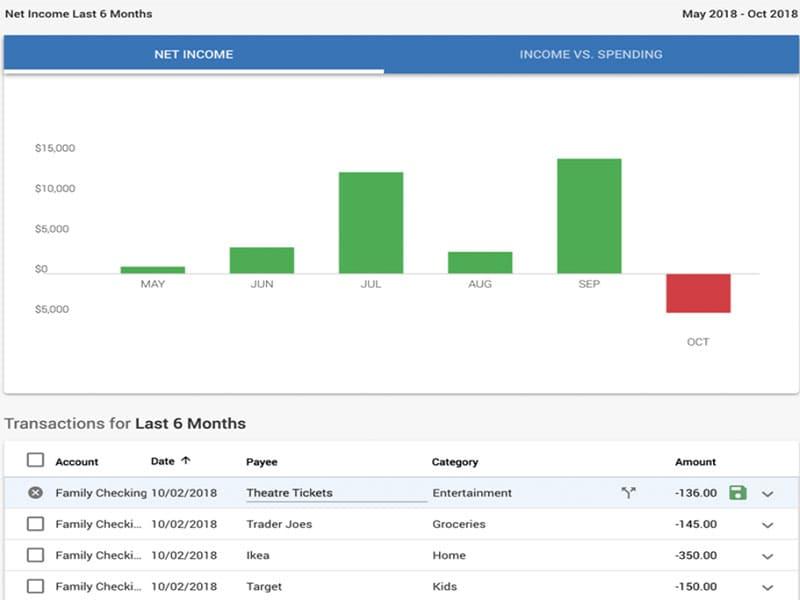
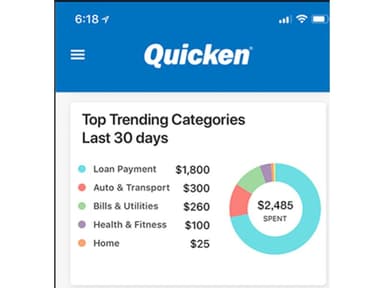
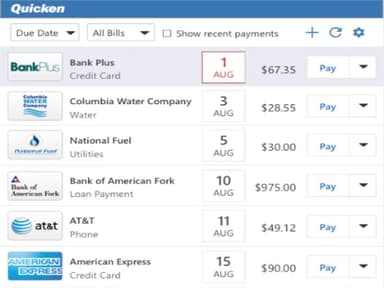
Income, bills, and expenses all update in real time as transactions come in. The balance left to spend shows after accounting for every cost and savings goal. Any budgeting method works, including zero-sum, envelope, and 50-30-20. Unused spending or savings rolls over into the next month.
Invoices
Quicken’s invoicing feature allows users to create and track invoices without maintaining separate spreadsheets. Services and expenses can be added to invoices, with receipts included where needed. It supports unlimited clients, projects, and invoices, while unpaid invoices can be tracked in real time. Users can also add their business name and logo to invoices and accept online payments through a connected Stripe account.
Business Cash Flow
All invoices show in one view by payment status, so no unpaid invoice slips through. One-click invoices include a payment link so clients can pay fast. Income and expenses sync from over 14,000 banks, removing manual entry from bookkeeping.
Business Tax Prep
Every transaction is auto categorized as business or personal as it comes in. Tax schedule reports for Schedules C, E, F, A, and B map each number line by line. Receipt photos are attached with every transaction. Quarterly estimates show what will be owed based on current income and expenses.
Pros And Cons of Quicken
Pros
Bank integration reduces manual work when checking finances
Expense tracking helps avoid mistakes during tax preparation
Autofill and recurring payments make check recording faster
Online transaction downloads keep financial information updated automatically
Straightforward design helps non-accountants manage finances with fewer mistakes
Cons
Downloaded transactions can sometimes appear in wrong accounts
Correcting entries sometimes takes more steps than needed
Custom categories take time to prepare useful reports
Quicken Pricing
Quicken Simplifi | Quicken Business and Personal |
|---|---|
$6.99 per month | $8.99 per month |
|
|
Disclaimer: The pricing details were last updated on Sep 07, 2026 from the vendor's website. Please contact us for a tailored pricing list.
Quicken Reviews
Total 116 reviews
3.9
All reviews are from verified customers
Rating Distribution
5
Stars50%
4
Stars24%
3
Stars8%
2
Stars5%
1
Stars13%
Share your experience
Anonymous
Real Estate, 1-10 employees
“Everything is well-organized”
Pros
Everything feels well organized, with plenty of options, categories and charts that clearly show your budget, balances and other financial details. It is easy to find information due to the well structured interface.
Cons
The downside is the glitches. At times after an update, the system stops pulling data automatically and it can go unnoticed for a while. Bank and credit card updates may not come through for days, weeks or even months which means pending transactions get missed depending on when you catch it. When that happens, you end up having to enter everything manually.
Rating Distribution
Ease of use
9
Value for money
8
Customer Support
8
Functionality
8
Raegan D.
Accounting, 1-10 employees
“All my finances in one place”
Pros
Being able to use Simplifi both on my phone and on the website has been a big plus. I also really appreciate that I can connect my bank accounts, credit cards and liability accounts so everything is pulled together automatically in one place for me.
Cons
My only real complaint is that accounts needing extra authentication or frequent password updates sometimes get disconnected from the app. It's not really the software's fault but it can still be a bit inconvenient.
Rating Distribution
Ease of use
10
Value for money
10
Customer Support
10
Functionality
10
Susana B.
Veterinary, 1-10 employees
“Interface feels logical”
Pros
The interface felt very natural because it mirrors a checkbook register. The way transactions are categorized and the reporting tools are set up makes it simple to track down older expenses and wrap up IRS tax prep with just a click. I was especially happy when tags were introduced since they let me get very specific without having to create a bunch of extra subcategories. On top of that, when I had a highly technical question about a process, customer support got back to me quickly with a helpful answer.
Cons
I can understand why the company shifted to an annual subscription model and moved more toward an online platform. Even so, I felt more secure with the desktop-only version, where I could back up my data to external hard drives myself. That setup also seemed more cost-effective to me.
Rating Distribution
Ease of use
10
Value for money
9
Customer Support
10
Functionality
10
Frequently Asked Questions
Does Quicken offer an API?
No, Quicken does not offer an API.
Does Quicken software have a mobile app?
Yes, Quicken does offer a mobile app for iOS and Android users.
What language does Quicken software support?
Quicken primarily supports English.
What types of pricing plans does Quicken software offer?
Quicken offers two pricing plans: Quicken Simplifi ($6.99/month) and Quicken Business and Personal ($8.99/month). Both of these plans are billed annually. Request a personalized Quicken cost estimate for your business.
What other apps does Quicken software integrate with?
The software integrates with PayPal and Stripe.
Who are the typical users of Quicken software?
Quicken is a versatile financial management solution tailored for consultants, self-employed professionals, freelancers, and small business owners.
What level of support does Quicken software offer?
Quicken offers support via phone, help desk, chat, and a knowledge base.