



Last Updated
Overview
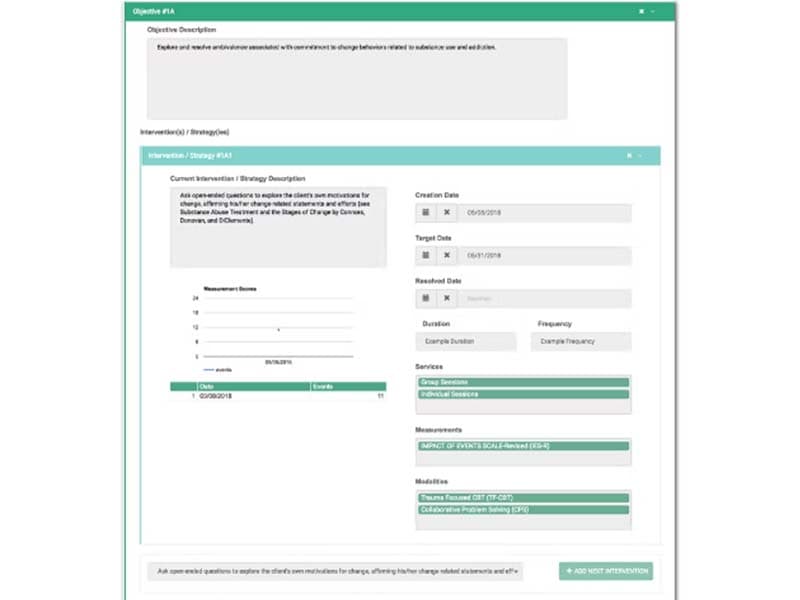
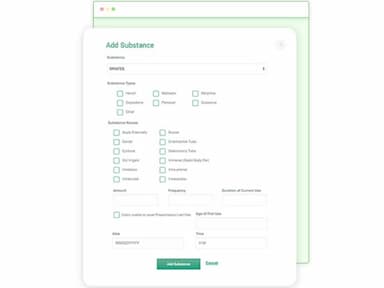
ZenCharts software is a cloud-based EHR solution, tailored for behavioral healthcare, offering features like e-prescribing, patient tracking, and smart scheduling. Its HIPAA-compliant platform ensures data security, making it ideal for addiction treatment centers and mental health facilities. Experience streamlined processes enhanced patient care, and efficient practice management with ZenCharts.
ZenCharts Specifications
- Appointment Management/Scheduling
- e-Prescriptions
- Lab Integration
- Patient Portal
ZenCharts Features
Smart Scheduling
ZenCharts smart calendar feature lets you store all of your appointments in one place, so you can easily see when everyone is available. And if there are any conflicts, you'll be notified right away. As a result, you can spend less time scheduling and more time getting things done.
e-Prescription
This feature allows clinicians to electronically prescribe medications, ensuring accuracy and efficiency. It reduces the risk of prescription errors and streamlines the medication management process, making it easier for both providers and patients.
Patient Portal
The software provides patients with secure access to their health records, appointment scheduling, and direct communication with their healthcare providers. It enhances patient engagement and allows for better management of their own health. Moreover, patients can view their treatment plans, track their progress, and receive timely reminders for appointments and medications.
Revenue Cycle Management
Facilities can manage billing and payments efficiently using this functionality. The software automates the billing process, tracks claims, and reduces the likelihood of denials, ensuring a steady revenue flow and financial stability for the practice.
Transparent Calendar
This feature provides a clear and organized view of all appointments and schedules. It helps healthcare providers to efficiently manage time, reduce no-shows, and ensure that the facility runs smoothly and efficiently. The calendar supports color-coded entries and reminders, making it easy to manage multiple schedules.
Pros And Cons of ZenCharts
Pros
Streamlines documentation, billing, and other workflows
Hosted on secure Google Cloud Platform
Offers training and unlimited support
Cons
Initial setup may take time
May require additional customization or integration costs
ZenCharts Reviews
Total 15 reviews
4.1
All reviews are from verified customers
Rating Distribution
5
Stars60%
4
Stars20%
3
Stars7%
2
Stars0%
1
Stars13%
Share your experience
Christopher
Healthcare, 51-100 employees
Less than a year
“Runs smoothly with excellent customization”
Pros
It works well, and most importantly, it provides excellent customization options. Also, It is a cloud-based EHR solution that helps me with e-prescribing, billing, patient tracking, scheduling, and more. It is designed specifically to assist behavioral healthcare providers like me.
Cons
Sometimes, dealing with pop-up windows can be frustrating to me.
Rating Distribution
Ease of use
10
Value for money
10
Customer Support
10
Functionality
10
Daren
Mental Health Care, 11-50 employees
More than a year
“Great Customer support”
Pros
The support I received from ZenCharts was exceptionally accommodating, especially considering that they are a smaller company. They showed a strong willingness to work with smaller clients like us. I found their ability to handle high-volume tasks to be very efficient, and their software provided many options for customizing workflows. They also introduced several automation features that not only streamlined my processes but also reduced redundant tasks. One aspect that I found appealing, depending on how you look at it, is their integration of the Wiley Treatment Planners into their treatment planning software.
Cons
From my perspective, there's an overarching assumption that companies would prefer utilizing a treatment plan aligned with their standard format, heavily influenced by the Wiley Treatment Planner. However, in our case, contractual obligations mandated highly individualized treatment plans. Consequently, the Wiley Templates posed a risk of staff resorting to cookie-cutter approaches. Moreover, for those unfamiliar with the Wiley integration, using it can actually be time-consuming. Lastly, the custom forms provided by the system can be or have been quite glitchy, prone to errors that necessitated rebuilding the entire form.
Rating Distribution
Ease of use
9
Value for money
10
Customer Support
10
Functionality
9
Marcella K.
Healthcare, 11-50 employees
More than a year
“Lab Integration with ZenCharts”
Pros
After I properly configured the system for our treatment center, ZenCharts became easy for me to use. I was able to integrate it smoothly with our lab, which allowed results to automatically transfer to each client's chart.
Cons
I find it pretty challenging to make changes or edits to forms or templates. The whole process feels awkward, especially when I need to update group notes. On top of that, the customer support was terrible! Whenever we raised concerns about the long response times, our account representative would put the blame on us, acting rude and defensive, and took forever to respond.
Rating Distribution
Ease of use
2
Value for money
1
Customer Support
1
Functionality
2
Frequently Asked Questions
What level of support does ZenCharts offer?
ZenCharts offers several support options, including phone and 24/7 customer service representative to provide clinical decision support and ensure users receive assistance whenever needed.
Who are the typical users of ZenCharts?
Typical users of ZenCharts software include behavioral health facilities, addiction treatment centers, mental health providers, and healthcare professionals in the behavioral health industry.
What languages does ZenCharts support?
ZenChart supports the English language.
Does ZenCharts support mobile devices?
Yes, ZenCharts software supports mobile devices.
Does ZenCharts have an app?
Yes, ZenCharts offers a mobile app for convenient access.
How much does ZenCharts cost?
ZenCharts software offers customized pricing plans tailored to the specific needs of each user or organization. For a detailed price breakdown request a personalized quote.
Is ZenCharts free?
No, ZenCharts is not free; it offers paid subscription plans.
What other apps does ZenCharts integrate with?
ZenCharts, a treatment planning software, integrates with Twilio, CHESS Health, Hatch Compliance, DoseSpot, PaySimple, CallTrackingMetrics, and Salesforce Engage Software.
Does ZenCharts offer an API?
Yes, ZenCharts provides an API for seamless integration with other software systems.
What are the main features of ZenCharts?
ZenCharts software provides treatment planning, progress notes, medication management, scheduling, billing, reporting, and compliance tools.
Is ZenCharts cloud-based?
Yes, ZenCharts software is a cloud-based EHR solution.
What type of pricing plans does ZenCharts offer?
The software offers customized pricing plans tailored to the specific needs of each user or organization.