



Last Updated
Overview
Are you struggling with the chaos of field service management? Missed appointments, dissatisfied customers, and lost paperwork can be a drain on your time and resources. Say goodbye to these challenges with Kickserv, the all-in-one platform designed to streamline your operations and enhance customer satisfaction. Discover how Kickserv can simplify your workflow and bring efficiency to your field service business.
Kickserv Specifications
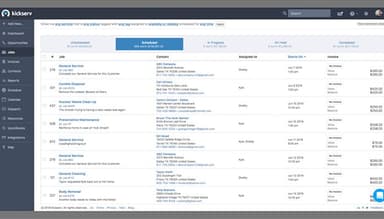
- Work Order Management
- Job Costing
- Time Tracking
- Inventory Management
Kickserv Features
Job Scheduling And Dispatching
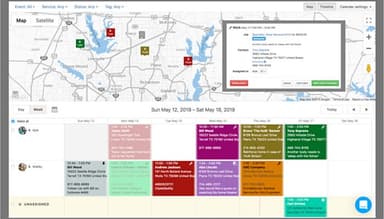
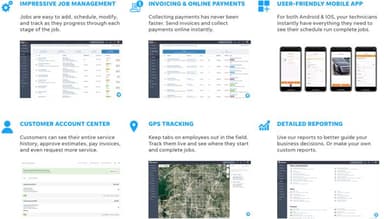
The drag-and-drop calendar simplifies scheduling and makes technician dispatching efficient. Optimize routes to save time and fuel costs and keep customers informed with automated notifications about technician arrival times.
Customer Relationship Management
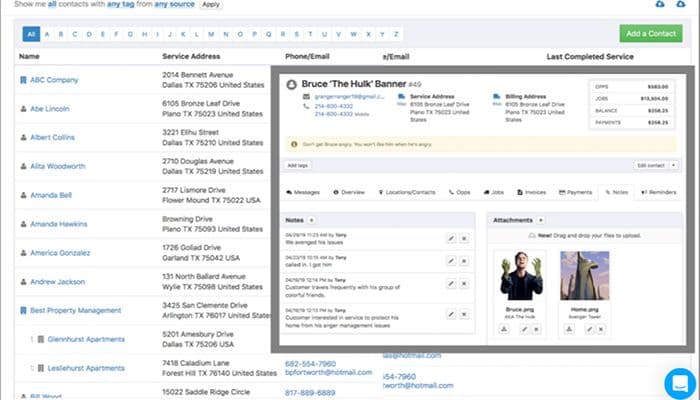
Centralize customer information, job history, and communications for easy access. Empower customers with a self-service portal where they can view job statuses and invoices and make payments, improving their experience and reducing administrative tasks for your team.
Estimates And Invoicing
Generate professional estimates quickly, even on the go, from your mobile device. Convert accepted estimates into jobs seamlessly and automate invoicing with online payment options for faster collections. With Kickserv, you can easily collect customer signature approval and efficiently manage receivables, streamlining the online payment process.
Reporting And Insights
Track key business metrics with customizable reports on revenue, job status, technician efficiency, and more. Use these data-driven insights to identify areas for improvement, optimize your operations, and make informed decisions.
Customizable Workflows
Adapt Kickserv to your business's operations by creating custom fields, forms, and workflows. This ensures the software aligns with your specific processes and terminology, making it even more user-friendly for your team.
Automated Reminders And Notifications
Reduce missed appointments and improve customer communication with automated reminders for jobs, follow-ups, and payment due dates. Keep customers in the loop with notifications about appointment confirmations and technician status updates.
Pros And Cons of Kickserv
Pros
Easy to use and intuitive interface
Excellent customer support and responsiveness
Streamlines scheduling and job management
Improves customer communication and experience
Continuous updates and feature improvements
Cons
Reporting could be more customizable
Some minor syncing issues occasionally
Occasional minor glitches in the software, according to some Kickserv reviews
Kickserv Pricing
Free2 users | Lite5 users | Standard10 users | Business20 users | PremiumUnlimited users |
|---|---|---|---|---|
$0per month | $47per month | $95per month | $159per month | $239per month |
|
|
|
|
|
Disclaimer: The pricing details were last updated on Sep 14, 2026 from the vendor's website. Please contact us for a tailored pricing list.
Kickserv Reviews
Total 24 reviews
4.8
All reviews are from verified customers
Rating Distribution
5
Stars83%
4
Stars17%
3
Stars0%
2
Stars0%
1
Stars0%
Share your experience
Construction, 11-50 employees
Less than 6 months
“More contacts, more management!”
Pros
I find it efficient with contact information and its extensive database.
Cons
I found it challenging to navigate with so many tools; I really got lost in the software.
Rating Distribution
Ease of use
10
Value for money
9
Customer Support
9
Functionality
9
Construction, 11-50 employees
More than a year
“Kickserv”
Pros
I appreciate the simplicity and convenience of the software. It's quite intuitive.
Cons
I have no complaints. We've been using the company for 6 years now.
Rating Distribution
Ease of use
10
Value for money
10
Customer Support
9
Functionality
10
Construction, 1-10 employees
Less than a year
“REVIEW”
Pros
At Emerald Yards, we really value the wide range of features it offers. From its various tools to its comprehensive functionalities, each aspect is useful and contributes significantly to our operations. We find that it enhances our workflow and makes managing tasks much more efficient.
Cons
I can manage without the importing/exporting of data.
Rating Distribution
Ease of use
10
Value for money
9
Customer Support
10
Functionality
10
Frequently Asked Questions
Does Kickserv offer an API?
Yes, the software has an API available.
What language does Kickserv support?
The software supports the English language.
What other apps does Kickserv integrate with?
The software integrates with Mailchimp, QuickBooks, Stripe, Podium, Customer Lobby, and Google.
Does Kickserv support mobile devices?
The software supports mobile devices.
What types of pricing plans does Kickserv offer?
Kickserv offers five pricing plans: a free plan at $0/month for 2 users, a Lite plan at $47/month for 5 users, a Standard plan at $95/month for 10 users, a Business plan at $159/month for 20 users, and a Premium plan at $239/month for unlimited users. Custom Kickserv pricing is available upon request.
Who are the typical users of Kickserv?
Kickserv is designed for small to medium-sized businesses in the HVAC, Plumbing, Electrical, Landscaping, Cleaning services, and Construction industries.
What level of support does Kickserv offer?
The software offers excellent customer service through phone calls, email, and an extensive knowledge base.
Can I use the Kickserv mobile app to track job progress and communicate with customers from the job site?
Absolutely! The Kickserv mobile app gives field technicians access to job details, schedules, customer communication, and updates in the field. They can also capture photos, track time and expenses, and update job progress in real-time.
How does Kickserv help me manage repeat business and improve customer management?
Kickserv's customer management tools include storing detailed customer information, job histories, and communication logs. It also has a customer portal for self-service and automated reminders, enhancing the customer experience and encouraging repeat business.
What are some key features for payment capturing and estimating within Kickserv?
Kickserv streamlines payments with online payment options and QuickBooks integration. Create and send professional estimates, even with a single text. It offers a user-friendly interface for easy editing of estimates on the go.
Can customers electronically sign and approve estimates directly through Kickserv?
Yes! Kickserv allows you to collect customer signature approvals for estimates electronically, streamlining the approval process and saving time. This feature can be easily used with your existing Kickserv account.