


APS Payroll
Last Updated

Key Takeaways
Generated from the text of customer reviews
APS Payroll is a payroll and HR platform with attendance and onboarding tools. It supports HR teams, payroll administrators, and managers across education, healthcare, hospitality, and nonprofits. Users praise its ease of use and responsive support, though some report occasional glitches. Recent updates include APS Health Wallets, a unified experience for managing HSAs, FSAs, and reimbursement accounts.
Our Verdict
APS Payroll suits growing nonprofits, schools, and healthcare organizations that want payroll and HR services through one provider. Its pricing offers reasonable value for businesses needing both services, although smaller teams with basic payroll needs may find the combined offering more than they require. We recommend it for teams seeking a dependable platform to grow into.
Overall Rating
Based on 38 users reviews
4.5
Rating Distribution
Positive
87%
Neutral
13%
Negative
0%
Starting Price
$6
per employee per month
APS Payroll Specifications
- Employee Information Management
- Recruitment and Applicant Tracking
- Attendance and Time Tracking
- Employee Onboarding
What Is APS Payroll?
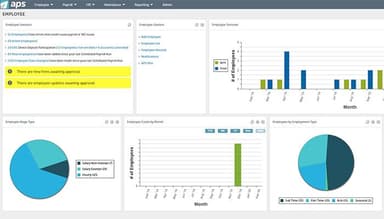
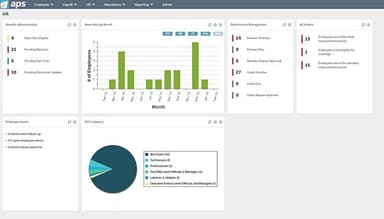
APS Payroll is a human capital management (HCM) software. It is accessed online through the APS OnLine platform and also offers a mobile app. The suite brings together payroll, core HR, attendance, workforce management, recruiting and onboarding. It also offers employee self service, Affordable Care Act compliance, and analytics and reporting. APS Payroll covers the full employee lifecycle from hire to retire, and connects with an organization’s existing platforms through imports, exports, and integrations.
What Is APS Payroll Best For?
The platform stands out for its 'Employee Hour Allocation' feature. However, time allocation by project, grant, client, or department requires the Payroll + Attendance plan or the Dimensions add-on with the Payroll plan. These options allow managers to track employee hours against specific cost centers and review labor costs by dimension. This makes APS Payroll suitable for mid-sized organizations managing multiple locations or complex workforce setups.
How Much Does APS Payroll Cost?
APS Payroll pricing starts at $6/employee/month under the Payroll plan, suitable for small businesses. The vendor also charges a $50/month base fee and requires $416.67/month minimum amount. Further pricing tiers of the software are:
- Payroll + Attendance: $10/employee/month (For Small to Mid-Size Businesses)
- Payroll + HR + Attendance: $14/employee/month (For Mid-Size and Growing Businesses)
In addition to the base subscription cost, organizations should also account for these additional expenses:
- Implementation: $1,000–$10,000 for small to mid-sized organizations and $10,000–$50,000 for larger or more complex deployments
- Additional Features And Integrations: $500–$5,000/year for optional features and integration-related expenses
- Training: $500–$3,000 for additional training or tailored sessions
User reviews generally describe APS Payroll price as affordable and good value, with several users saying it compares well against costlier alternatives. Some users felt the low price, however, came with limits, citing basic scheduling, weak onboarding, and applicant tracking.
Disclaimer: The pricing is subject to change.
APS Payroll Integrations
APS Payroll connects with various business applications, including:
How Does APS Payroll Work?
Follow the steps below to understand how the software typically works:
- Set up your system by importing employee records, past payroll history, and user permissions
- Link external software using built-in platform integrations, data exports, and file imports
- Manage job applicants through hiring workflows and send new hires digital onboarding packets
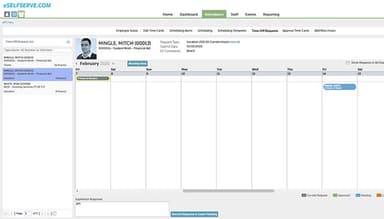
- Track employee shifts, attendance, and time-off requests directly inside the platform
- Give staff self-service access so they can log time and view pay stubs independently
- Process payroll using tracked hours and customize earnings and deductions for each payroll run
- Pull workforce reports to track turnover, tenure, and labor expenses across the business
Who Is APS Payroll For?
The software is ideal for a wide range of industries and sectors, including:
- Education
- Faith-based organizations
- Financial and professional services
- Healthcare
- Hospitality
- Manufacturing and distribution
- Nonprofits
APS Payroll Use Cases
Based on our analysis of APS Payroll's current tools and offerings, we have identified the following key business scenarios where it is well suited:
Small Software Companies Recovering From Lost HR Records And Slow Onboarding
Losing employee documents in an old HR system can leave a small software company unsure of its own records. APS imports employee data during setup and covers the hire-to-retire process in Core HR, with recruiting and onboarding tools alongside it. Reviewers moving from alternatives to APS after losing documents there said payroll now runs faster and onboarding new employees is easier.
Large Wellness Organizations Paying Staff Under Several EINs
The software is well-suited for large wellness organizations that pay staff under several EINs in one system. APS supports multiple EINs, allowing organizations to manage payroll for different business entities through the same platform. Reviewers praised the multiple-EIN setup and the dedicated team that supported them during rollout.
Healthcare Employers With Field Staff Who Rarely Use A Computer
Organizations with field-based employees who rarely or never use a computer can use APS's attendance and employee self-service tools to support time tracking and access to payroll information. Its attendance tools track hours and manage schedules, while employee self-service sits in the same product suite. One verified reviewer from a hospital and health care organization with more than 10,000 employees said their field-based team rarely or never logged onto a computer and described how APS simplified access to self-service and clocking in.
Chemical Companies Replacing ADP To Cut Data Entry Across Hiring, Payroll, And Benefits
Chemical companies switching from another payroll provider can use APS for recruiting, onboarding, and payroll in one platform. Reviewers noted that new-hire data flowed directly into payroll after switching to APS, while EDI feeds with benefit carriers reduced manual data entry.
Is APS Payroll Right For You?
If you want human capital management backed by responsive support, APS Payroll provides tools for your team. It is trusted by thousands of organizations nationwide, including Grayson College. The software can help eliminate payroll compliance risk. It also reports a high platform uptime and responds to every support ticket within an hour. If you value dependable support and expert payroll guidance, APS is worth considering for your business.
Still unsure whether APS Payroll software is the right fit for you? Contact us at (661) 384-7070 for further guidance regarding its functionality.
APS Payroll Features
Expense Management
APS Payroll features 'Expense Management' that simplifies reimbursement by letting employees submit receipts and track report statuses directly. Custom policies, categories, and validation rules help businesses manage expense policies, while AI highlights receipt mismatches for audit-ready traceability. Approved expenses sync with payroll, reducing the need for duplicate data entry.
Flexible On-Demand Pay
Powered by DailyPay, the On-Demand Pay feature gives employees real-time access to earned wages before payday via the mobile app at no extra business cost. Staff can transfer funds to their bank accounts or debit cards through the APS mobile app. The DailyPay app separately includes savings, budgeting, and financial education features. Instant transfers may involve an additional fee. Meanwhile, accessed wages automatically reconcile within normal payroll runs.
Automated Paperless Payroll
The software offers digital payment options, including direct deposit and paycards, alongside instant online access to pay stubs, W-2s, and 1099s. Built-in compliance tools, automated document storage, and real-time analytics simplify compliance, support document management, and provide reporting while reducing manual paperwork.
Centralized Employee Scheduling
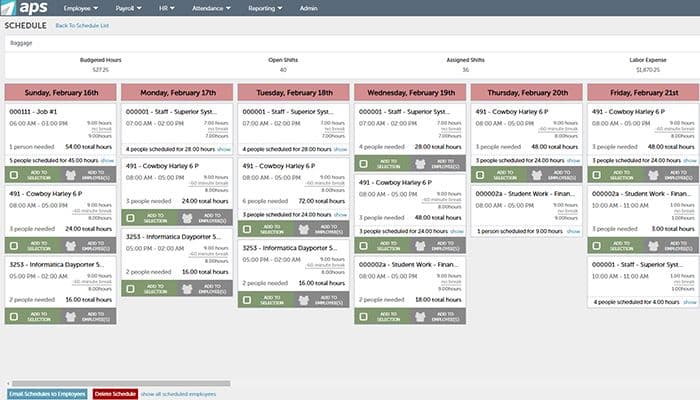
APS Payroll’s scheduling software lets managers create flexible schedules, build reusable weekly templates, and control role-based permissions from a central dashboard. Shift trading capabilities enable employees to release or swap shifts with peer confirmation and manager approval. Real-time alerts minimize coverage conflicts and automatically sync scheduled hours into payroll.
Pros And Cons of APS Payroll
Pros
Users appreciate the clean dashboard layout and organized interface
Users report that the software runs reliably without crashing
Employees can clock in through the mobile app or desktop platform
Offers excellent customer service
Users can set up multiple EINs in payroll
Cons
‘Self-help’ part isn’t very helpful
Reporting feature could be more customizable
Search bar isn’t easily accessible
APS Payroll Pricing
Payroll | Payroll + Attendance | Payroll + HR + Attendance |
|---|---|---|
$6 per employee per month | $10 per employee per month | $14 per employee per month |
|
|
|
Disclaimer: The pricing details were last updated on Oct 23, 2026 from the vendor's website. Please contact us for a tailored pricing list.
APS Payroll Reviews
Total 38 reviews
4.5
All reviews are from verified customers
Rating Distribution
5
Stars61%
4
Stars26%
3
Stars13%
2
Stars0%
1
Stars0%
Share your experience
Non-Profit Organization Management, 51-100 employees
“Drastically improved our expenditure.”
Pros
I love how easy it is to track time with APS, and I can automate the time entry process, which is not something other time tracking software can easily do. It also helps us in our work since we do a lot of site visits and there’s not a single day that all of us are available at the same office to check in and out. APS offers a variety of ways in which users can clock in and clock out based on where they are. It is relatively affordable if you compare it with others in the market, and we were able to deliver "time clocks" to each location, which was more than enough use for us.
Cons
Everything works great in the APS software, but the only thing that is problematic is the iPad app. It is very common for us to carry tablets along wherever we go, and that’s the reason this issue is highlighted; otherwise, we might have never even experienced it. There are two spots in our area where the app weirdly disconnects from the network, and we do have a workaround for that. It is still an inconvenience for a typical user.
Rating Distribution
Ease of use
9
Value for money
8
Customer Support
7
Functionality
7
Information Services, 51-100 employees
Less than 6 months
“prioritized triage and alerts”
Pros
One of the best parts of the product is the dashboard HUD which gives us a clear, prioritized picture of how issues should be triaged. The email and Slack notifications are also incredibly useful since they trigger immediate conversations and quick action whenever something is detected.
Cons
A few parts of the UI aren't the most polished visually but I'd still take strong functionality over appearance any day. From what I know, their product team is already working on a UI/UX refresh in the coming months so it doesn't feel like a major concern. I'm looking forward to seeing the updated interface.
Rating Distribution
Ease of use
10
Value for money
8
Customer Support
8
Functionality
9
Gringos Mexican Kitchen Corporate Office, 50-99 employees
“ We are happy with APS.”
Pros
No one can compare with APSs phenomenal customer care. The software is fast with incredible functions. It is a time-saving system. On top of that APS is extremely easy to operate.
Cons
Communication is poor.
Rating Distribution
Ease of use
8
Value for money
10
Customer Support
8
Functionality
8
Frequently Asked Questions
Does APS Payroll offer an API for custom developer integrations?
Yes. APS offers a Developer API that allows businesses to connect their systems and access or update data in APS. API access is available as a paid add-on at $1/employee/month after access is approved.
Does APS Payroll have a mobile app?
Yes. APS offers a mobile app for employees to access payroll and HR information from their smartphones or tablets. Employees can view pay stubs and tax forms, check benefits, review time cards, request time off, and update personal information.
What does APS Payroll implementation involve?
APS Payroll provides a guided implementation process with a dedicated project manager. The process includes configuring company settings, importing employee information and payroll history, setting up integrations, and testing payroll through parallel runs before launch.
What type of customer support does APS Payroll offer?
The vendor offers customer support via phone, contact form, and customer and employee login portals.