


Netchex
Last Updated

Key Takeaways
Generated from the text of customer reviews
Netchex is a payroll and human resources platform that unifies various tasks into one platform. Administrators and managers at small and mid-sized businesses use Netchex, with automotive dealerships among its frequent adopters. Reviewers give Netchex high ratings for ease of use and support responsiveness. Report navigation draws some criticism. The vendor recently launched Mesh, a set of AI assistants for deskless workforces.
Our Verdict
Netchex suits smaller operational businesses that run payroll in-house and want a single system backed by reachable service. It fits lean teams where a few people handle payroll, benefits, and compliance together. Pricing reads as fair for this segment, with value ratings among the strongest. We recommend it to mid-sized companies managing an hourly and deskless workforce.
Overall Rating
Based on 26 users reviews
4.5
Rating Distribution
Positive
92%
Neutral
8%
Negative
0%
Starting Price
Custom Pricing
Netchex Specifications
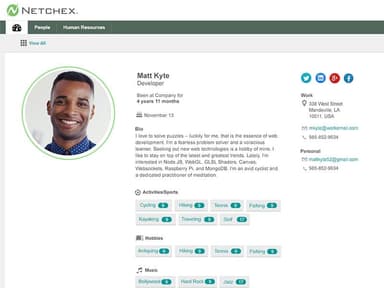
- Employee Information Management
- Recruitment and Applicant Tracking
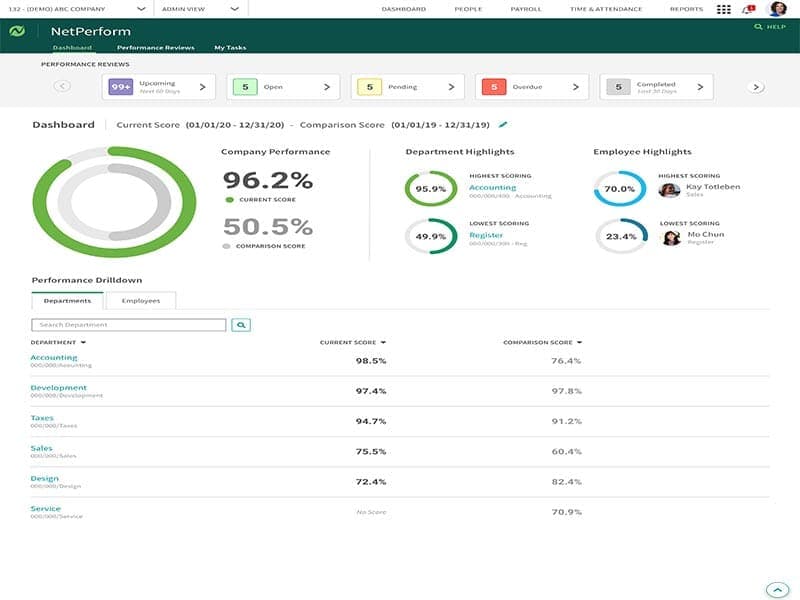
- Performance Management
- Attendance and Time Tracking
What Is Netchex?
Netchex is a payroll and human resources platform that is designed for businesses with hourly and salaried teams. It covers onboarding, time tracking, payroll, earned wage access, engagement, HR, and reporting.
Hiring, scheduling, benefits, performance management, and learning management are also a part of the platform. It also connects compliance work to equal employment reporting, employment eligibility verification, and healthcare coverage rules.
What Is Netchex Best For?
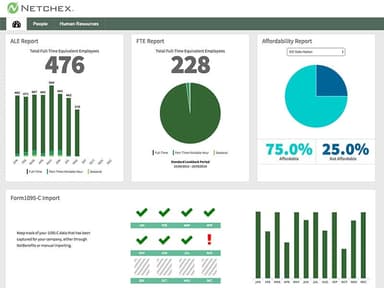
Netchex is best known for its "Reporting and Analytics." The report builder works through clickable options and drop-down choices, which lets a manager segment a report by topic such as payroll, human resources, or benefits. That format can then be saved, so the same report repeats on a routine basis without rebuilding it. Every run pulls up-to-the-minute data, so the numbers stay current.
How Much Does Netchex Cost?
Netchex pricing approximately starts at $12/month. The software offers three customizable plans, which include:
- Core
- All-In
- Flex
In addition to the base subscription costs, organizations should typically account for the following approximate additional expenses:
- Implementation And Setup: Approximately $500–$5,000 one-time, depending on staff size and the number of modules added
- Time And Attendance Module: Around $2–$5/employee/month, based on scheduling and timecard tracking needs
- Recruiting And Onboarding Module: Roughly $2–$5/employee/month, depending on how many roles a team hires
- Benefits Administration And Compliance Reporting: About $2–$4/employee/month, based on plan options and yearly filing needs
- Time Clock Hardware: Usually $300–$1,200/device one-time, depending on the clock type and number of work sites
- Year-End Tax Form Processing: Close to $5–$8/form, based on how many W-2 and 1099 forms a team sends
Reviewers often describe Netchex cost as affordable and competitive with other payroll platforms. Some reviewers also point to good value from the features they receive. However, others mention that pricing can be less clear because of minimum fees and additional charges.
Disclaimer: Pricing references are based on publicly available third-party information and industry benchmarks. Actual costs may vary.
Netchex Integrations
The platform supports several third-party integrations, including;
How Does Netchex Work?
Users should follow these steps to see how the platform works day to day:
- Log in by entering your credentials to open the main dashboard
- Add employee records with personal details, documents, and signed policy acknowledgments
- Onboard new hires by sending their forms and paperwork online before the first day
- Track hours as staff clock in and out from the mobile app or a time clock
- Run payroll, including pay cards and tax filing, from the same system
- Enrol employees in benefits once you mark them eligible
- Set goals, run reviews, and assign training courses to your teams
- Build reports by topic and export them for sharing
Who Is Netchex For?
Netchex supports businesses across a range of industries and sectors, including:
- Hospitality
- Healthcare
- Manufacturing
- Professional services
- Banking
- Retail
- Automotive
Netchex Use Cases
Based on our analysis of user reviews and Netchex features, we have identified key scenarios where this software is a good fit:
Healthcare Providers Working With A Third-Party Benefits Team
Healthcare organizations use Netchex to keep payroll and benefits aligned while an outside team handles enrolment. What makes this work is that eligibility runs off employment status, a field payroll already maintains, so the benefits team is notified by the same action that updates pay. Geofencing carries the same advantage into timekeeping. It ties clock-ins to approved locations to make the timesheet a record of where work happened, not only how long it took. Users often mention that the app suits staff who are not at a desk.
Manufacturers Moving Payroll Into A Dedicated System
Production and manufacturing companies turn to Netchex when payroll and onboarding need a system built for the job. Tax filing sits with the pay run, which matters because submission then uses figures already approved during payroll rather than a separate calculation. NetGuide and NetRecruiter extend that to hiring, feeding onboarding details into the employee record, so one dataset carries a worker from hire through to filing. Teams frequently note NetGuide among the tools they use most.
Community Banks Running Payroll With One Administrator
Netchex fits community banks where one administrator runs payroll from entry through to approval. Side-by-side comparison is the useful part here, because checking the pending run against the previous one turns approval into a comparison of figures rather than a judgement call. Tax calculation and filing sit in the same place, which moves the most technical step away from the individual while leaving approval with them. Feedback indicates that payroll submission is clear and easy to follow.
Dealerships Paying Technicians, Sales Staff, And Hourly Employees
Automotive dealerships run flat-rate technicians, commissioned employees, and hourly staff through Netchex together. Holding all three structures in one system means each group's rules apply within a single cycle, so no department or rooftop is processed separately. The two-way Dealertrack DMS integration matters for the same reason. This way, technician hours start in the dealer system, and direct exchange keeps the pay basis and the dealership record in step. Users with unusual pay scales often mention that it handled rules other software could not.
Is Netchex Right For You?
Netchex assists businesses in managing payroll, HR, benefits, time, hiring, onboarding, and reporting through one connected system. It assists employees and managers in handling HR tasks on the move through the mobile app, including time tracking, schedules, pay information, benefits, and requests.
Various businesses like Sheridan County YMCA, Macon Bank & Trust Company, and CKJ Management use Netchex for their payroll and HR operations. Netchex also follows SOC 1 and SOC 2 compliance standards to protect its platform and data.
Still doubtful if Netchex software is the right fit for you? Get in touch at (661) 384-7070, and we will help you make an informed decision.
Netchex Features
Payroll
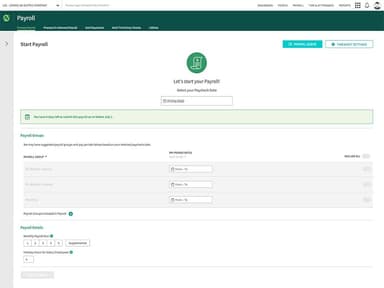
The payroll feature manages pay runs for single or multiple companies from one dashboard, covering tax calculations, tax filing, overtime, bonuses, multiple pay rates, and shift differentials. Countdown timers and progress bars show the status of each company, while bulk actions allow approvals, declines, and updates across companies. Payroll also supports direct deposit, pay cards, earned wage access, and printed checks for different payment methods.
Time And Attendance
The platform lets employees record work hours through mobile devices, biometric clocks, proximity clocks, or swipe clocks. Managers can set punch rules, review missed-punch alerts, approve timesheets, and track breaks, meals, overtime, and accruals. Scheduling tools also handle shift swaps, open shifts, and department transfers while keeping time records connected to payroll.
Talent Management
Talent Management brings recruitment, onboarding, learning, and performance management into the same employee lifecycle. Its applicant tracking system manages candidates and passes hired employees to the onboarding platform. NetLearn then supports new-hire training, skill development, and company-wide compliance courses.
Employee Benefits Administration
This module manages benefits tasks during onboarding, open enrollment, qualifying life events, and offboarding. Employees can view benefits information, coverage details, deductions, required training, and benefits partners through the employee portal. The system also supports ACA compliance tasks and can connect retirement plan administration with payroll for deductions, employer matches, eligibility, and contribution records.
Employee Engagement
Employee engagement tools combine recognition, employee feedback, and company communication within a shared engagement environment. The portal supports public kudos, private praise, surveys, company announcements, birthdays, work anniversaries, and performance spotlights, bringing these activities into one place. Short engagement surveys add employee feedback to the same system, while the portal supports communication across remote, seasonal, and multi-location teams.
Pros And Cons of Netchex
Pros
Reduces paperwork through online time-off requests
Simplifies time tracking for less tech-savvy staff
Handles different pay scales more accurately
Adapts the system to specific business needs for efficiency
Records work hours from phones for accessibility
Cons
Scheduler module needs more development for daily planning
Interface design feels basic across the platform
Company code transfers can take more effort than expected
Netchex Pricing
Core | All-In | Flex |
|---|---|---|
Custom Pricing | Custom Pricing | Custom Pricing |
|
|
|
Disclaimer: The pricing details were last updated on Sep 25, 2026 from the vendor's website. Please contact us for a tailored pricing list.
Netchex Reviews
Total 26 reviews
4.5
All reviews are from verified customers
Rating Distribution
5
Stars58%
4
Stars35%
3
Stars8%
2
Stars0%
1
Stars0%
Share your experience
Small-Business, 101-500 employees
“Timecards easy to adjust”
Pros
timecards are incredibly easy to use and I can make any changes I need without running into any issues. It's so simple...whether I am adjusting hours or reviewing entries, everything is right at my fingertips.
Cons
the reporting structure could use some improvement. It's not as easy to use as it could be.
Rating Distribution
Ease of use
9
Value for money
9
Customer Support
9
Functionality
7
Mid-Market, 101-500 employees
“every feature needed integrated”
Pros
It is absolutely amazing! It has every feature you could possibly need and the best part is that they all work flawlessly. From payroll management to time tracking everything is so well integrated and easy to use.
Cons
Although it works for us I still think this system is better suited for larger companies rather than small businesses like ours.
Rating Distribution
Ease of use
8
Value for money
9
Customer Support
9
Functionality
9
Mid-Market, 500+ employees
“easy to learn, scheduler and mobile app need upgrades”
Pros
I am new to payroll but Netchex made it really easy to learn. Whenever I had questions someone was always there to help me out. The online training was super helpful too.
Cons
The Scheduler module really needs an upgrade. Also the mobile app could be more useful. If I need to call an employee I can quickly find their number but I have to close the app to make the call. It'd be way easier if I could just click the number to dial directly from the app.
Rating Distribution
Ease of use
8
Value for money
9
Customer Support
9
Functionality
7
Frequently Asked Questions
Does Netchex offer an API?
Yes, it offers an API.
What language does Netchex support?
The platform currently supports the English language.
What other apps does Netchex integrate with?
Netchex integrates with third-party applications including Employee Navigator, QuickBooks, Hireology, Toast POS, Revel Systems, and WellSky Rehabilitation.
Does Netchex have a mobile app?
Yes, Netchex has a mobile app for Android and iOS.
What types of pricing plans does Netchex offer?
Netchex pricing starts at $12/month. The vendor offers three customizable plans: Core, All-In, and Flex. Get in touch for a customized Netchex price estimate.
Who are the typical users of Netchex?
Netchex serves businesses in hospitality, healthcare, manufacturing, professional services, banking, retail, and automotive.
What level of support does Netchex offer?
The platform offers support by phone, live chat, support tickets, its Experience Hub knowledge base, FAQs, and a resource center.