


Shiftboard
Last Updated

Overview
Shiftboard streamlines complex shift scheduling operations using intelligent automation capabilities and scalable design. It ensures optimized coverage through advanced algorithms while maintaining compliance. Though implementing advanced features requires training, Shiftboard's configurable design and strategic benefits make it the right choice to optimize workforce management.
Overall Rating
Based on 14 users reviews
4.4
Rating Distribution
Positive
93%
Neutral
7%
Negative
0%
Starting Price
$45
per month
Shiftboard Specifications
- Attendance and Time Tracking
- Employee Self-Service Portal
- Workforce Analytics
- HR Compliance
What Is Shiftboard?
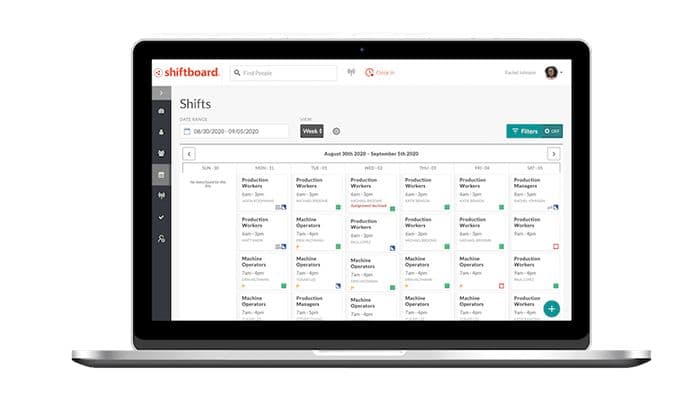
Shiftboard, now a UKG company, helps operations teams build employee schedules for manufacturing, energy, and corrections environments. Managers assign workers to shifts, approve leave, and fill coverage gaps from one place. By using the web browser or mobile app, workers can also submit leave and see shifts available. The platform also integrates payroll and HR systems via open APIs and pre-built connectors.
What Is Shiftboard Best For?
Shiftboard is best known for its Labor Cost Management capability. Real-time dashboards compare planned versus actual hours and track overtime by department, while historical labor data is used to forecast staffing needs before a schedule is built. Without this, managers often find out they're understaffed only after a shift has already started, at which point overtime or outside agency workers become the only options. Shiftboard's forecasting lets managers post open shifts to part-time or contingent staff ahead of time, addressing gaps before overtime costs are triggered rather than after.
How Much Does Shiftboard Cost?
Shiftboard pricing starts at $45/month and includes schedule automation and worker engagement. Other plans include:
- Enterprise
- Enterprise Plus
In addition to the base subscription costs, organizations should account for the following potential expenses:
- Implementation: $5,000–$25,000 for standard enterprise deployments; $25,000–$50,000+ for complex, highly regulated implementations
- Data Migration And Configuration: $2,000–$10,000, depending on employee data volume, scheduling rules, historical records, and configuration requirements
- Admin And Manager Training: $1,000–$10,000, depending on workforce size and training scope
- HRIS, Payroll, ERP, SSO, And API Integrations: $2,000–$15,000+/integration, depending on integration complexity and customization requirements
- Customization And Advanced Compliance Configuration: $5,000–$20,000+, particularly for complex union rules, collective bargaining agreements, qualification requirements, fatigue management, and regulatory compliance workflows
Users across manufacturing and corrections cite meaningful overtime savings after implementation. Smaller teams occasionally flag the pricing as better suited to enterprise-scale operations, while larger organizations generally describe the cost as justified by the labor savings.
Disclaimer: Pricing references are based on publicly available third-party information and industry benchmarks. Actual costs may vary.
Shiftboard Integrations
The platform hasn't publicly shared information about its integrations.
How Does Shiftboard Work?
Here's how operations teams typically move through the platform after logging in:
- Configure operating areas, crew structures, shift patterns, and scheduling rules for each site
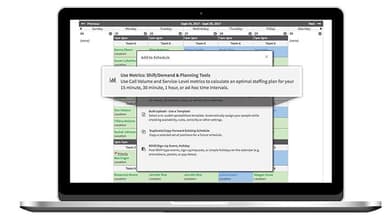
- Convert production or service targets into jobs and shifts using Labor Demand Planning
- Generate schedules based on worker qualifications, availability, and union or policy rules
- Notify workers through the web or mobile app so they can pick up, trade, or decline shifts
- Backfill last-minute gaps from a live list of qualified and available workers
- Approve or deny leave requests, with the schedule updating automatically on approval
- Collect timesheets online, validate entries for errors, and export pay codes for payroll
- Compare planned versus actual hours by job and location to improve future schedules
Who Is Shiftboard For?
Shiftboard software is suitable for a range of industries and sectors, including:
- Manufacturing
- Energy
- Healthcare
- Logistics
Shiftboard Use Cases
Based on our analysis of user reviews and Shiftboard features, we have identified key scenarios where the platform is a strong fit for shift-based operations:
Staffing Operations With No Quick Way To Fill Shift Callouts
Finding a replacement when a worker calls out sick can be time-consuming, especially for teams that manage many shifts each day. Managers may have to contact employees one by one to find someone who is available and qualified to take the open shift. Shiftboard helps simplify this process by automatically alerting eligible workers when a shift becomes available. Workers can review and claim open shifts themselves, reducing the need for managers to make multiple calls or send individual messages. This can help staffing teams fill last-minute gaps more quickly while keeping shift coverage organized.
Organizations Managing Mixed Worker Types Across Different Shifts
Organizations such as hospitals, warehouses, and large service operations may rely on a mix of full-time employees, part-time workers, and contractors to cover different shifts. Managing these workers can become difficult when they have different working hours, availability, and labor requirements. Shiftboard brings all worker types into one scheduling system, allowing managers to assign shifts, track availability, and apply the same scheduling process across the workforce. This can reduce scheduling errors and make it easier to manage staffing requirements across teams while keeping labor rules in mind.
Manufacturing Schedulers Filling Shifts Around Union Rules And Fatigue Limits
A scheduler in a unionized manufacturing facility building shifts by hand has to manually check each assignment against collective bargaining agreement rules, fatigue-hour limits, and required certifications before publishing a schedule. UKG Shiftboard checks these rules automatically as a schedule is built, flagging violations of CBA terms, fatigue thresholds, or missing certifications before the schedule goes out, rather than catching them after a grievance is filed.
Safety Coordinators Verifying Certifications Before Assigning Work
A safety coordinator assigning workers to equipment or tasks that require specific training has to manually cross-check each worker's certification status against a spreadsheet before confirming the assignment. UKG Shiftboard ties certification records directly to scheduling, so a worker without a current, required certification isn't available to be assigned to that task in the first place. These checks happen at the point of scheduling, not as a separate manual verification step.
Is Shiftboard Right For You?
Shiftboard is designed for organizations with complex, compliance-focused scheduling needs, particularly manufacturers and other shift-based operations. It helps organizations manage factors such as union rules, fatigue standards, staffing shortages, and employee scheduling preferences within a single system.
The platform is used by large organizations across multiple locations, including BJ's Wholesale Club, Shell, Bon Secours Mercy Health, Crocs, and MGM Grand. Shiftboard supports more than 500 organizations and complies with SOC 2 and GDPR requirements.
If you need expert advice, you can contact us at (661) 384-7070.
Shiftboard Features
Employee Retention
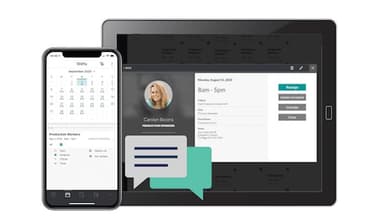
Workers get a secure web and mobile app. They can view schedules, pick up shifts, trade shifts, and request leave. When a shift changes last minute, a built-in tool sends automated SMS, emails, or phone calls to staff. This reduces the number of missed notifications that come from relying on a single communication channel, like a posted paper schedule or a group text.
Scheduling Flexibility
This tool projects staffing demand from production goals. Managers use it to plan backup schedules. A live list of available, qualified workers fills gaps without pulling in outside agencies. Worker availability and shift preferences are tracked to cut down on no-shows. Because coverage is built from an internal pool first, backup planning doesn't depend on agency lead times or last-minute outside staffing costs.
Scheduling Efficiency
An automated engine assigns eligible employees to open shifts based on cost and qualifications. Front-line managers get day-of tools to replace workers who call out sick. The rules engine is configurable to match each facility's scheduling policies. This lets a single ruleset apply consistently across shifts, rather than each manager making case-by-case coverage decisions.
Union Compliance
A rules engine automatically enforces Collective Bargaining Agreements (CBAs). It handles seniority-based priority, job classifications, and overtime equalization. Compliance checks run before every schedule goes live. Every change is logged in a full audit trail. This gives a facility a documented record to reference if a scheduling decision is ever disputed.
Labor Cost Management
Real-time dashboards compare planned versus actual hours and track overtime by department. Historical labor data helps forecast staffing needs and avoid overstaffing. Managers post open shifts to part-time or contingent staff before overtime costs kick in. This shifts labor cost decisions earlier in the scheduling process, rather than identifying overspend after payroll has already been run.
Fatigue Management
Work schedules are checked against industry fatigue safety standards before they go live. Real-time audits flag or block shifts that break mandatory rest requirements. Managers get clear warnings and rule explanations before a schedule is finalized. This catches fatigue-related violations before a shift is worked, rather than after an incident prompts a review of the schedule.
Pros And Cons of Shiftboard
Pros
Workers manage their own profiles, cutting admin time
Mobile app lets workers view and claim shifts anywhere
Shift trading lets workers swap hours among themselves
Cross-site booking check reduces double-scheduling across active sites
Bulk shift posting removes the need to contact staff individually
Cons
Frequent auto-logouts interrupt work during longer scheduling sessions
Mobile app limits what admins can do compared to desktop
Some fields cannot be changed, requiring workarounds for specific needs
Shiftboard Reviews
Total 14 reviews
4.4
All reviews are from verified customers
Rating Distribution
5
Stars43%
4
Stars50%
3
Stars7%
2
Stars0%
1
Stars0%
Share your experience
IT, 500+ employees
Less than a year
“Engineers Perspective”
Pros
The software allows for quick and accurate editing.
Cons
Some features within the app are more challenging to locate and utilize.
Rating Distribution
Ease of use
10
Value for money
10
Customer Support
8
Functionality
10
Higher Education, 101-500 employees
“Less admin burden!”
Pros
Letting our staff sign in and handle updates to their own profiles has seriously reduced the administrative load on our team.
Cons
Even though the system is customizable, there are still a few areas we can't modify. Still, given the price, it remains a solid overall solution.
Rating Distribution
Ease of use
9
Value for money
7
Customer Support
8
Functionality
9
Staffing and Recruiting, 101-500 employees
“instant updates for immediate visibility”
Pros
I really enjoy how updates roll out instantly to everyone in the system so people can see available work right away without waiting for anything to refresh.
Cons
Would be even better if there were a easy way to filter out or seed duplicate lists,like duplicate clients, users or locations.
Rating Distribution
Ease of use
10
Value for money
9
Customer Support
9
Functionality
9
Frequently Asked Questions
Does Shiftboard offer an API?
Yes, it does offer an API.
What language does Shiftboard support?
The software supports the English language.
What other apps does Shiftboard integrate with?
Shiftboard has not shared information about its integration arrangements publicly.
Does Shiftboard software have a mobile app?
Yes, Shiftboard offers mobile apps for iOS and Android users.
What types of pricing plans does Shiftboard offer?
Shiftboard is estimated to cost around $45/month, with custom Enterprise and Enterprise Plus plans available. Request a personalized Shiftboard cost estimate for your business.
Who are the typical users of Shiftboard software?
Shiftboard software is used by organizations across healthcare, corrections, logistics, manufacturing, and energy sectors.
What level of support does Shiftboard offer?
Shiftboard offers support via phone, help desk, and contact form.