


Typeform
Last Updated

Key Takeaways
Generated from the text of customer reviews
Our Verdict
Overall Rating
Based on 109 users reviews
4.5
Rating Distribution
Positive
90%
Neutral
10%
Negative
0%
Starting Price
$39
per month

Typeform Specifications
- Employee Onboarding
- Recruitment and Applicant Tracking
- Employee Engagement
- Employee Surveys and Feedback
Typeform Features
Typeform AI
Typeform AI automates recruitment workflows and generates forms and email campaigns from natural language prompts. It also assists HR teams to build a list of respondents, automate follow-up communications, and streamline the onboarding and employee feedback process.
Form Builder
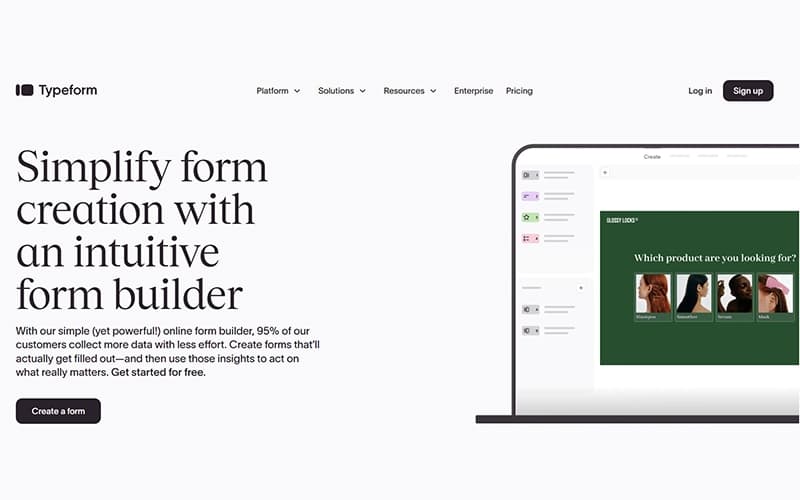
Using drag-and-drop, templates, conditional logic and branding options, the Form Builder enables teams to design a conversational form without any coding. It can be used for surveys, applications, onboarding forms, and feedback questionnaires. This helps HR teams to gather employee and candidate information through personalized conversational experiences.
Growth Flow
Follow up actions are automated when a form is submitted to help HR teams get candidates/employees through onboarding, feedback, and engagement workflows. It sorts contacts, adds extra data to the submitted information, and sends follow-up e-mail or SMS according to the response. This minimizes repetitive administrative tasks and ensures HR processes remain efficient.
Research Flow
Research Flow feature makes it possible for HR teams to conduct AI-supported research studies that are more than just surveys. It moderate interviews to ask subsequent questions that build on the answer just given. This aids companies in collecting more comprehensive feedback in employee engagement efforts, applicant evaluations, and workplace studies. AI summaries can assist HR teams in quickly reviewing the results, saving HR teams time from manually reviewing the answers.
Contacts And Automation
Once responses are collected, Contacts and Automations helps keep HR workflows moving without constant manual follow-ups. It organizes respondents into contact lists, triggers email and SMS communication, and automates next steps based on form submissions. This makes it easier for teams to manage onboarding, employee communications, and recurring HR processes from a single workflow.
Pros And Cons of Typeform
Pros
Helps creates engaging forms that lead to higher completion rates and better user participation
Supports branded, professional-looking forms that improve customer and candidate experiences
Reduces manual effort through conditional logic, automations, and integration capabilities
Helps teams collect, organize, and share responses efficiently across connected business tools
AI-assisted form creation speeds up survey and questionnaire development for recurring tasks
Cons
Reporting and analytics may not meet the needs of advanced research teams
Form customization options can feel restrictive for highly specific design requirements
AI-generated forms occasionally require manual editing to get desired results
Typeform Pricing
Basic | Plus | Talent | Business | Growth Flow | Enterprise |
|---|---|---|---|---|---|
$39 per month | $79 per month | $119 per month | $129 per month | $379 per month | Custom Pricing |
|
|
|
|
|
|
Disclaimer: The pricing details were last updated on Sep 14, 2026 from the vendor's website. Please contact us for a tailored pricing list.
Typeform Reviews
Total 109 reviews
4.5
All reviews are from verified customers
Rating Distribution
5
Stars61%
4
Stars28%
3
Stars10%
2
Stars0%
1
Stars0%
Share your experience
Insurance, 101-500 employees
More than a year
“versatile platform for surveys”
Pros
For me the platform's versatility stands out because whether I'm collecting surveys, soliciting feedback or running knowledge assessments I find it easy and user friendly to operate.
Cons
Well I would appreciate additional filtering options when exporting reports since more granular controls would help me analyze data faster although overall I remain satisfied with the product's capabilities.
Rating Distribution
Ease of use
10
Value for money
8
Customer Support
10
Functionality
9
Animation, 1-10 employees
Less than 6 months
“approachable interface for form building”
Pros
Honestly I find tool's interface to be highly approachable and simplely designed making the task of building and managing forms noticeably simpler even for users without technical backgrounds which reduces friction and accelerates setup and day-to-day use.
Cons
While I appreciate several aspects of the product I am put off by its relatively high cost and the possibility of additional usage-based fees and I find it limited in terms of advanced customization and managing complex form workflows. It lacks certain higher-level features such as in-depth analytics and richer text-editing options and in my experience the overall visual interface can feel somewhat outdated compared with more modern solutions.
Rating Distribution
Ease of use
7
Value for money
5
Customer Support
7
Functionality
7
E-Learning, 1-10 employees
Less than 6 months
“simple setup with easily accessible help”
Pros
Setup is easy and it was simple for me to rearrange elements inside the form also when I consulted the help sections I discovered information more easily than I had expected.
Cons
I was unable to change font sizes or create a cohesive flow between the beginning and the end that would permit me to fully customize the paragraph's look and feel. It also needs to be made explicit that the link page at the conclusion provides only constrained customization which limited what I could do.
Rating Distribution
Ease of use
9
Value for money
7
Customer Support
9
Functionality
9
Frequently Asked Questions
What other apps does Typeform integrate with?
The platform offers integration with multiple third-party platforms, including Slack, Stripe, Klaviyo, INTERCOM, and Calendly.
What language does Typeform support?
Typeform offers support in the English language.
What level of support does Typeform offer?
The software provides support via its Help Center, email, community discussions, and live chat.
What types of pricing plans does Typeform offer?
Typeform price starts at $39/month for the Basic plan. It also offers a free plan with limited features. Other paid plans include Plus at $79/month, Talent starting at $119/month, Business at $129/month, Growth Flow at $379/month, and Enterprise with custom pricing. Request a personalized Typeform cost estimate now!
Does Typeform offer an API?
Yes, Typeform provides a developer API, including Create API, Responses API, Webhooks API, and an Embed SDK for building custom integrations and automating workflows.
Does Typeform have a mobile app?
No, Typeform does not offer a dedicated mobile app.
Who are the typical users of Typeform?
Typeform serves HR teams, marketing teams, product teams, customer success teams, researchers, educators, and organizations of all sizes.