


Wagepoint
Last Updated

Overview
WagePoint payroll software offers a stress-free payroll experience for businesses. With automated payroll processing, tax compliance, and direct deposit features, it simplifies payroll management, reduces errors, and saves time. Elevate your payroll processes with WagePoint - take the hassle out of payroll today!
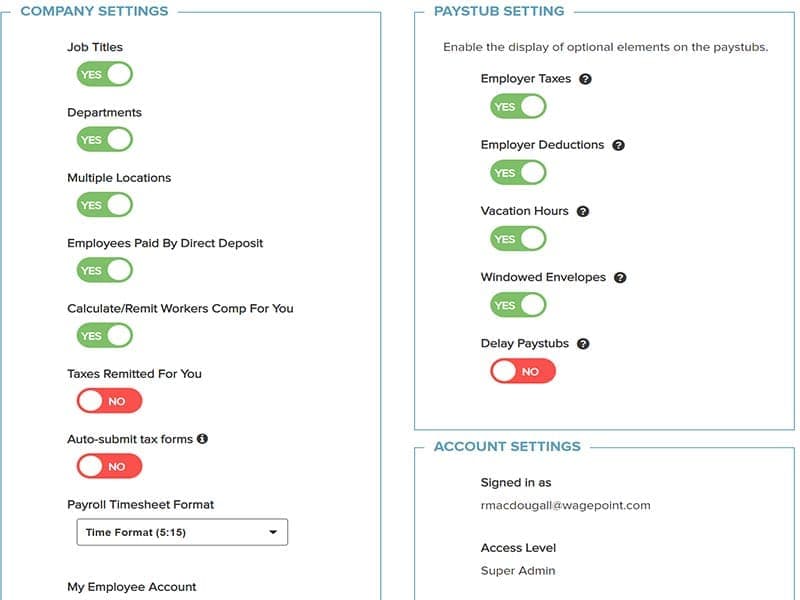
Wagepoint Specifications
- Employee Information Management
- Recruitment and Applicant Tracking
- Performance Management
- Attendance and Time Tracking
Wagepoint Features
Wagepoint Time Tracking
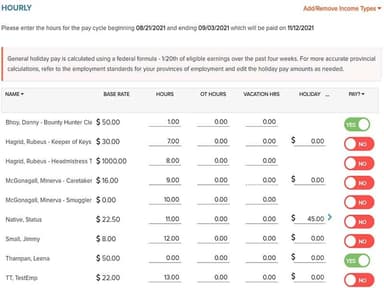
The software enables businesses to automate timekeeping, reduce manual errors, and improve payroll accuracy. With streamlined tracking, businesses can easily calculate overtime, track project-specific hours, and generate precise pay reports, saving time and effort for payroll administrators.
Wagepoint Payroll Management
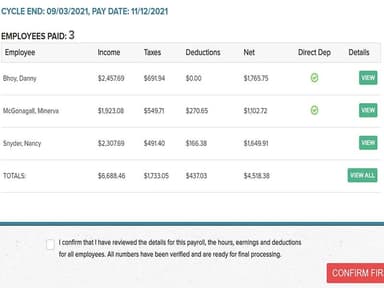
This feature simplifies the entire payroll process. It automates wage calculations, tax deductions, and direct deposits, eliminating manual data entry and reducing the risk of errors. It also provides comprehensive reporting, enabling businesses to track payroll expenses and maintain compliance with tax regulations.
Wagepoint Tax Compliance
Wagepoint ensures businesses stay up-to-date with tax regulations. It automatically calculates and deducts taxes based on federal, state, and local requirements, reducing the risk of non-compliance and associated penalties. This simplifies tax management and avoids the complexities of tax-related tasks, allowing companies to focus on core operations and minimize the risk of errors.
Wagepoint Employee Portal
The software empowers employees by providing secure, self-service access to their payroll information. Employees can view their pay stubs, access tax documents, update personal details, and review their vacation and leave balances. This improves transparency, increases employee engagement, and reduces the administrative burden on HR departments, enhancing overall employee satisfaction.
Wagepoint Vacation/Leave Tracking
Wagepoint enables businesses to track and manage vacation accruals, sick leave, and other types of time off. By automating leave calculations, businesses can accurately monitor and allocate employee time off, streamline approval processes, and ensure efficient resource management. This feature reduces the likelihood of leave conflicts and promotes fair and consistent time off policies.
Pros And Cons of Wagepoint
Pros
Automates payroll for time-saving efficiency
Ensures accurate tax compliance calculations
User-friendly interface for easy navigation
Comprehensive reporting for payroll insights
Streamlined time tracking for precise payroll
Cons
Integration options can be improved according to users
Occasional updates may disrupt access briefly
Lacks functionality for departmental expense tracking
Wagepoint Reviews
Total 27 reviews
4.3
All reviews are from verified customers
Rating Distribution
5
Stars52%
4
Stars33%
3
Stars7%
2
Stars4%
1
Stars4%
Share your experience
Education Management, 11-50 employees
More than a year
“Simple secure and great value”
Pros
There's hardly anything to learn, it's all really interactive. Feels secure, great value for what you pay and it's user-friendly for both me and my staff.
Cons
From what I have seen of other platforms out there, it is definitely the best. I am drawing a blank when I try to think of any actual negatives.
Rating Distribution
Ease of use
10
Value for money
10
Customer Support
10
Functionality
10
Automotive, 1-10 employees
More than a year
“Automatic payroll saves time”
Pros
I love that it just handles all the deduction calculations and payments automatically, it makes payroll so easy. Plus it creates and sends in ROEs and T4s for me which saves me a ton of time.
Cons
Ok, if I really have to nitpick, the customer support setup is a little annoying. When you call, you have to explain everything and then someone has to call you back later which is not always the best timing. That said once they do call back, they always get my issues sorted out pretty quickly.
Rating Distribution
Ease of use
10
Value for money
10
Customer Support
7
Functionality
10
Motion Pictures and Film, 1-10 employees
More than a year
“easy payroll with great reports”
Pros
Its really easy to get around. It pumps out these awesome, super detailed reports and honestly, their support team is just fantastic.
Cons
I really can't think of any complaints. We have been using it for our payroll for about four years now and honestly, it just works great for us.
Rating Distribution
Ease of use
10
Value for money
10
Customer Support
10
Functionality
10
Frequently Asked Questions
Does Wagepoint offer an API?
No, the software does not provide an API.
What language does Wagepoint support?
The software supports the English language.
What other apps does Wagepoint integrate with?
The software integrates with Xero and QuickBooks Online.
Does Wagepoint support mobile devices?
The software supports mobile devices.
What types of pricing plans does Wagepoint offer?
Wagepoint offers pricing plans starting at $20/month for Solo plan and $40/month for the Unlimited plan, with additional per-employee fees. A 14-day free trial is also available. Request a custom Wagepoint pricing plan now.
Who are the typical users of Wagepoint?
Wagepoint is ideal for small and medium-sized businesses across diverse industries, including technology, professional services, retail, hospitals, and healthcare.
What level of support does Wagepoint offer?
Wagepoint provides support through live chat, form submission, and a dedicated knowledge base.