



Last Updated
Overview
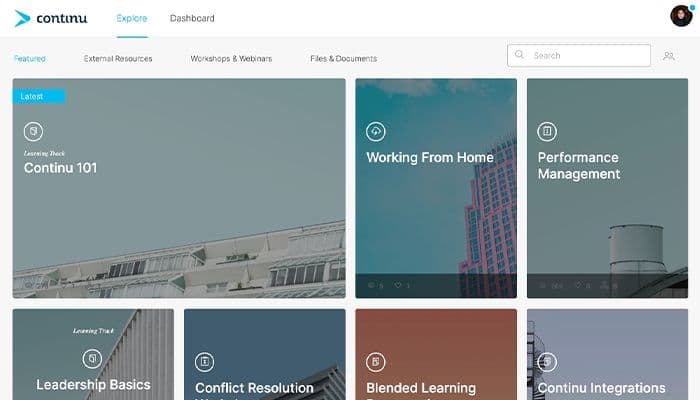
Continu LMS helps enterprises manage partner and customer training through content authoring, certifications, analytics, and branded portals. While performance can feel slow when handling larger volumes of users, its automated role-based recommendations help employees find relevant training. Overall, it suits enterprises managing complex training programs across multiple audiences.
Overall Rating
Based on 9 users reviews
4.7
Rating Distribution
Positive
100%
Neutral
0%
Negative
0%
Starting Price
Custom Pricing
Continu Specifications
- Activity Dashboard
- Asynchronous Learning
- Activity Tracking
- Access Controls/Permissions
Continu Features
Journeys
The platform combines courses, assessments, workshops, labs, and imported content into structured learning programs. Admins can control the order of activities, set prerequisites, and decide when content becomes available. They can also create different paths based on learner attributes or assessment results and let experienced learners test out of material they already know. This gives teams more control over how each learner progresses instead of assigning the same fixed sequence to everyone.
Smart Segmentation
This feature builds dynamic audiences using learner data such as role, partner tier, region, signup date, and custom attributes. It combines multiple conditions with AND/OR logic to create more specific groups. Learners can automatically move into the relevant segments when connected CRM or HRIS data changes. The same segments can be reused across assignments and automations, which removes the need to rebuild audience rules as learner information changes.
Eddy
It is an AI learning agent that answers natural-language questions using content already available in a Continu instance. It uses Smart Segmentation™ to find information that is relevant to and permitted for each learner. Users can ask questions through Continu, Slack, Microsoft Teams, or SMS. Since it works with existing Continu content, teams do not need to create a separate knowledge base for the agent.
Continu Insights
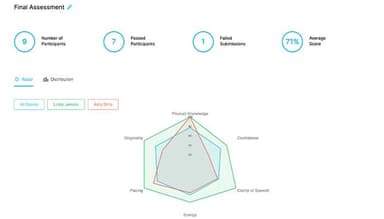
Continu offers real-time dashboards that help teams track learning data such as completion, engagement, and certification status. Admins can ask questions about this data in plain English and turn the results into visual reports. Salesforce integration connects enablement data with metrics such as pipeline velocity, deal size, and win rates. This moves reporting beyond course completion by linking learning activity with business performance.
Extend
White-labeled portals can be set up for partners, customers, and vendors, with separate branding, content, and user management for each audience. Each portal keeps its external users and learning content separate from internal training, but selected courses and resources can still be shared across portals. Self-registration can also trigger onboarding when a new user signs up. This structure lets teams manage multiple external learning environments from one admin view without mixing their audiences or content.
Pros And Cons of Continu
Pros
Gathers company knowledge into one searchable hub
Sends automatic reminders for pending training
Displays a real-time preview during edits
Organizes complex technical training into clear pathways
Adds subtitles to training videos automatically
Cons
Learner view could benefit from a few refinements
Settings may shift slightly after updates
Survey length feels somewhat limited
Continu Pricing
Growth | Professional | Enterprise |
|---|---|---|
Custom Pricing | Custom Pricing | Custom Pricing |
|
|
|
Disclaimer: The pricing details were last updated on Sep 14, 2026 from the vendor's website. Please contact us for a tailored pricing list.
Continu Reviews
Total 9 reviews
4.7
All reviews are from verified customers
Rating Distribution
5
Stars67%
4
Stars33%
3
Stars0%
2
Stars0%
1
Stars0%
Share your experience
IT, 101-500 employees
Less than a year
“Continu for Internal E-Learining”
Pros
When I'm seeking company resources like videos, documents, or information, I always turn to this platform. It's incredibly user-friendly and easy to navigate.
Cons
When searching for materials related to specific keywords and finding various results, clicking on one of them causes the research filter to expire. This requires typing the keywords again, which can be cumbersome.
Rating Distribution
Ease of use
10
Value for money
8
Customer Support
8
Functionality
8
Manufacturing, 500+ employees
Less than 6 months
“Simple yet high-performing”
Pros
Continu software is quite user-friendly, and it offers features that are highly valuable for our audience. What stands out most is how well it handles content management while also managing learning paths and programs. It ensures learners have access to the right resources at the right time. Another highlight is the seamless integration with tools like LinkedIn Learning, which adds a lot of value. Also their customer support team is very helpful, working hard to resolve any issues and they genuinely consider user feedback when introducing new features.
Cons
Their team is relatively small, which causes challenges at times. And even though the available features are great but still not the best as compared to others. For instance, I'd love to see a better search feature and ways to organize content that are more user-friendly. Also I feel like improved authoring tools within the platform would also make a big difference, similar to what some stronger competitors offer.
Rating Distribution
Ease of use
8
Value for money
10
Customer Support
9
Functionality
8
Social Media, 500+ employees
Less than a year
“User-friendly!!”
Pros
Sharing articles, assigning content and assessments and editing materials is now very easy, credit goes to Continu. With a large workforce requiring continuous training, Continu has made it so much easier for employees to access what they need. The interface is not only functional but also visually appealing, making navigation simple and enjoyable.
Cons
While the search functionality works, it is a bit difficult or tedious to use. Because once you have clicked on a result, you can't return to the original list and have to start the search all over again, which causes a lot of frustration.
Rating Distribution
Ease of use
8
Value for money
10
Customer Support
10
Functionality
8
Frequently Asked Questions
Does Continu offer an API?
Yes, Continu offers an API.
What language does Continu support?
Continu supports more than 90 interface languages, including English, Spanish, French, German, Arabic, Chinese (Simplified and Traditional), Japanese, and Korean.
What other apps does Continu integrate with?
The software integrates with several third-party systems such as OpenAI, Zoom, Microsoft Teams, CreateOne, Go1, Oracle, Box, Vimeo, Video Coaching, OneLogin, and Google SSO.
Does Continu software have a mobile app?
Yes, it has a mobile app for both iOS and Android.
What types of pricing plans does Continu offer?
Its pricing is estimated to start at $1,000/month. The vendor offers three custom-priced plans: Growth, Professional, and Enterprise. Users can request a custom Continu pricing quote based on their requirements.
Who are the typical users of Continu?
The platform is mainly suitable for L&D, HR, training, compliance, and enablement teams, as well as managers.
What level of support does Continu offer?
Continu provides support through a help desk, knowledge base, ticket submissions, contact forms, live chat, email, and phone.