

CourseMill
Last Updated
Overview
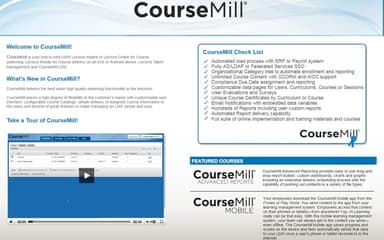
CourseMill e-learning is an intuitive, agile software that streamlines educational and training content management. Explore its robust functionalities to create customized, engaging courses for any learner type. The user-friendly platform empowers businesses to manage all aspects of learning efficiently.
CourseMill Specifications
- Activity Dashboard
- Asynchronous Learning
- Activity Tracking
- Access Controls/Permissions
What Is CourseMill?
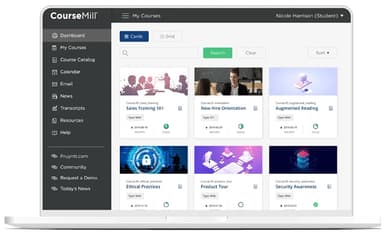
CourseMill is a learning and development software that meets the needs of global learners. It is GDPR-compliant, accessible, and available in multiple languages, offering a personalized, user-friendly interface that puts learners front and center. Its cloud-based platform provides effective and convenient learning strategies, including microlearning support and timely notifications.
CourseMill software also provides an organized dashboard for tracking progress, a flexible course structure, and the ability to onboard over 100,000 learners in a single instance. With the learning management system (LMS), businesses can easily manage courses, deliver online training, certify learners, and create advanced reports.
What Is CourseMill Best For?
CourseMill LMS is best for delivering a personalized and user-friendly experience that caters to diverse learners. It supports various learning strategies, including microlearning and self-paced training. The software is particularly advantageous to businesses that require an efficient LMS migration process, as it promises an easy transition with minimal downtime.
CourseMill Pricing
CourseMill Integrations
The software integrates with third-party integrations, including:
- SAP
- Oracle
- PeopleSoft
- NetSuite
- Workday
- Salesforce
- Tableau
How Does CourseMill Work?
Users can navigate the CourseMill with the following steps:
- Log into the CourseMill software using the credentials
- Track your progress using the organized dashboard
- Access courses from the course management section
- Add, edit, share, or package courses as needed
- Deliver self-paced training by organizing assets
- Certify learners for designated time periods
- Manage user permissions and structure
Who Is CourseMill For?
CourseMill is suitable for businesses of all sizes, from small businesses to large enterprises. Industries and sectors that prioritize ongoing professional development can benefit from the software, such as:
- Agriculture
- Healthcare
- Manufacturing
- Entertainment
- Transportation
- Hospitality
- Retail
- Financial services
Is CourseMill Right For You?
If your business requires a user-friendly LMS that supports diverse learning strategies, then CourseMill is an excellent choice. It's ideal for companies that need to onboard many learners quickly and those requiring a painless LMS migration process. Moreover, it offers excellent security and helps manage compliance and certifications effectively, making it a reliable and trustworthy platform.
For more insight into the benefits of the software, read CourseMill reviews. Contact Software Finder at (661) 384-7070 for more information.
CourseMill Features
Course Management
CourseMill allows for easy publishing and packaging of eLearning content. Instructors can add and modify training materials with just a few clicks. This simplifies course administration and updates.
Automated Enrollment
The LMS has features for automating the enrollment of new employees or students. Administrators can import user profiles in bulk and specify group permissions. The system can also automatically notify users when it's time to retake or renew a training program.
Online Course Sales
This feature includes a custom-branded e-commerce interface, allowing courses to be sold directly through the LMS. This provides a way to monetize training content and reach new learners.
Microlearning Support
The platform supports deploying microlearning modules to enhance engagement and retention. Small, bite-sized lessons and activities can be built into the learning experience.
Non-SCORM Compatibility
In addition to standard SCORM packages, CourseMill can integrate various non-SCORM materials like PDFs, videos, audio files, and more. This broadens the types of content that can be managed through the system.
Reporting And Business Intelligence
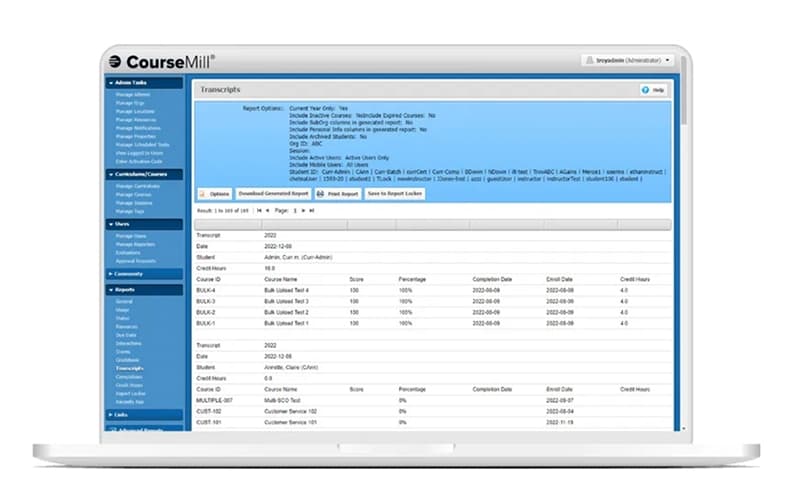
Comprehensive data collection and advanced reporting tools allow administrators to measure and illustrate the impact of learning programs. Data can be exported to business intelligence platforms for in-depth analysis.
Pros And Cons of CourseMill
Pros
Facilitates both formal and informal learning
Helps manage compliance and certifications
Users can track student credit hours
Works as an advanced reports software
Allows disconnected mobile delivery, as per one CourseMill review
Cons
Customer service can improve
Instructor-led courses may be challenging to deliver
Initial training required
CourseMill Reviews
Total 154 reviews
4.6
All reviews are from verified customers
Rating Distribution
5
Stars68%
4
Stars22%
3
Stars8%
2
Stars1%
1
Stars1%
Share your experience
Trucking Accounting, 51-100 employees
Less than 6 Months
“Progress data”
Pros
The ability to pick up where you left off until completing the entire training package was convenient.
Cons
I couldn't find how to save the entire presentation for future reference.
Rating Distribution
Ease of use
10
Value for money
10
Customer Support
10
Functionality
10
Crime and Fidelity, 11-50 employees
Less than 6 Months
“Health & Safety Training”
Pros
Clearly and succinctly presented. The illustrations were beneficial.
Cons
It didn't always fit on my screen, so I had to keep scrolling up and down, which may be due to my small screen.
Rating Distribution
Ease of use
10
Value for money
10
Customer Support
9
Functionality
10
Construction, 1-10 employees
Less than 6 Months
“Screen Equipment Display”
Pros
User-friendly interface, with clear explanations and useful reminders that didn't consume too much time.
Cons
There wasn't anything about the software that I disliked.
Rating Distribution
Ease of use
10
Value for money
10
Customer Support
8
Functionality
7
Frequently Asked Questions
Does CourseMill offer an API?
Yes, CourseMill LMS software has an API available for use.
What languages does CourseMill support?
It supports English, Chinese (Simplified), German, Hungarian, Polish, Portuguese, French, and Spanish.
What other apps does CourseMill integrate with?
It can integrate with several third-party tools, such as SAP, Salesforce, etc.
Does CourseMill support mobile devices?
It is compatible with Android and iOS devices.
What types of pricing plans does CourseMill offer?
The CourseMill cost can depend on user volume, customizations, and other factors.
Who are the typical users of CourseMill?
Small to large organizations in various industries and sectors can use the software.
What level of support does CourseMill offer?
Customer support is available via phone, chat, and a knowledge base.
How does the student interface contribute to training processes in CourseMill?
The student interface in CourseMill is user-friendly and personalized, enhancing training processes by providing effective learning strategies, including microlearning and timely notifications.
How does advanced reporting make CourseMill more effective?
Advanced reporting makes it more effective by enabling businesses to easily pull learning statistics, manage courses, track progress, and certify learners, all in a user-friendly interface.