


Raven360
Last Updated
Overview
Raven360 streamlines knowledge sharing and customer enablement. Its AI-powered platform develops expertise at scale by capturing engagement data. Though some interface elements could be improved, Raven360 remains effective for delivering tailored training, empowering self-service, and maximizing success through unified customer profiles.
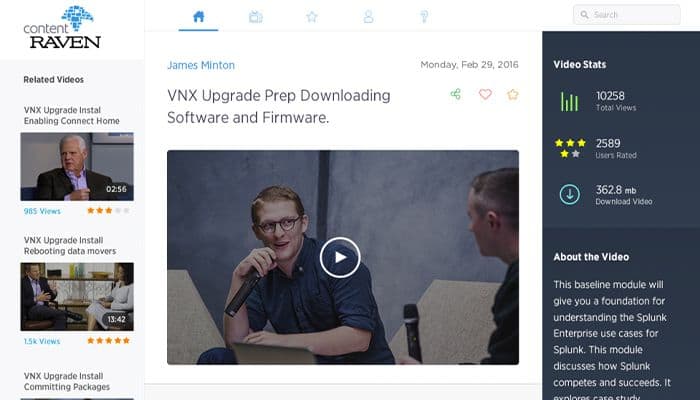

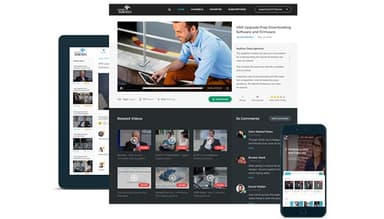
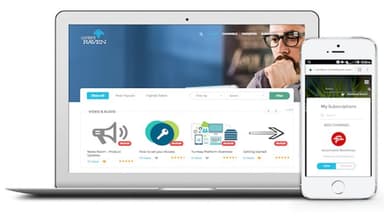
Raven360 Specifications
- Activity Dashboard
- Asynchronous Learning
- Activity Tracking
- Access Controls/Permissions
Raven360 Features
Knowledge Content Creation
Raven360 allows users to easily create and deliver various types of educational digital content, such as eBooks, video courses, PDF guides, and blog posts. It even covers solutions, products, and industry trends. Businesses can manage content through an intuitive interface.
Content Management
The platform provides tools for efficiently organizing extensive knowledge assets. Users can categorize, tag, and seamlessly stream content to create cohesive learner journeys. Whether assembling training modules, curating product documentation, or structuring onboarding materials, this feature ensures a smooth end-to-end learning experience.
Engagement Tracking
The software captures comprehensive analytics on content consumption patterns, sales, marketing campaign performance, and individual lead profiles. It also provides insights into engagement, intent, and affinity that help optimize strategies.
Learning Platform
Organizations can create and manage certification courses within Raven360, allowing learners to complete these programs remotely and earn recognized certifications. The platform also supports virtual instructor-led training (ILT) sessions, where participants engage in real-time discussions, ask questions, and receive personalized guidance. Raven360 also enables the creation of assessments, quizzes, and tests that help organizations evaluate learners’ knowledge and track progress.
Campaign Management
Raven360 empowers organizations to configure marketing workflows seamlessly. Within the platform, users can orchestrate multichannel demand generation and digital advertising campaigns.
Pros And Cons of Raven360
Pros
Intuitive online academy platform
Flexible platform to host different content types
Integration with various CRM and LMS
Deliver training effectively through learning elements
Cons
Occasional minor bugs encountered, as per some Raven360 reviews
Some interface elements could be more intuitive to navigate
Raven360 Reviews
Total 2 reviews
4.5
All reviews are from verified customers
Rating Distribution
5
Stars50%
4
Stars50%
3
Stars0%
2
Stars0%
1
Stars0%
Share your experience
IT, 11-50 employees
Less than a year
“Easy to implement, supportive client success team, great user documentation”
Pros
The different content deployment options and the ability to control who it is deployed to are great. The assessments module is easy to configure and maintain.
Cons
Some UI elements in the Admin portal could be improved, particularly regarding ease of navigation within the admin panel.
Rating Distribution
Ease of use
10
Value for money
9
Customer Support
10
Functionality
10
IT, 11-50 employees
Less than 6 months
“My review of Raven 360”
Pros
The product allows for clear and simple content development, with the ability to layer up as the content increases. The tagging and referencing features are superb.
Cons
It's inconvenient to rely on a separate content management tool.
Rating Distribution
Ease of use
9
Value for money
10
Customer Support
10
Functionality
10
Frequently Asked Questions
Does Raven360 offer an API?
No, it does not have an API.
What languages does Raven360 support?
The software supports the English language.
What other apps does Raven360 integrate with?
Raven 360 integrates with Salesforce, HubSpot, Zoom, 6sense, Marketo, and Hotjar.
Does Raven360 support mobile devices?
Yes, it is optimized for mobile devices.
What types of pricing plans does Raven360 offer?
The software provides tailored pricing plans to accommodate diverse business requirements and budgets. Contact us for a custom Raven360 cost right away!
Who are the typical users of Raven360?
It caters to businesses of all sizes across various sectors and industries, including manufacturing, healthcare, real estate, and information technology.
What level of support does Raven360 offer?
Raven360 offers phone, chat, email, a help desk, and knowledge base support.
Does Raven360 have alternatives?
Yes, CANVAS, Moodle, and Systeme.io are considered the best Raven360 alternatives based on some of the user feedback reviews.