


Kahua
Last Updated

Overview
In the world of construction projects, Kahua is a name synonymous with streamlined collaboration and efficient project management. It empowers various stakeholders, from owners to contractors, to work together seamlessly throughout the entire project lifecycle. It provides top-notch security and offers future growth scalability.
Kahua Specifications
- Project Planning and Scheduling
- Budget Management
- Resource Allocation
- Document Management
What Is Kahua?
Kahua is a leading provider of capital programs and construction project management software. The world’s leading construction organizations use Kahua’s collaborative construction management solutions to improve efficiency, lower costs, and reduce project risk throughout the lifecycle of their capital programs. Kahua's purpose-built solutions for owners, program managers, and contractors enable rapid implementation that minimizes time-to-value and enhances user adoption. And with the industry’s only low-code application platform, Kahua's customers can easily customize existing Kahua apps or even build their own new apps to run their businesses at peak efficiency today and rapidly adapt as business conditions dictate.
What Is Kahua Best For?
One key aspect that makes Kahua stand out is its focus on centralized document management. Traditional software might offer document storage, but Kahua goes a step further. It creates a secure, cloud-based repository for all project documents, plans, and revisions.
This ensures everyone has access to the latest information, eliminates version control issues, and fosters seamless collaboration throughout the entire building process.
Kahua Pricing
Kahua Integrations
Kahua integrates with some of the top project management software, such as:
How Does Kahua Work?
Get started with Kahua with these steps:
- Log in using your Kahua credentials
- Navigate to the project management section and create a new project
- Input all necessary details such as project name, location, start and end dates, and budget
- Add team members to your project by inviting them via email
- Assign roles and permissions based on their responsibilities
- Upload and organize project documents
- Use version control and set permissions for different team members
- Create and assign tasks, set deadlines, and track progress
Who Is Kahua For?
Kahua is used by project managers and other team members engaged in the following sectors and industries:
- Commercial
- Construction
- Education
- Healthcare
- Public Sector
Is Kahua Right For You?
If your construction projects suffer from communication breakdowns, inefficient workflows, or a lack of real-time data, Kahua can be a game-changer. Its centralized platform streamlines communication, automates tasks and provides valuable insights throughout the project lifecycle.
Kahua's potential to boost efficiency, minimize errors, and ultimately deliver successful projects makes it a compelling choice for construction professionals seeking an all-in-one solution. Its wide range of features can boost your construction business.
For further guidance, call us at (661) 384-7070 and consult with our experts. You can also read Kahua reviews.
Kahua Features
Capital Planning
Track various funding sources within Kahua, allowing for clear visibility into overall project finances. The software allows for real-time adjustments based on market fluctuations or design changes, letting you create realistic capital programs. Moreover, Kahua ensures proactive cost management to keep the project financially on track.
Design Management
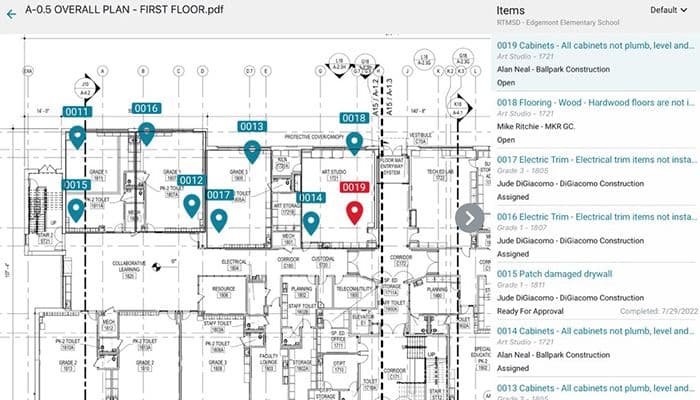
Kahua provides secure and central cloud storage for all your project design documents, plans, and their revisions. This ensures everyone has access to the latest information and eliminates version control issues. Additionally, Kahua facilitates a collaborative design review process. Team members can mark up plans electronically, add comments, and discuss revisions directly within the platform. Moreover, with Kahua software, real-time reporting can be enabled in even the largest mega-projects, with no impact on system performance.
Cost Management
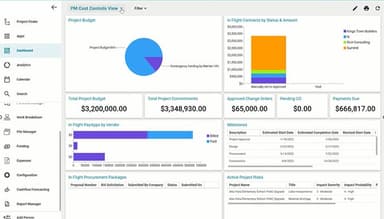
Manage all project commitments—contracts, subcontracts, purchase orders—within a centralized platform. Track spending against commitments and identify potential budget variances early. Streamline the often-complex process of changing orders. Kahua facilitates transparent communication and approval workflows, minimizing financial surprises.
Portfolio Management
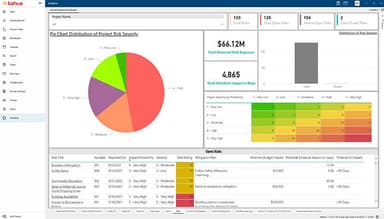
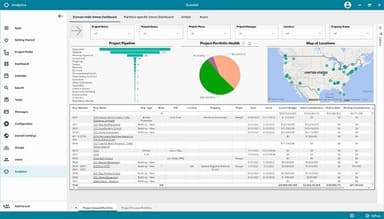
Gain a holistic view of your entire project portfolio. Kahua helps prioritize projects, allocate resources effectively, and identify potential bottlenecks. You can also track the progress of each project within your portfolio or proactively identify and mitigate risks across your entire portfolio of projects, minimizing potential disruptions and delays.
Asset Management
Create a detailed inventory of all project assets within Kahua, capturing information like type, location, quantity, and associated costs. Using Kahua, gain instant insights into the status of your assets. The software tracks the location and usage of equipment, materials, and prefabricated components, ensuring they are readily available when needed.
Document Management
Use Kahua's document management suite to eliminate scattered files and version control issues. The platform provides a secure, cloud-based location to store all project documents, plans, and revisions. Ensure only authorized personnel have access to specific documents based on their role in the project. Automate repetitive tasks like document review and approval processes, freeing up valuable time for project teams.
Pros And Cons of Kahua
Pros
Automated workflows for tasks like document approvals free up valuable time for project teams
Valuable insights throughout the project lifecycle with dashboards and reports
Ensures peak efficiency through detailed features
Kahua offers a comprehensive set of features for cost control, document management, and more
Helps construction companies operate more efficiently, leading to time and cost savings
Cons
Due to a wide range of functionalities, there might be a learning curve for new users
Kahua can be a significant investment, particularly for smaller construction companies
Some businesses might require more customization options for their workflows
Kahua Reviews
Total 17 reviews
4.8
All reviews are from verified customers
Rating Distribution
5
Stars76%
4
Stars24%
3
Stars0%
2
Stars0%
1
Stars0%
Share your experience
Financial Services, 500+ employees
More than a year
“Great customizable real estate PMIS”
Pros
The overall company culture really stands out. Everyone I interacted with was genuinely nice and willing to help which made the whole process feel smooth. It is definitely worth considering if you're shopping for a Real Estate PMIS system, it's customizable enough to fit different business needs and the platform keeps getting improved with new and enhanced features. Also, the support team is super helpful and responsive so you're not left stuck when questions come up. Overall, it feels like a strong company with a solid product.
Cons
A limitation I noticed is that it doesn't let me open multiple tabs at the same time so switching between different applications can be a bit more tiring.
Rating Distribution
Ease of use
9
Value for money
10
Customer Support
9
Functionality
8
Information Technology and Services, 51-100 employees
More than a year
“Such useful extensions”
Pros
We've been adopting the platform across our organization and it's honestly been a solid experience overall. The platform is pretty expansive and can feel complex but the team has been very supportive throughout the process. One of the biggest wins for us is being able to extend the system and build solutions that match how we manage projects which helps us keep everything aligned with our needs. Lately, the new AI features have also made things feel a lot more exciting.
Cons
Because it's such a broad solution, it can take some time to keep up with new features and improvements. It would be great to have a more agent-like way to discover what's new and quickly catch up on the evolving capabilities.
Rating Distribution
Ease of use
9
Value for money
10
Customer Support
9
Functionality
8
Construction, 51-100 employees
More than a year
“five-star collaboration !!”
Pros
Overall, the experience has been fantastic, this product is clearly improving in the right areas. I've been working with it for around three years and collaboration plus customization really feel like core strengths rather than afterthoughts. The pace of innovation has stood out a lot especially during the last year.
Cons
There is a fairly steep overall complexity when you're configuring everything. Getting started can feel overwhelming and it takes some effort to work through that initial learning curve.
Rating Distribution
Ease of use
8
Value for money
10
Customer Support
9
Functionality
9
Frequently Asked Questions
Does Kahua offer an API?
Yes, Kahua offers an open API.
What language does Kahua support?
Kahua supports 11 languages, including English, Spanish, Turkish, and Portuguese.
What other apps does Kahua integrate with?
Kahua integrates with Oracle, CMiC, DocuSign, SAP, Autodesk FORGE, Microsoft Dynamics 365, and several others.
Does Kahua support mobile devices?
Yes, Kahua supports Android and iOS mobile devices. Users can also access it through the Kahua app.
What types of pricing plans does Kahua offer?
Kahua pricing plans are flexible and generally customized to meet each organization's requirements. For further guidance, contact Software Finder.
Who are the typical users of Kahua?
Kahua is typically used by project managers, contractors, subcontractors, and other stakeholders involved in a construction project. It is used across various industries, such as commercial, construction, education, public sector, and healthcare.
What level of support does Kahua offer?
Kahua offers these support options: phone, email, support tickets, webinars, and FAQs.