

Toggl Track
Last Updated
Key Takeaways
Generated from the text of customer reviews
Toggl Track is a time-tracking platform used by project teams, agencies, consultants, and other service-based businesses. Users frequently laud its ease of use and clear time summaries, while some mention sync issues and difficulty editing time entries. Recent vendor updates include expanded reporting capabilities.
Our Verdict
Toggl Track is a practical option for freelancers, consultants, and project-based teams that need consistent visibility into time spent across client work. It is especially relevant where billing and workload planning depend on accurate time records. Pricing appears reasonable for individual users, though some find team plans more expensive as user counts grow. Overall, we recommend it for small to mid-sized teams with time-based workflows.
Overall Rating
Based on 25 users reviews
4.8
Rating Distribution
Positive
100%
Neutral
0%
Negative
0%
Starting Price
$12
per user per month


Toggl Track Specifications
- Time Tracking
- Task Management
- Reporting
- Budget Management
What Is Toggl Track?
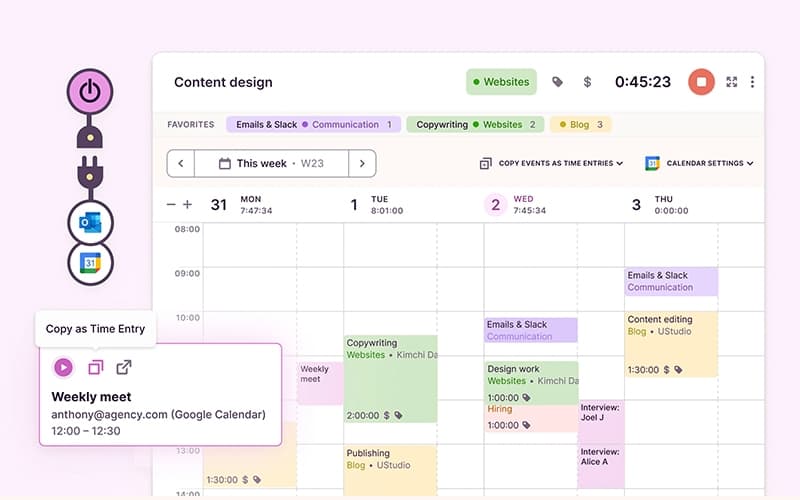
Toggl Track is a time-tracking software that helps teams record and review time spent across projects and tasks. Users can track time through web, desktop, mobile, and browser extensions. Automated time tracking and calendar-based entries are also available. The software provides customizable reports focused on productivity, profitability, and workloads. These reports give teams insight into task and project duration, resource use, and team capacity.
What Is Toggl Track Best For?
Toggl Track stands out for its “Time Tracker” feature, which offers several ways to record work time. They can track in real time, work offline and sync later, or switch between timer and manual modes. One-click timers make it easier to start tracking against the correct project or client, while Timeline records app and browser activity privately. This gives users more control over how and when they capture their time.
How Much Does Toggl Track Cost?
Toggl Track pricing starts at $12/user/month with the Starter plan. This tier is designed for teams that need paid time tracking capabilities beyond the free option. The software also offers a Free plan for a limited number of users.
Further pricing tiers are as follows:
- Premium: $24/user/month
- Enterprise: Custom pricing
The platform also offers a free plan known as Basic. In addition to the base subscription, organizations should account for the following expenses:
- Optional Onboarding And Training: Around $1,000 for SMB teams and $2,000–$8,000 for larger rollouts, based on typical SaaS onboarding benchmarks
- Custom integration work (via API/MCP): Estimated at $2,000–$15,000/integration when custom API or engineering support is required
- Data Migration From Another Time Tracker: Around $0–$1,500 for straightforward migrations and $1,500–$5,000 for larger or more complex ones
Most reviewers consider Toggl Track to be good value for freelancers and individual users, particularly when the free plan meets their needs. However, some users feel paid plans become less cost-effective for solo users or larger teams once additional licenses are required.
Disclaimer: The pricing is subject to change.
Toggl Track Integrations
The software supports integration with multiple systems and platforms, such as:
How Does Toggl Track Work?
Here's how you can get started with the software:
- Create or log in to your Toggl Track account to access your workspace and begin tracking time
- Set up projects, clients, and time entries so tracked work is organized against the right records
- Track time in real time, work offline and sync later, or add entries manually when needed
- Use one-click timers or Calendar View to capture and review time against projects, clients, and scheduled work
- Add teammates to shared time entries when multiple users need the same time record in their accounts
- Review Timeline activity and choose which app or browser activity to convert into time entries
- Generate customizable reports to review productivity, profitability, workloads, task duration, and team capacity
Who Is Toggl Track For?
Toggl Track is ideal for a wide range of industries and sectors, including:
- Creative agencies
- Legal
- Information technology
- Finance
Toggl Track Use Cases
Based on our analysis of user feedback and Toggl Track features, we have identified the following key scenarios where it may be a good fit:
Freelancers Tracking Client Hours And Billing
For freelancers, Toggl Track can keep hours separated across clients and projects while providing records for billing. Reviews noted that billable and non-billable reports helped users understand where their time was going and attach detailed time reports to invoices. In this regard, the software fits independent professionals whose client billing depends on accurate records of hours worked.
Researchers Managing Time Across Multiple Projects
Researchers working across different studies, contracts, or academic responsibilities can use Toggl Track to separate time between projects and tasks. User feedback highlights that it was useful for tracking several projects and jobs, particularly research assistant contracts with a fixed number of hours. This makes it relevant when research work needs to be divided clearly across separate commitments.
Small Teams Recording Time Across Shared Projects
Toggl Track can also fit smaller teams that need a consistent way to record project time across several users. Reviews laud its intuitive project tracking and ability to work with different cost levels. For teams handling multiple pieces of work at once, this provides a structured way to keep project hours organized without relying on separate manual records.
Software Professionals Reviewing Daily Work Allocation
Software professionals can use Toggl Track to maintain a record of how their working day is divided across projects and activities. User reviews noted that the platform helps him track everything he is doing and keep it organized. This use case is particularly relevant for technical work where several tasks or project streams may be active during the same day.
Is Toggl Track Right For You?
Toggl Track is a practical choice if your team needs better visibility into how time is spent across projects and tasks. It may be particularly useful for organizations that want to use time data to review productivity, profitability, and workloads through customizable reports.
Trusted by companies like Fuse, Big Sky Care Connect (BSCC), and Xmartlabs, Toggl Track holds ISO 27001 certification and SOC 2 Type II compliance. It is also GDPR compliant.
Still doubtful if Toggl Track software is the right fit for you? Reach out to us at (661) 384-7070, and we’ll help you make the right choice.
Toggl Track Features
Invoicing
The platform connects tracked billable hours with client and project records. Teams can use this time data when preparing reports and invoices, rather than relying on estimates or separate logs. It gives users a clearer breakdown of completed work when reviewing hours before client billing.
Timesheets Reports
The software builds timesheets from billable and non-billable hours recorded by team members. Submitted timesheets can be reviewed, approved, or rejected by managers before payroll processing. For closer review, users can filter reports by client, project, team member, or timeframe and export the results when required.
Time Reporting And Analytics
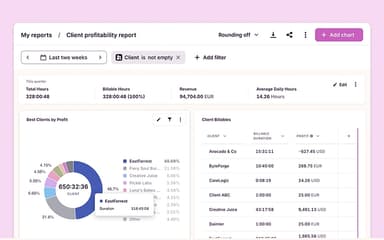
Toggl Track organizes recorded hours into reports for reviewing client, project, task, user, and billability data. Teams can compare estimated and actual hours, examine workload distribution, and assess profitability. These reporting options give managers more context when reviewing project budgets, staffing requirements, and resource allocation.
Time Off Management
The platform keeps time-off information such as vacations, sick leave, balances, and team availability within Toggl Track. Employees can submit requests for manager review, while automatic approvals can also be configured. Organizations can set leave allowances, reset dates, and prorated accruals according to their time-off policies.
Pros And Cons of Toggl Track
Pros
Easy to use for everyday time tracking
Detailed reports support billing and workload review
Offline tracking works well for project-based work
Automated tracking reduces manual time entry
Works across desktop, web, and mobile devices
Cons
Report customization can feel limited for client needs
Project folders and task organization can get confusing
Google Calendar syncing may require extra setup
Toggl Track Pricing
Basic | Starter | Premium | Enterprise |
|---|---|---|---|
$0 | $12 per user per month | $24 per user per month | Custom pricing |
|
|
|
|
Disclaimer: The pricing details were last updated on Oct 12, 2026 from the vendor's website. Please contact us for a tailored pricing list.
Toggl Track Reviews
Total 25 reviews
4.8
All reviews are from verified customers
Rating Distribution
5
Stars76%
4
Stars24%
3
Stars0%
2
Stars0%
1
Stars0%
Share your experience
Banking, 500+ employees
More than a year
“Flexible project organization”
Pros
The flexibility this tool provides really helps me, making it easy to add or remove items as needed to keep projects organized and moving forward.
Cons
There were occasions when the app crashed which sometimes added stress to my workday.
Rating Distribution
Ease of use
8
Value for money
9
Customer Support
8
Functionality
9
Publishing, 1-10 employees
More than a year
“Simple task timing and summaries”
Pros
Being able to set a timer with a single touch and later receive clear summaries helps me delegate editorial tasks without needing to micromanage the team.
Cons
I get frustrated by the occasional sync glitches. I also find the advanced permission settings too limiting when I need to manage different editor roles on a project
Rating Distribution
Ease of use
9
Value for money
10
Customer Support
9
Functionality
10
Sports, 1-10 employees
Less than 6 months
“free plan covers core needs!”
Pros
For my needs, the free tier covered everything required. I found it easy to use and it clearly showed where my time was going and which tasks I could stop doing or delegate.
Cons
There really wasn't anything I didn't like about it. Because I didn't require features for more complex tasks, this app did everything I needed, for simply keeping track of my time in an organized way, it's excellent.
Rating Distribution
Ease of use
10
Value for money
10
Customer Support
10
Functionality
10
Frequently Asked Questions
Does Toggl Track offer an API?
Yes, Toggl Track offers an API.
What level of support does Toggl Track offer?
Toggl Track offers support through an online contact form, a knowledge base, the Toggl community, and FAQs.
What other apps does Toggl Track integrate with?
Toggl Track integrates with multiple systems and platforms, including Drupal, GitHub, and Asana.
What types of pricing plans does Toggl Track offer?
Besides a free Basic plan, Toggl Track pricing starts at $12/user/month with the Starter plan. It also includes a Premium plan for $24/user/month and a customizable Enterprise plan. Get a detailed Toggl Track cost breakdown tailored to your specific requirements.
Who are the typical users of Toggl Track?
Toggl Track is used by organizations across a range of industries and sectors, including information technology, creative agencies, and legal.
Does Toggl Track have a mobile app?
Yes, Toggl Track offers a dedicated mobile app.
What language does Toggl Track support?
Toggl Track primarily supports multiple languages, including English, Brazilian Portuguese, Japanese, and French.