


Otter.ai
Last Updated
Overview
Otter.ai streamlines enterprise documentation by automatically recording and transcribing meetings to create a searchable knowledge base. Although it needs a stable internet connection to work well, its high accuracy and automated summaries make it an essential tool for boosting productivity. Try it to capture every detail.
Otter.ai Specifications
- Call Recording
- Call Reporting And Analytics
- Speech Analytics
- Interactive Voice Response (IVR)
Otter.ai Features
Otter AI Chat
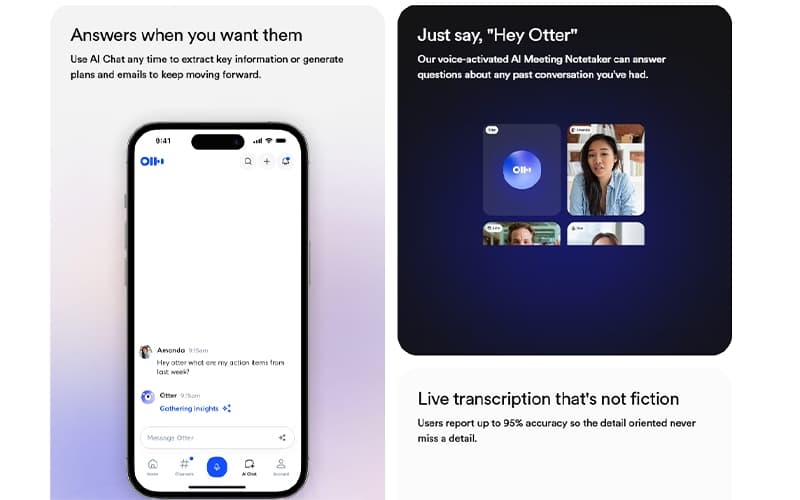
Otter AI Chat functions as an always-on intelligence layer for your meeting data. Users can query the system at any time to extract key information, generate project plans, or draft follow-up emails. This on-demand retrieval eliminates the need to review full transcripts, keeping workflows moving forward efficiently.
Voice Activated Assistant
The platform features a voice-activated assistant that responds to the prompt "Hey Otter." This AI meeting notetaker can instantly answer questions about any past conversation in your history. By enabling hands-free interaction, it allows participants to remain engaged in the discussion while still accessing critical historical context.
High Accuracy Transcription
Delivering up to 95% reporting accuracy, the transcription engine ensures that detail-oriented professionals never miss a specific point. The system captures spoken words with high fidelity, creating a reliable text record that minimizes the need for manual corrections. This precision is essential for maintaining a trustworthy source of truth.
Collaborative Channels
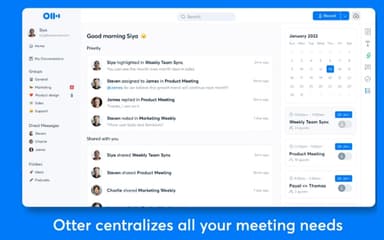
Otter.ai featues ‘Collaborative Channels’ which provide a unified workspace that seamlessly blends live conversations with asynchronous updates. Team members can access shared notes, highlight key segments, and stay aligned on project developments in real-time. This structure ensures that everyone remains on the same page, regardless of their location or attendance at specific meetings.
Automated Insights Extraction
The artificial intelligence engine automatically identifies and pulls out the most important information from every session. It highlights key takeaways so users do not have to manually sift through long transcripts. This automated extraction significantly reduces administrative time, allowing teams to focus on acting on insights rather than organizing them.
Pros And Cons of Otter.ai
Pros
Imports pre-recorded audio/video files
Learns custom vocabulary
automatically captures and assigns action items from meetings
Cons
Lower accuracy for non-standard and non-native accents
Performs poorly with low-quality audio
Otter.ai Reviews
Total 31 reviews
4.3
All reviews are from verified customers
Rating Distribution
5
Stars45%
4
Stars39%
3
Stars13%
2
Stars3%
1
Stars0%
Share your experience
Consulting, 51-100 employees
Less than a year
“Weekly schedule overviews are helpful”
Pros
Each week I get an overview email at the start of the week showing what the upcoming schedule looks like and it also highlights key points from follow-up meetings which is helpful.
Cons
I struggle to quickly find an older transcript once there are a lot of recordings built up over time.
Rating Distribution
Ease of use
8
Value for money
9
Customer Support
8
Functionality
9
Not Specified, N/A employees
“Great for minutes, struggles with hindi”
Pros
Otter.ai really handy for generating meeting minutes. Plus the transcripts it produces are detailed, informative and genuinely helpful. It also works well with Google Meet and the rest of Google Workspace, and getting started was not a problem.
Cons
One thing I did not like is that it struggles with Hindi at times. Also the notification emails and the frequent prompts to join meetings get really irritating.
Rating Distribution
Ease of use
8
Value for money
9
Customer Support
8
Functionality
9
Small Business, 11-50 employees
“A user-friendly go-to transcription tool”
Pros
I have been using Otter AI as my go-to tool for taking notes and transcribing calls. It has proven to be user-friendly and I like that it links smoothly with Google Meet and Zoom. The auto-generated meeting summaries help me quickly capture the main points and overall it functions as a very handy personal note-taker for my workflow.
Cons
At times the transcripts are off and I end up needing to correct them manually, so human intervention is still necessary.
Rating Distribution
Ease of use
8
Value for money
9
Customer Support
8
Functionality
9
Frequently Asked Questions
What language does Otter.ai support?
Otter.ai is available in English.
Does Otter.ai have a mobile app?
Yes, Otter.ai offers mobile applications for both iOS and Android devices to record and transcribe on the go.
Who are the typical users of Otter.ai?
Otter.ai features are used by professionals in Sales, Education, Media, Recruitment, Consulting, and Healthcare.
What types of pricing plans does Otter.ai offer?
The software offers Basic (Free), Pro ($16.99/user/month), Business ($30/user/month), and Enterprise plans. For a custom Otter.ai cost estimate, contact us.
What level of support does Otter.ai offer?
Otter.ai offers customer support via email and a comprehensive knowledge base.
What other apps does Otter.ai integrate with?
Otter.ai integrates with Zoom, Microsoft Teams, Google Meet, Slack, Salesforce, HubSpot, Dropbox, and Zapier.
Does Otter.ai offer an API?
Yes, Otter.ai offers a public API (currently in beta) for enterprise clients to build custom integrations.