

Last Updated

Overview
TimeClock Plus software is the ultimate workforce management solution. Offering features like time and attendance tracking, employee scheduling, and labor cost control, it streamlines operations and boosts productivity. Optimize your workforce management with TimeClock Plus - take control of your business today!
TimeClock Plus Specifications
- Time Tracking
- Task Management
- Reporting
- Budget Management
TimeClock Plus Features
Real-time labor information
The platform offers managers immediate access to crucial labor data. It allows for timely and informed decision-making, essential in dynamic business environments for rapidly changing workforce demands. Managers can respond to changes more effectively by accessing real-time data, ensuring optimal workforce deployment and productivity.
Time And Attendance
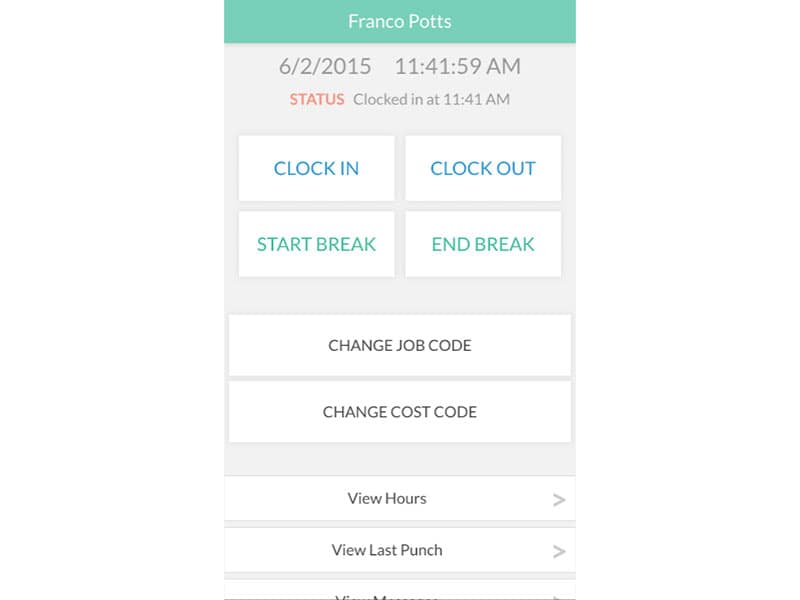
TimeClock Plus simplifies the process of tracking employee hours and attendance. It provides a single, user-friendly application where all time-related data is centralized. It eliminates the administrative burden of managing multiple systems and increases the accuracy of time records by minimizing manual entries and potential errors.
Employee Scheduling
This functionality enables businesses to create and manage employee schedules efficiently. The system allows for the quick creation of schedules, taking into account employee availability, skills, and labor laws. It guarantees that the appropriate personnel are scheduled at optimal times, resulting in heightened operational efficiency and enhanced employee contentment.
Leave And Absence Management
The leave and absence management feature streamlines the process of managing employee leaves and absences. It lets administrators approve or deny leave requests and track all leave-related data in one place. TimeClock Plus project management software simplifies leave management and ensures accurate tracking of employee absences, which is crucial for maintaining compliance with labor laws.
Labor Costing And Job Tracking
The software provides businesses with precise labor tracking capabilities. It allows for detailed tracking of labor costs associated with specific jobs or projects. TimeClock Plus provides valuable insights into budgeting and cost control. By accurately tracking labor costs, the system enables organizations to better manage their resources and make informed project staffing and scheduling decisions.
Reporting And Analytics
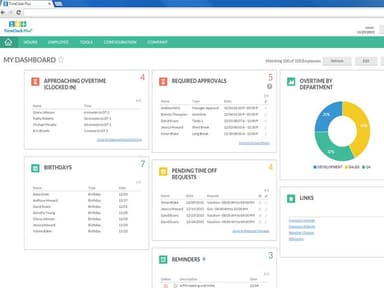
You can get valuable insights into their workforce trends using this functionality. The system enables you to customize reports and dashboards to suit your needs, offering quick access to relevant data. These insights can help you identify patterns, make data-driven decisions, and spot potential issues to enhance your workforce management strategies.
Pros And Cons of TimeClock Plus
Pros
Automates timekeeping and scheduling
Enhances compliance tracking
Streamlines workforce management
Improves employee experience
Offers a user-friendly interface
Cons
Initial setup may require IT assistance
Limited customization options
Mobile app can be more intuitive, according to some user reviews
TimeClock Plus Reviews
Total 1 reviews
5
All reviews are from verified customers
Rating Distribution
5
Stars100%
4
Stars0%
3
Stars0%
2
Stars0%
1
Stars0%
Share your experience
Aries
Retail, 1-10 employees
Less than 6 months
“TimeClock Plus Review”
Pros
The standout feature of TimeClock Plus is the wide range of punching options and integrations available to us.
Cons
I wouldn't say that TimeClock Plus has any major downsides for me, but there is room for improvement in terms of reporting.
Rating Distribution
Ease of use
10
Value for money
9
Customer Support
10
Functionality
10
Frequently Asked Questions
Does TimeClock Plus offer an API?
No, TimeClock Plus does not offer an API to its clientele.
What language does TimeClock Plus support?
TimeClock Plus supports the English language.
What other apps does TimeClock Plus integrate with?
TimeClock Plus offers seamless integration with a variety of third-party applications. These include Oracle HCM, SAP, NetSuite, Sage, Paychex, QuickBooks, and ADP.
Does TimeClock Plus support mobile devices?
Yes, TimeClock Plus supports iOS and Android devices.
What types of pricing plans does TimeClock Plus offer?
The TimeClock Plus cost depends on your organization’s size, type, and needs.
Who are the typical users of TimeClock Plus?
TimeClock Plus software is utilized across a variety of industries. These include education, retail, healthcare, manufacturing, and construction.
What level of support does TimeClock Plus offer?
TimeClock Plus offers email, a help desk, a 24/7 customer representative, a knowledge base, and chat and phone support.
What are the main features of TimeClock Plus?
The main functionalities of TimeClock Plus include employee time sheets management, major payroll calculations, and time clock operations.