


Last Updated
Overview
MindGenius helps plan and manage projects through visual mindmaps, task management, and AI-inspired idea generation. Although some users report occasional performance dips when handling complex tasks, its collaborative maps and built-in reporting speed planning and clarify priorities. On the whole, this software offers practical visual planning for teams.
Overall Rating
Based on 8 users reviews
4.9
Rating Distribution
Positive
100%
Neutral
0%
Negative
0%
Starting Price
$0
14-day free trial
MindGenius Specifications
- Task Management
- Reporting
- Resource Allocation
- Mobile App
What Is MindGenius?
MindGenius Online is a cloud-based mind mapping and visual planning platform designed to help individuals and teams think more clearly, plan more effectively, and collaborate with ease. It is built for brainstorming, project planning, and problem-solving in one place.
The platform combines intuitive drag-and-drop mind maps with task management, real-time collaboration, and seamless sharing. Whether you’re organizing ideas, mapping out workflows, or aligning teams around a common goal, MindGenius Online turns complex thinking into clear, actionable plans—all in one flexible, easy-to-use workspace.
MindGenius Pricing
The software offers a 14-day free trial, along with the following pricing plans:
Subscription:
- £10/seat/month (supports up to 25 users)
Enterprise:
- Custom pricing (supports up to 25+ users)
Bulk Pricing Offer:
- 1-10 Users: £100
- 11-25 Users: £90
- 26-50 Users: £75
- 51-100 Users: £50
- For 100+ Users: Custom pricing
Disclaimer: The pricing is subject to change.
MindGenius Integrations
The platform integrates with several popular productivity, cloud storage, and collaboration tools, making it easier to include your existing files and workflows in your visual planning and project management.
- Microsoft Teams
- Dropbox
- Google Drive
- OneDrive
- Microsoft Outlook
- Microsoft Project
- Microsoft Word
- Unsplash
Who Is MindGenius For?
MindGenius Online is designed for a wide range of users who need a versatile tool for visual thinking, planning, managing, and collaborating. It’s particularly well-suited for:
- Project management teams
- Managers and decision makers
- Brainstormers and strategists
- Analysts and planners
- Students
- Teachers
Is MindGenius Online Right For You?
MindGenius Online is right for you if you need a visual way to capture ideas, plan projects, and collaborate with others. It’s ideal for professionals, teams, educators, and students who want to move from brainstorming to clear, actionable plans using an intuitive online workspace that brings structure to complex thinking.
Still doubtful if MindGenius software is the right fit for you? Connect with our customer support staff at (661) 384-7070 for further guidance.
MindGenius Features
Visual Tools And Mindmap Enhancements
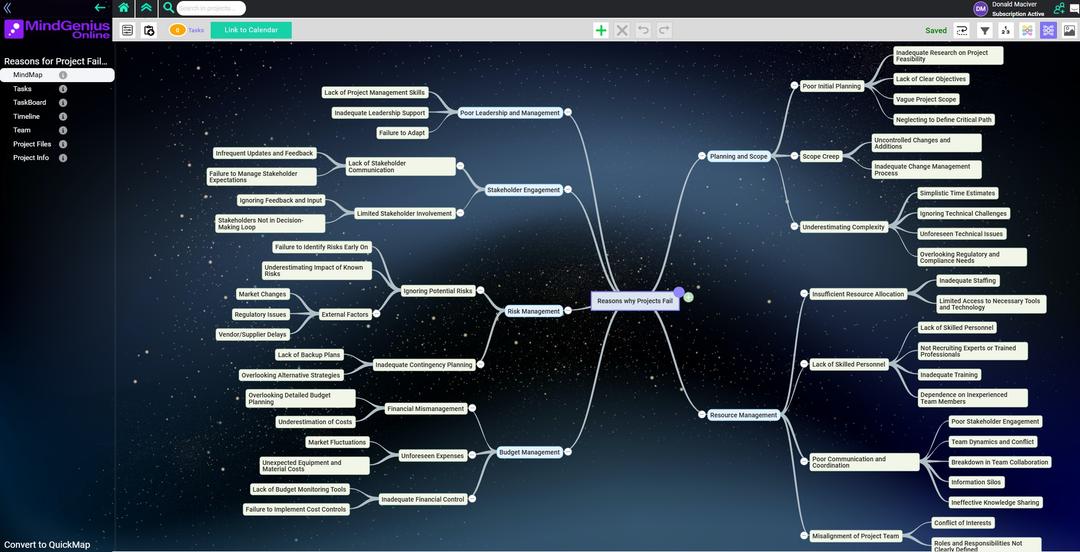
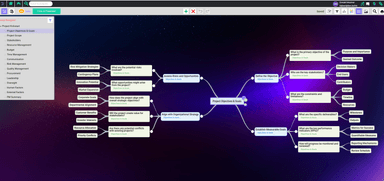
MindGenius features color templates, auto-color options, floating text, and adjustable fonts that make mindmaps clearer and more engaging. Image additions further enhance context, supporting smoother idea understanding and project thinking.
Task Management
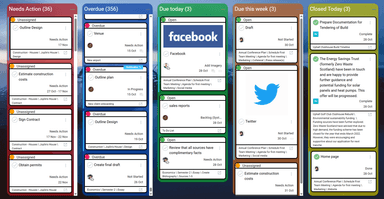
With this feature, tasks are visually organized, prioritized, and arranged to show relationships and focus areas. Clear hierarchy, drag-and-drop adjustments, and structured task details support smoother planning and more confident progress across projects.
Reports And Multi-Project Insights
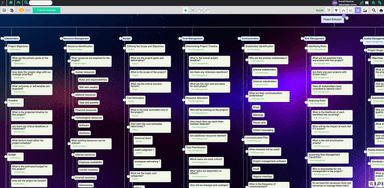
The platform offers clear visual reports that present data, highlight project status, and surface insights across multiple views. Graphic overviews, task tracking, and progress visibility support better understanding and steadier decision-making throughout ongoing work cycles.
Resource Management
The software provides clear visibility into resource availability, task relationships, and multi-project demands. Structured views, linked resources, and collaborative feedback offer a broader perspective that supports steadier planning and more balanced allocation across ongoing work.
Pros And Cons of MindGenius
Pros
Resource chart simplifies managing complex schedules
File exporting works smoothly across platforms
Project visibility improves communication with clients
Cons
Would benefit from broader multi-device access
The interface can feel slightly confusing initially
MindGenius Reviews
Total 8 reviews
4.9
All reviews are from verified customers
Rating Distribution
5
Stars88%
4
Stars13%
3
Stars0%
2
Stars0%
1
Stars0%
Share your experience
Pavan sreevatsav A.
Consumer Services, 500+ employees
Less than a year
“simple project handling”
Pros
Handling projects is pretty simple with this tool. It grasps what the project needs and examines the information you provide. The summaries it creates from that data have been very useful. It also makes presenting to clients much simpler. I think partnering with them is a smart move because it really simplifies managing work.
Cons
If they could lower the cost, a lot of smaller businesses would be able to take advantage of everything it offers.
Rating Distribution
Ease of use
8
Value for money
7
Customer Support
10
Functionality
8
Andrew H.
Professional Training & Coaching, 1-10 employees
More than a year
“Incredibly simple and adjustable”
Pros
It's incredibly simple to operate, adjust and handle information. It's perfect for taking notes, mapping out a project or following customer details. I love how you can just type and press enter, drag and drop to rearrange items and all the different styling choices.
Cons
I truly can't think of anything the computer program lacks, at least for what I need it to do.
Rating Distribution
Ease of use
10
Value for money
10
Customer Support
10
Functionality
10
Anonymous
Consumer Goods, 1-10 employees
More than a year
“perfect for structuring thoughts”
Pros
I love that I can jump straight into the program to sort out thoughts, details and information as it comes in. Being able to structure the data and zoom in or out on what's shared means I can go deep into specifics or give a high-level overview, depending on what's needed.
Cons
I'm not a big fan of the default color palette. I wish that was more flexible. Having color-coded sections in the timeline view would be very effective when sharing a large idea map.
Rating Distribution
Ease of use
9
Value for money
8
Customer Support
9
Functionality
9
Frequently Asked Questions
What language does MindGenius support?
The platform primarily supports English; however, its AI-powered capabilities can process inputs in 85 languages.
Who are the typical users of MindGenius?
The platform is designed for a wide range of users who seek a versatile tool for visual thinking, planning, managing, and collaborating. It’s particularly well-suited for project management teams, managers, decision makers, brainstormers, strategists, students, analysts, planners, and teachers.
Does MindGenius offer an API?
Yes, MindGenius offers an API.
Does MindGenius have a mobile app?
No, MindGenius does not offer a mobile app.
What types of MindGenius price plans are available?
The software includes a 14-day free trial and offers two main plans: a Subscription option priced at £10/seat/month for up to 25 users and an Enterprise option with custom pricing for 25+ users, both billed annually. A Bulk Pricing Offer plan is also available, with rates of £100 for 1–10 users, £90 for 11–25 users, £75 for 26–50 users, £50 for 51–100 users, and custom pricing for 100+ users. Contact us to request a personalized MindGenius cost quote based on your institution's requirements.
What other apps does MindGenius integrate with?
The platform integrates with several third-party applications and systems, including Microsoft Teams, Microsoft Word, Unsplash, UserFlow, and Google Drive.
What level of support does MindGenius offer?
The platform provides support via email, phone, and help center.