


Jira Software

Last Updated
Key Takeaways
Generated from the text of customer reviews
Jira is a project management software used by product, IT, and business teams, particularly those managing agile projects. Users value its visibility into tasks, project progress, and team responsibilities. However, some mention that the software can be tricky to navigate. Recently, the vendor released 15 new capabilities, including the Delivery Agent, rebuilt views, and capacity planning.
Our Verdict
Jira is a strong fit for organizations that need a highly configurable system capable of supporting complex, evolving workflows. Its tiered pricing can become costly as team size and requirements expand. We recommend it for growing organizations that need customization, integrations, and process control rather than a lightweight project management tool.
Overall Rating
Based on 5751 users reviews
4.4
Rating Distribution
Positive
93%
Neutral
7%
Negative
0%
Starting Price
$9.05
per user per month
Jira Software Specifications
- Time Tracking
- Task Management
- Reporting
- Budget Management
What Is Jira?
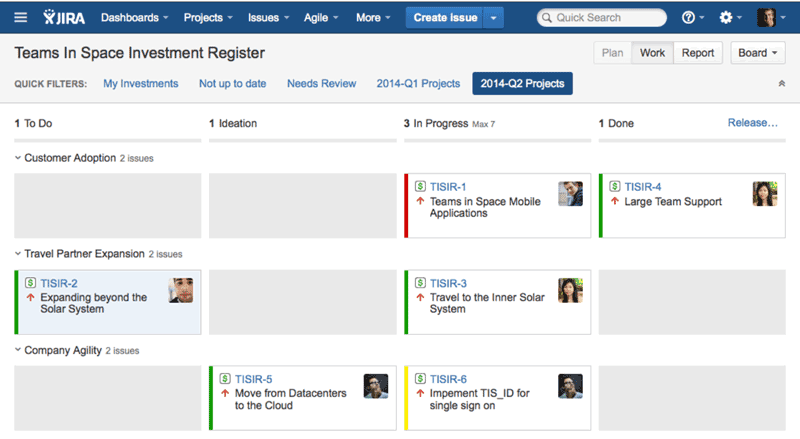
Jira is a cloud-based project management and work-tracking platform developed by Atlassian. The tool supports software development, product, and marketing teams that require project tracking and planning. Its core features include Scrum and Kanban boards, sprint planning, backlog management, and built-in reports on project progress. Users can organize work through boards, lists, timelines, and calendars while managing tasks, dependencies, and project goals.
What Is Jira Best For?
A standout aspect of Jira is its highly configurable workflow management. Teams can build custom workflows with their own statuses and transitions, then manage work through Scrum or Kanban boards based on how projects actually move from start to finish. Jira also supports mixed agile approaches, making it particularly useful for teams that need more control over complex processes than a fixed task-management system provides.
How Much Does Jira Cost?
Jira pricing starts at $9.05/user/month for its Standard plan. Further plans include:
- Free - $0 for 10 users
- Premium - $18.30/user/month
- Enterprise – Custom Pricing
It also offers a 14-day free trial. Other than the base subscription, organizations should consider the following estimated additional costs:
- Implementation: Typically costs $1,000–$10,000+ for Jira setup, project configuration, permissions, issue types, and deployment support
- Data Migration: Generally ranges from $1,000–$15,000+, depending on the number of projects, users, attachments, apps, and historical records being moved
- Training And Onboarding: Usually estimated at $500–$5,000+ for administrator training, team onboarding, Jira usage guidance, and role specific instruction
- Customization And Configuration: Can cost $1,000–$10,000+ for custom project structures, issue types, permissions, dashboards, automation rules, and third-party app configuration
User sentiment on Jira’s pricing is mixed. Some users consider it good value for the depth of its project management and customization features, while others find costs rise quickly as teams expand or require more advanced functionality.
Disclaimer: The pricing is subject to change.
Jira Integrations
The tool connects with over 3,000 third-party applications, such as:
- Slack software
- Microsoft Teams
- Salesforce
- Zoom
- GitHub
- Figma
How Does Jira Work?
Here's how to get started with Jira software:
- Log in to Jira and access your software space
- Create a work item and select its type, such as a task, bug, or story
- Add relevant details and assign the work item to a team member
- Use filters to locate work items by criteria such as assignee, status, priority, or due date
- Open the board to view work items across different status columns
- Plan sprint work from the backlog when using a Scrum board
- Move work items across board columns as their status changes
- Access reports to review project, sprint, and work item data
- Add comments and mention team members within work items
Who Is Jira For?
The software is used across various industries and sectors, including:
- Information technology
- Marketing
- Legal
- Finance
- Logistics
- Retail
- Hospitality
Jira Use Cases
Based on our analysis of user feedback and Jira's current capabilities, we have identified key scenarios where this software is a good fit for teams managing complex, cross-functional work:
Teams Planning Projects With Interdependent Tasks
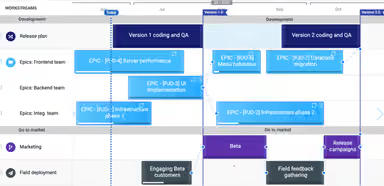
Project plans become difficult to manage when one task depends on another or schedules change during execution. Jira helps teams map dependencies and view the timing and sequence of related work. Teams can then identify potential blockers while adjusting project plans as priorities or deadlines change.
Marketing Teams Coordinating Product Launches
Product launches often depend on engineering work being completed on schedule, making it difficult for marketing teams to plan campaigns when development timelines shift. Jira gives marketing teams visibility into engineering progress, blockers, and expected delivery dates, helping them adjust campaign timelines and launch activities when product work changes.
Agile Teams Planning Work Across Sprints
Software teams can face difficulty deciding which backlog items should enter the next sprint when priorities and team capacity compete. Jira provides a backlog where teams can prioritize upcoming work and select items for individual sprints. Reporting adds context around capacity, timelines, and performance when teams prepare subsequent sprint plans.
Program Leaders Coordinating Work Across Multiple Teams
Large initiatives become harder to oversee when several teams contribute separate projects with connected deadlines and dependencies. Jira helps break broader plans into smaller pieces while showing work across participating teams. Program leaders can also map dependencies and review progress, priorities, and resourcing as requirements change.
Is Jira Right For You?
If your organization needs structured project tracking, agile planning, and configurable workflows in one platform, Jira can be a strong fit. It scales from smaller teams to enterprise environments, with broader controls available as requirements grow. For organizations with stricter security needs, Jira supports customizable roles and IP allowlisting. Data is encrypted in transit using TLS 1.2+ and at rest using AES-256.
Still unsure about Jira? Contact us at (661) 384‑7070, and our team will help you assess whether it matches your project management needs.
Jira Software Features
Project Templates
Jira software offers customizable and pre-built templates for different project types, including marketing campaigns and agile sprints. Teams can use an existing structure rather than building a project setup from scratch. As a result, this helps new Jira users establish a base starting point for recurring project types.
Custom Fields And Project Configuration
The platform provides project level and global configuration options alongside customizable fields. Administrators can adapt the information captured for work items based on how different teams manage projects. This helps organizations accommodate distinct project requirements without applying identical settings to every team.
Dependency Management
The tool connects related work across engineering, product, and marketing projects. Teams can map dependencies to see when one task or initiative relies on another before it can move ahead. This context can help project leads identify scheduling conflicts and coordinate connected activities during larger releases.
Project Views
Jira features project work through boards, lists, timelines, and calendars. Teams can choose a view based on what they need to examine, such as individual tasks or scheduled work. This flexibility helps project leads to follow progress without requiring every team to review work in the same format.
Agile Reporting
Jira provides built-in reports for Scrum, Kanban, and other agile workflows. Scrum teams can track sprint progress through sprint, burndown, release burndown, and velocity reports. Kanban teams can use cumulative flow diagrams and control charts to identify bottlenecks and review cycle or lead times. Jira also includes reports for issue analysis, workload, resolution time, and forecasting.
Jira Software Key Sentiments
Most Positive Sentiments
Integration Options

97.22% Positive

2.78% Neutral

0% Negative
Ticket Management
77.59% Positive
21.55% Neutral
0.86% Negative
Content Discovery
75% Positive
16.18% Neutral
8.82% Negative
Least Positive Sentiments
Loading Performance
5.13% Positive
37.18% Neutral
57.69% Negative
User Onboarding
14.29% Positive
56.43% Neutral
29.29% Negative
Feature Requests
15.46% Positive
40.21% Neutral
44.33% Negative
Most Positive Sentiments
Least Positive Sentiments
Integration Options
97.22% Positive
2.78% Neutral
0% Negative
Loading Performance
5.13% Positive
37.18% Neutral
57.69% Negative
Ticket Management
77.59% Positive
21.55% Neutral
0.86% Negative
User Onboarding
14.29% Positive
56.43% Neutral
29.29% Negative
Content Discovery
75% Positive
16.18% Neutral
8.82% Negative
Feature Requests
15.46% Positive
40.21% Neutral
44.33% Negative
Pros And Cons of Jira Software
Pros
Offers highly customizable workflows for different project and team processes
Task prioritization helps teams stay organized and meet project deadlines
Provides strong visibility into project progress through multiple views
Cons
Can be difficult for new users to learn
Heavy customization can make workflows complex and harder to maintain over time
Jira Software Pricing
FreeFree forever for 10 users | StandardEverything you need to get started | PremiumAlign multiple teams | EnterpriseAdvanced analytics, scale and security for enterprises |
|---|---|---|---|
$0 | $9.05 per user per month | $18.30 per user per month | Custom Pricing |
|
|
|
|
Disclaimer: The pricing details were last updated on Oct 12, 2026 from the vendor's website. Please contact us for a tailored pricing list.
Jira Software Reviews
Total 5751 reviews
4.4
All reviews are from verified customers
Rating Distribution
5
Stars52%
4
Stars40%
3
Stars6%
2
Stars1%
1
Stars0%
Share your experience
Workforce Management, 51-100 employees
More than a year
“JIRA enables efficient project planning and execution for businesses !”
Pros
JIRA helps us in streamlining task management and tracking project updates and progress and enhancing collaboration between different teams. It is helping immensely to assign tasks and resolve queries in real time, providing business approvals with clear audit logs for traceability and transparency. Complex business workflows are simplified, and sharing updates between teams is easier and secured end to end.
Cons
We often face API integration issues while integrating JIRA with other software/tools, which creates integration hindrance and restricts collaboration in sharing information. The rest of the parameters are great and are working excellently so far around JIRA. We are using it for the past 6 years now
Rating Distribution
Ease of use
9
Value for money
9
Customer Support
10
Functionality
9
Nonprofit, 51-100 employees
More than a year
“JIRA makes ticketing simple, transparent, and trackable from issue creation to closure”
Pros
In ASCI’s work, where multiple assessment agencies, internal teams and stakeholders are involved, Jira helps us in tracking IT issues from ticket creation to resolution and reduces dependency on emails and manual follow-ups. It helps in improving accountability, and provides a complete audit trail for operational and quality-related issues. This is extremely useful for managing assessment-related queries, eliminating bottlenecks, monitoring pending assessment actions and ensuring timely closure across pan-India training and assessment operations.
Cons
Sometimes, it becomes bit complex for users who are not familiar with ticketing systems. For ASCI’s large and diverse stakeholder base, including assessment agencies and field teams, some users require initial training to understand workflows, ticket categorization and status updates. Also, setting up and customizing workflows for different operational requirements need administrative effort.
Rating Distribution
Ease of use
9
Value for money
10
Customer Support
9
Functionality
10
Advertising, 1-10 employees
Less than 6 months
“Horrible platform”
Pros
Literally 0
Cons
Complete sham of a company. They have automated texts sent out qith offers during the weekend, yet when you try and reach out to contact someone all you get is there AI "Camilla" who is of no help whatsoever. I requested to talk with a representative and it gave no help, and promptly ended the chat. You guys reached out to me, dug through my information to spam text me, but when i try and interact with you in return i get only crickets. Absolutely no intention of ever working with this outfit, and quite irritated with their forced advertisment, and completely non-existant customer service.
Rating Distribution
Ease of use
1
Value for money
1
Customer Support
1
Functionality
1
Frequently Asked Questions
Does Jira offer an API?
Yes, Jira software offers an API.
What language does Jira support?
Jira software supports multiple languages, including English, German, Chinese, Danish, Czech, French, Italian, and many more.
What other apps does Jira integrate with?
Jira integrates with over 3,000 applications, including Slack, Microsoft Teams, Salesforce, GitHub, Figma, and Zoom Meetings.
Does Jira offer a mobile app?
Yes, Jira offers a dedicated mobile app for Android and iOS.
What types of pricing plans does Jira offer?
Jira pricing starts at $9.05/user/month for its Standard plan. Further plans include Free ($0 for 10 users), Premium ($18.30/user/month), and Enterprise (Custom pricing). The platform also offers a 14-day free trial. Contact us for a personalized Jira price quote.
Who are the typical users of Jira?
The software is used by project teams across marketing, legal, finance, logistics, finance, retail, hospitality, and IT.
What level of support does Jira offer?
Jira offers support through a ticket system and a help center.