


MaestroCR Software
Last Updated
Overview
Are you experiencing challenges in project management due to miscommunication and scope issues? Consider MaestroCR software, an effective, adaptable solution to determine success by streamlining project lifecycles, monitoring budgets, and mitigating risks, offering improved control over your projects. Explore MeastroCR features today to enhance your organization’s project management.
Overall Rating
Based on 3 users reviews
5
Rating Distribution
Positive
100%
Neutral
0%
Negative
0%
Starting Price
$0
per month
MaestroCR Software Specifications
- Time Tracking
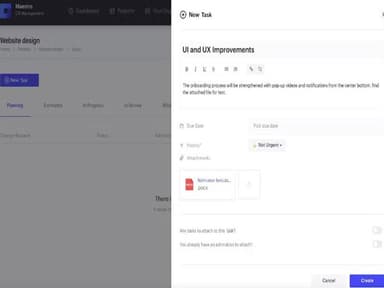
- Task Management
- Reporting
- Budget Management
What Is MaestroCR Software?
Overview
MaestroCR Software is a cloud-based software that streamlines project management and change request processes. It is a unified platform for tracking project progress while collaborating with stakeholders and clients. Furthermore, MaestroCR alleviates project management challenges, including communication gaps, scope creep, and budget overruns, through real-time visibility.
What Is MaestroCR Software Best For?
MaestroCR Software is renowned for simplifying and enhancing agile project management processes. It facilitates precise control over the various stages involved in project management, offering a clear and streamlined approach. With MaestroCR, you can seamlessly navigate the project lifecycle.
MaestroCR Software Pricing
The vendor offers the following four pricing plans:
- Free – $0/month
- Standard – $13/month
- Enterprise – $350/month
- Self Hosted – Custom pricing
Disclaimer: The pricing is subject to change.
MaestroCR Software Integrations
Users can integrate MaestroCR project management software with the following third-party applications:
How Does MaestroCR Software Work?
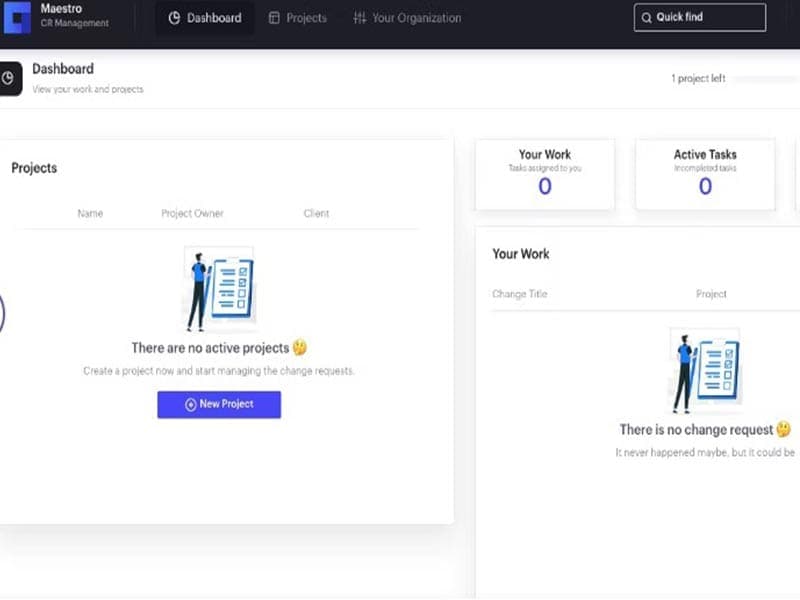
Here's how you can navigate the dashboard and make use of the software's features:
- Log in to access MaestroCR’s dashboard
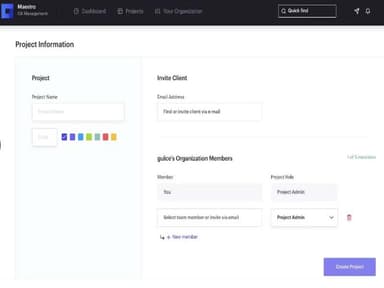
- Create a project and add relevant details to it, including its name, deadlines
- Invite your client to the project
- Set your contractor pricing in the settings
- Check efforts and budgets, which are automatically calculated from the settings
- See where you are in the automated CR cycle whenever you want
- Track your effort and the budget of your contractors in real-time
- Use the risk management feature to reduce the risk of change and project failures
Who Is MaestroCR Software For?
MaestroCR can accommodate the needs of growing companies, including small organizations, large enterprises and freelancers. It is used in the following niches:
- Software development
- Designers
- Creative
- Contractors
Is MaestroCR Software Right For You?
Are you looking for a project management tool that simplifies the process for all parties involved and enables you to control every stage of the project, from estimation to delivery? Then, MaestroCR might be the perfect fit for you.
The software is SCORM compliant and ensures data security and confidentiality. Moreover, the platform's scalability features make it adaptable for various businesses, from small enterprises to larger corporations.
Still unsure if MaestroCR is right for you? Contact our customer support team at 661-384-7070, who will help you analyze if the software is worth your investment.
MaestroCR Software Features
Client Approval
This feature streamlines the estimation and effort approval stage, preventing time-wasting in multiple communication tools. It ensures all stakeholders are on the same page before a project begins, reducing misunderstandings and scope creep. Additionally, it helps you create efficient workflows, eliminating the need for back-and-forth communication through different platforms.
Effort And Invoice Tracking
The effort and invoice tracking functionality helps you convert billable items into proforma invoices. MaestroCR simplifies the invoicing process and ensures accurate billing based on actual work. It also provides a clear overview of all billable items, making it easier to manage finances and maintain transparency with clients.
Real-Time Visibility
The software enables you to track the effort and budget of your contractors in real time. It provides up-to-date information on project progress and budget utilization, enabling timely decision-making. MaestroCR also allows for better resource allocation, as you can easily see which tasks take up most of your team’s time and adjust accordingly.
Risk Management
You can reduce the risk of change and project failures using this feature. It lets teams identify potential risks early and take appropriate mitigation measures. The platform also promotes a proactive approach to project management, encouraging teams to anticipate challenges and plan accordingly.
Pros And Cons of MaestroCR Software
Pros
Streamlines project management processes
Enhances communication and transparency
Real-time visibility for project progress
Efficient effort and invoice tracking
Reduces scope creep and misunderstandings
Cons
Learning curve for new users
Limited customization options
May require adjustment to existing workflows, according to some reviews
MaestroCR Software Pricing
FreeBring your ideas to life | StandardBest for small teams | EnterpriseBest for big teams | Self-HostedFor teams of all sizes, hosted on your server |
|---|---|---|---|
$0per month | $13per month | $350per month | Custom Pricing |
|
|
|
|
Disclaimer: The pricing details were last updated on Sep 25, 2026 from the vendor's website. Please contact us for a tailored pricing list.
MaestroCR Software Reviews
Total 3 reviews
5
All reviews are from verified customers
Rating Distribution
5
Stars100%
4
Stars0%
3
Stars0%
2
Stars0%
1
Stars0%
Share your experience
Computer Software, 51-100 employees
More than a year
“Great Interface for Software Project CR Management”
Pros
MaestroCR effectively addresses the essential challenges in the communication process between a software company and its clients during software project management. In essence what stands out for me is the adept management of the effort-to-invoice cycle executed with utmost simplicity.
Cons
The simplicity and user-friendliness of everything are pleasing and I appreciate the seamless integrations with our existing tools.
Rating Distribution
Ease of use
10
Value for money
9
Customer Support
9
Functionality
10
Computer Software, 500+ employees
Less than 6 months
“Solves small problems but the impact is big”
Pros
They discovered an effective solution for the software project development sector. A valuable tool for project managers to have.
Cons
There's room for additional integrations/plugins.
Rating Distribution
Ease of use
10
Value for money
9
Customer Support
9
Functionality
10
Textiles, 500+ employees
Less than a year
“Completes the missing part”
Pros
Its integrations are crucial for effective software project management.
Cons
Rating Distribution
Ease of use
10
Value for money
9
Customer Support
9
Functionality
10
Frequently Asked Questions
Does MaestroCR offer an API?
No, MastroCR does not offer an API to its customers.
What language does MaestroCR support?
MaestroCR supports the English language.
What other apps does MaestroCR integrate with?
Trello, Jira, Basecamp, Asana, Azure DevOps, Slack, and GitHub integrate with MaestroCR.
Does MaestroCR support mobile devices?
No, MaestroCR does not support mobile devices.
What types of pricing plans does MaestroCR offer?
The software offers four pricing plans: Free ($0/month), Standard ($13/month), Enterprise ($350/month), and Self Hosted (Custom pricing). Get a personalized MaestroCR pricing plan per your company’s needs.
Who are the typical users of MaestroCR?
Maestro software is used in several niches, such as designers, contractors, software development, and creative.
What level of support does MaestroCR offer?
MaestroCR provides a help desk, email, and phone support options.